
Reviewing photos as you move around
You look at photos in different rooms and weigh up having enough screen space against choosing a tablet that’s comfortable to carry.


If you often move between rooms and regularly hold your tablet, start by looking at a size of around 11 inches and compare the weight of the complete set-up. A larger screen may be more suitable if you mainly sit down or view photos side by side at a table, but it is less convenient to carry around frequently. Also check that your own files and apps work, and whether you need enough offline storage, mobile connectivity or stylus support. Screen specifications alone are no guarantee of accurate colour assessment.
You look at photos in different rooms and weigh up having enough screen space against choosing a tablet that’s comfortable to carry.
You want to examine research images in detail or compare them side by side, and are happy to use a larger, heavier screen.
You want to be able to find your images when there’s no Wi-Fi, so you check storage, file transfer and, if needed, mobile connectivity against the way you work.
Start with how you view your photos: if you move around a lot, you’ll need to weigh up different factors than if you compare images side by side at a table. Then check that your files, app and any annotations work on the model you’re considering.
| What to consider | What should you check? | Who is this important for? |
|---|---|---|
| Photos and details | View your own photos at the size you’re considering, and check zoom, reflections and file formats in the app you use. | If I want to assess details, I need to see my own images on the screen and in the app I’ll be using. Around 31% of consumers put photo detail first. |
| Carrying it between rooms | Compare the weight and dimensions of the model, including the case or keyboard you plan to carry. | When I move between rooms often, it matters how the tablet feels in my hand and how much the complete set-up weighs. Around 31% of consumers give portability top priority. |
| Offline access | Test file transfer, available storage and access without Wi-Fi using your own files. Choose Wi-Fi or 5G based on where your files are stored. | If I need to open photos without Wi-Fi, I want to know in advance how to get them onto the tablet and how much space they take up. Around 19% of consumers prioritise offline access. |
| Annotations and data | Check whether the app supports stylus annotations and which stylus is included with the model you’ve chosen. For personal data, set up access security, app permissions and updates. | If I want to add notes to images or work with identifiable people, I need to check the stylus and app, as well as how the files are handled. Around 19% of consumers say this is their main concern when buying. |
Apple states that the 13-inch iPad Air Wi-Fi weighs 616 g, while the 11-inch model weighs 464 g, without accessories. That difference matters if you often carry your tablet between rooms.
Compare how each size feels in your hand, and consider the weight of the complete set-up you plan to carry.
Samsung’s stated maximum brightness applies in High Brightness Mode; Xiaomi also lists a maximum brightness. Manufacturers’ specifications don’t establish how accurately photos will look in your working environment.
View your own photos in the conditions you work in, and assess separately whether the display meets your requirements.
Stylus support, an included stylus and a microSD slot are separate features. They may depend on the model or bundle.
Check what’s included in the exact bundle and test your annotation app. You may need to buy a compatible stylus or memory card separately.
The iPad Air is available in 11- and 13-inch models, giving you a choice between portability and screen space.
The Galaxy Tab S10 FE series includes Wi-Fi and 5G models, and may be worth considering if you want to annotate photos or expand storage.
The Xiaomi Pad 7 is an Android option with an 11.2-inch screen to compare if you’re weighing up a handy size and the stated resolution.
The Tab M11 is an 11-inch alternative to compare if basic display quality and note-taking matter more to you than the highest stated screen specifications.
This selection focuses on tablets around 11 inches for viewing photos as you move around. Check that your own files, app and connectivity needs are supported by the model.
 No image available
The 11-inch size suits anyone who wants to view photos between rooms.
The product title specifies a 2.5K screen and a MediaTek Dimensity 6300 processor.
 No image available
The listed internal storage may suit anyone who wants to keep photos locally; choose a capacity that fits your own files.
The product name specifies 8 GB RAM and 256 GB ROM.
 No image available
The 11-inch size is an option to compare if you carry photos between rooms.
The product name specifies an IPS screen, 90 Hz and Android 15. According to the product information, the charger isn’t included as standard and must be purchased separately.
 No image available
The stated 11-inch size is an option to carry around and test with your own photos.
The product name specifies an FHD+ screen, 90 Hz and 4G LTE. The stated 32 GB RAM consists of 6 GB RAM and 26 GB virtual RAM.
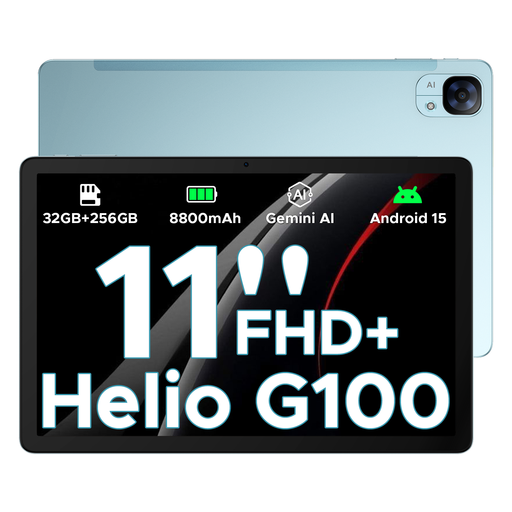 No image available
The 11-inch size is an option to compare if you want to view photos while moving around.
The product name specifies an FHD+ screen and 5G/Wi-Fi. Check which type of connectivity you need for the way you work, and how the stated storage applies to the model you choose.
Only if you need to download files on the go using mobile data, and Wi-Fi or saving them locally in advance isn’t enough. Check coverage, your mobile plan and the model you’re considering. 5G isn’t necessary for photos stored locally.
Start by testing a small set of original files in the photo app you use, and check zoom, transfer and offline access. If the photos contain personal data, the Dutch Data Protection Authority recommends, among other things, access security, appropriate app permissions and regular updates.
No. According to the Dutch government, the Netherlands has no fixed statutory warranty period; what you can expect from a product depends on factors including the product itself and the information provided. If something is faulty, contact the seller. For a business purchase, check which contract terms apply rather than assuming that consumer rights apply in the same way.
The situation alone doesn’t mean there is a general ban or blanket permission. According to the Dutch Data Protection Authority, photos showing identifiable people are personal data; the exemption for personal or household use doesn’t apply to business use. Before processing or sharing the specific images, consider the applicable legal basis, purpose and appropriate security measures.