What should you look for?
Start with the game you want to play and how you’ll play it. Then compare size and controls, check offline use and see what you’ll need to charge the tablet while travelling.
| What to consider |
What should you check? |
Who is this important for? |
| Size and comfort |
Compare the size and weight of the exact model. Think about whether you’ll mainly hold the tablet or set it down. |
If I’m playing while I wait without a table, I want the tablet to feel comfortable to hold and the controls to be easy to reach. Consumers who prioritise portability make up around 33% of those for whom this is the most important purchase priority. |
| Playing offline |
Check that the game is available for the operating system, install it in advance and test whether it starts without an internet connection. |
If you don’t want your chosen game to stop working when the connection drops, check in advance how much storage space the installation needs, too. Consumers who prioritise offline availability make up around 25% of those for whom this is the most important purchase priority. |
| Controls |
Check the controls for the specific game and make sure it supports a controller before relying on one. |
If I want precise control over jumps, I want to know whether the touchscreen controls are easy to reach or whether my game supports a controller. Around 25% of consumers give controls top priority. |
| Charging and battery life |
Compare play time only using tests based on similar gaming use. Check what you’ll need to charge the tablet and the rules for carrying a power bank in your luggage. |
For consumers who take accessories and play time between charges into account, both the equipment they need and how they plan to use it matter. Around 17% put total cost and battery life at the top of their list. |
Tablets at Joybuy
This selection includes compact tablets for handheld use and larger models with more room for touchscreen controls. Before choosing, check that your preferred game is available for the operating system and can start offline.
 No image available
Lenovo Tab One 8.7" Wi-Fi, 4 GB RAM, 128 GB, Luna Grey (ZAF00221GR)
The 8.7-inch screen is a compact option if you’d rather play handheld while you wait.
Specification: Wi-Fi, 4 GB RAM, 128 GB storage, Luna Grey, model ZAF00221GR.
View at Joybuy
 No image available
Samsung Galaxy Tab A11 X135, 8.7-inch, LTE, 4 GB RAM, 64 GB, grey
The compact 8.7-inch size suits anyone who’d rather hold a tablet while waiting.
Specification: LTE, 4 GB RAM, 64 GB storage, grey, model X135.
View at Joybuy
 No image available
HONOR Pad X8b, 128 GB, Space Grey
The 11-inch screen gives you more room for touchscreen controls, but is less compact to hold for long periods.
Storage: 128 GB. Storage can be expanded via microSD.
View at Joybuy
 No image available
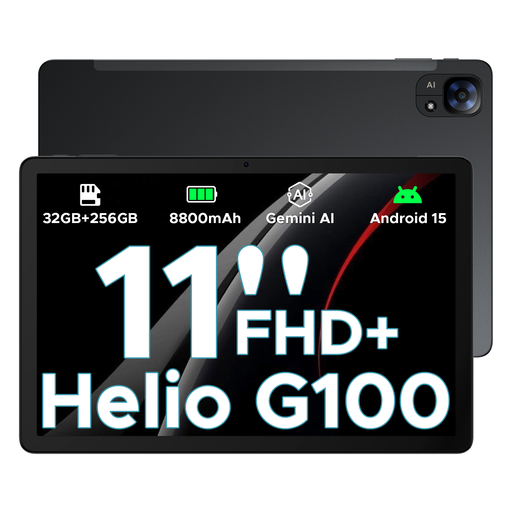
DOOGEE Tab E3, Android 15, 32GB+256GB/2TB, 11-inch FHD+, 90Hz, 8800mAh, black
The 11-inch screen gives you more room for touchscreen controls, but is less compact to hold for long periods.
The product name lists Android 15, an 11-inch FHD+ screen, 90 Hz and 8800mAh. It also lists 32GB+256GB/2TB.
View at Joybuy
 No image available
OPPO Pad SE, 128 GB, 6 GB RAM, Twilight Blue, LTE (OPD2420 EUN)
The 11-inch size gives you more room for touchscreen controls, but takes up more space when you’re holding or carrying the tablet.
Specification: 128 GB storage, 6 GB RAM, Twilight Blue, LTE, model OPD2420 EUN. Memory card expansion isn’t supported.
View at Joybuy
Frequently asked questions
Will every installed platform game work without airport Wi-Fi?
No. You can’t tell just from the tablet or the fact that the game is installed. Download and open the game you want before setting off, and test whether that particular game starts without an internet connection. Google Play Help also highlights the need for enough storage space when downloading and installing games.
How do I connect a controller to an iPad?
Put a compatible Bluetooth controller into pairing mode and select it in the iPad’s Bluetooth settings, as Apple explains. Also check that your chosen game supports controller use.
Can I take a power bank with me when I fly?
EASA says that spare batteries and power banks must go in hand luggage, not checked baggage. Schiphol sets a limit of two power banks. Check your airline’s rules and your travel itinerary, too.
Do I need an extra warranty if my tablet breaks?
You don’t need an extra warranty to have statutory rights if a product is faulty. According to the Government of the Netherlands, there is no fixed statutory warranty period in the Netherlands, and the seller must offer a solution if a product is faulty. Only compare the terms of a paid warranty if you’re considering extra cover.


