Who is this guide for?

Reader in a crowded train carriage

You mainly read continuous text and want a tablet that’s easy to hold and put away. Viewing a full PDF page isn’t your main priority. Lenovo lists the Tab One ZAF00255SE as weighing around 320 grams, with an 8.7-inch screen.

Reader who annotates texts

You read philosophical articles or scans with a fixed page layout and want to highlight passages or add notes with a pen. Check that the pen works with your device and reading app, and whether it comes with the version you’re considering.

Reader who wants to read without interruption

You prioritise long reading sessions and a comfortable screen, but may also need access to specific files or apps. BOOX lists EPUB and PDF support for the Go 10.3 (Gen II) series; DRM protection may determine whether a book opens on your device or in your app.

What should you consider when choosing?

Compact standard tablet

Choose this option: if you mainly read continuous text and want to hold the tablet comfortably during your journey.

Bear in mind: fixed PDF pages may require more zooming on a smaller screen.

Larger standard tablet with a pen

Choose this option: if you want to see full PDF pages or annotate passages with a pen.

Bear in mind: a larger screen is less portable, and pen support doesn’t always mean the pen is included.

E-ink tablet

Choose this option: if long reading sessions and handwritten notes matter more to you than versatile colour use.

Bear in mind: lighting varies by version, and EPUB or PDF support doesn’t guarantee that every DRM-protected book will work.

Consideration What should you check? Who is this important for?
Comfortable to hold Compare the screen size and weight of the exact version. Try opening a sample of your own text and PDF, too. If I mainly read continuous text and want to hold my tablet in a crowded carriage, portability is a priority for me. Around 36% of consumers put comfortable reading first.
PDFs and annotations View one of your own PDFs on the screen size you’re considering. Also check the pen’s compatibility and what’s included. If I want to read fixed-layout PDF pages and annotate passages, I need enough screen space and a pen that suits the way I work. Around 29% of consumers give PDFs and annotations top priority.
Extended reading sessions Compare the screen type and, for e-ink, the lighting on the exact version. Check that your own books and apps work. If I want to read in comfort on longer journeys, I focus on the screen experience and the lighting I’ll need. Around 21% of consumers prioritise extended reading.
Offline access to books Download a book in advance and test that it opens offline in your app. Check the DRM terms if you want to transfer files to another device. If I want to read my own books without relying on a connection, I check in advance that they’re available offline. Around 14% of consumers prioritise access to books without a reliable connection.

Common mistakes

  • Choosing a compact screen when you mainly read fixed-layout PDFs

    Continuous text can adapt to the screen, but a PDF with a fixed page layout can’t. This can make the page harder to read on a smaller screen.

    Before you choose, open a representative PDF on the screen size you’re considering.

  • Assuming every e-ink tablet has lighting

    The standard BOOX Go 10.3 (Gen II) doesn’t have a front light, but the Lumi version does.

    Check the full model name and think about the lighting conditions you usually read in.

  • Confusing file format support with access to your books

    EPUB or PDF support doesn’t automatically mean that a DRM-protected book will open in your preferred app or on your device.

    Check your book’s terms and test the shop, app and type of protection you use before making a choice.

  • Mixing up the specifications of different versions

    A model name alone doesn’t always tell you which version or box contents you’re looking at.

    Compare the full model code, the manufacturer’s specifications and what’s included with that exact version.

Brands to consider

Samsung

The Galaxy Tab A11 mentioned here is a compact standard tablet; the Galaxy Tab S10 Lite has a larger screen and is offered with S Pen support.

  • Samsung Netherlands lists an 8.7-inch screen for the A11 version mentioned here, and a 10.9-inch screen with S Pen for the S10 Lite.
  • These details apply to those versions. Check the model variant and what’s included in the box.

Lenovo

The Tab One is a compact Android option; Idea Tab versions have a larger screen, with some variants offered with a pen.

  • Lenovo Netherlands lists the Tab One ZAF00255SE as weighing around 320 grams, with an 8.7-inch screen. The Idea Tab ZAFR0632SE is offered with an 11-inch, 2560 × 1600-pixel screen and “+ Pen”.
  • The “+ Pen” listing doesn’t automatically apply to other Idea Tab versions.

Apple

The 11-inch iPad (A16) is a standard tablet for reading and using apps, with support for specific Apple Pencil models.

  • Apple Netherlands lists the Wi-Fi version as weighing 477 grams, with a screen measuring around 10.86 inches diagonally as a rectangle.
  • Support for Apple Pencil (USB-C) or the 1st generation doesn’t mean a Pencil is included. Also check compatibility with your reading app.

BOOX

The Go 10.3 (Gen II) series consists of e-ink tablets for text, supported PDFs and handwritten notes.

  • BOOX lists EPUB and PDF support and a stylus included with the series.
  • According to BOOX, the standard Gen II doesn’t have a front light, but the Lumi does. File format support doesn’t confirm that every DRM-protected book will open.

Joybuy tablets for PDFs and note-taking

This Joybuy selection features larger standard tablets with a pen, for anyone who wants to read PDFs or make notes. Check whether the pen mentioned is included with each version and works with your reading and note-taking apps.

Lenovo Yoga Tab ZAG60028PL tablet, 11.1-inch, 3.2K, Luna Grey

Lenovo Yoga Tab ZAG60028PL, 11.1-inch 3.2K, 12GB/256GB, with Tab Pen Pro

A larger tablet with a pen for reading PDFs and making notes.

11.1-inch touchscreen with 3.2K resolution; 12GB LPDDR5X and 256GB UFS 4.0; Tab Pen Pro included.

View at Joybuy

Lenovo Idea Tab Plus WiFi, 12.1-inch 2.5K, 8GB/256GB, Rose, with pen

Lenovo Idea Tab Plus WiFi, 12.1-inch 2.5K, 8GB/256GB, Rose, with pen

A larger screen with a pen for PDFs, annotations and note-taking.

12.1-inch 2.5K screen; 8GB RAM and 256GB storage; pen included.

View at Joybuy
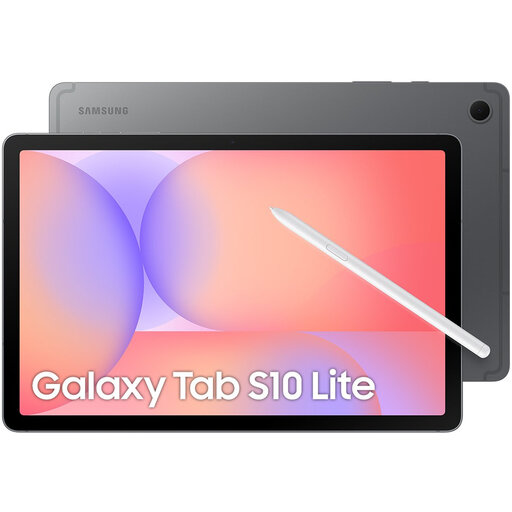
Samsung Galaxy Tab S10 Lite, Wi-Fi, 10.9-inch, 128GB, grey

Samsung Galaxy Tab S10 Lite, Wi-Fi, 10.9-inch, 128GB, Grey

A larger standard tablet for PDFs and passages you want to annotate with a pen.

10.9-inch screen; 128GB storage; the version listed comes with an S Pen.

View at Joybuy

TECLAST P50, 11-inch, 128GB, Android 16

TECLAST P50, 11-inch, 128GB, Android 16

An 11-inch Android tablet for anyone who wants to read on a larger screen; check which note-taking and reading apps you need.

11-inch IPS screen; 128GB ROM; 90Hz; 4G LTE and Wi-Fi.

View at Joybuy

Lenovo Idea Tab, 11-inch, 256GB, Android 15, grey, with stylus

Lenovo Idea Tab, 11-inch, 256GB, Wi-Fi, Android 15, Grey, with stylus

A larger screen with a stylus for reading and note-taking; bear in mind that the product description says the charger must be purchased separately.

11-inch screen; 256GB storage; stylus included.

View at Joybuy

Frequently asked questions

Is a smaller screen big enough for philosophical articles in PDF format?

A compact screen can be comfortable for continuous text, but more screen space is often more practical for a PDF with a fixed page layout. Try one of your own PDFs on the size you’re considering; you may need to zoom on a small screen.

How do I get my tablet ready for reading on the train without Wi-Fi?

Download your books in advance and open them once in your chosen app while offline. NS lists free Wi-Fi on almost all Intercity trains, but it isn’t guaranteed on every journey. Kobo Plus books may also have specific conditions for offline reading.

Can I simply transfer an e-book I’ve already bought to an e-ink tablet?

Not always: DRM protection may restrict exports to another device or app. Kobo says that many books and magazines are DRM-protected. Check the terms for your book and the device or app’s support before choosing.

What can I do if my tablet develops a fault, and do online purchases come with a cooling-off period?

For a consumer purchase in the Netherlands, the seller must offer a solution if a product is faulty; the Dutch government says there’s no fixed statutory guarantee period that applies to all products. For online purchases from a business, a 14-day cooling-off period applies in many cases. Check the terms that apply to your order.

Do I need to buy a pen or charger separately?

It depends on the model and version. Before buying, check that the pen is compatible and actually included. Also check which charging accessories are in the box; the product description for the Lenovo Idea Tab 256 GB 11-inch says that a charger must be purchased separately.
