
Designer with their own tablet
You want to create wedding invitations on an existing iPad or Galaxy Tab. First, check that the pen is compatible with your exact device.


Start by checking your exact tablet model: Apple Pencil, Logitech Crayon and Samsung S Pen are not interchangeable. For hand-drawn details, choose a pen that supports the drawing features you need; a simpler pen may be enough for sketching, text corrections and layout work. For print, also check margins, bleed and the export file: choosing the right pen won’t guarantee a good print.
You want to create wedding invitations on an existing iPad or Galaxy Tab. First, check that the pen is compatible with your exact device.
You draw your own lettering, flowers or other accents, and compare drawing features with simpler pens for sketching and annotating.
You move between workspaces or also work on a computer. Pairing, charging, storage and the space available for a graphics tablet may all be factors.
First, check compatibility with your device. Then compare the level of line control you need, how you’ll use the pen and how you’ll prepare your design for print.
| What to consider | What should you check? | Who is this important for? |
|---|---|---|
| Compatibility | Find your full tablet model and software version, then compare them with the compatibility list for the exact pen version. Apple Support Netherlands and Samsung Netherlands list compatibility by model or pen version. | If you want to keep using an existing tablet, you’ll want to know whether the pen works with it before you buy. Around 36% of consumers prioritise compatibility. |
| Line control | Check separately whether you need pressure sensitivity, tilt sensitivity or specific drawing controls. Logitech Netherlands states that the Crayon is not pressure-sensitive. | For lettering or illustrations with varied lines, the drawing features that suit your design matter. Around 29% of consumers say control over hand-drawn lines is their main concern. |
| Shared workspace | Compare how the pen charges and is stored, and whether you’ll need a cable or another drawing setup. Apple says the Pencil (USB-C) charges via USB-C; magnetic attachment is not the same as magnetic charging. | If you regularly move between desks, you’ll want a routine that suits the space and charging options available. Around 21% of consumers place the most importance on working and storing their pen at a shared workspace. |
| Check safe text margins, bleed, the export file and a proof print. Canva Help Centre explains what to consider for margins and bleed, and notes that colours can look different on screen and in print. | If the invitation will ultimately be printed, you’ll want to avoid important text sitting too close to the trim edge or colours turning out differently. Around 14% of consumers prioritise print suitability. |
Compatibility can vary by pen version, tablet model and software version. Apple also lists adapter requirements for pairing and charging Apple Pencil (1st generation) with certain iPads.
Make a note of your full tablet model and software version, then check them against the exact pen before placing your order.
With the Logitech Crayon, tilting can affect the line, but pressing harder won’t change it through pressure sensitivity, according to Logitech.
Decide whether your design needs pressure-controlled brush strokes, and check for this feature separately from tilt sensitivity.
Apple describes magnetic pairing and charging for Apple Pencil Pro. Apple Pencil (USB-C) charges via USB-C; magnetic attachment does not mean it charges magnetically.
Check how pairing, charging and storage work for the exact pen.
The right pen won’t stop text being cut off during trimming or prevent screen and print colours from looking different.
Check margins, bleed and export settings, and review a proof print before ordering a print run.
Apple Pencil Pro and Apple Pencil (USB-C) are designed for different drawing needs on supported iPads.
S Pen versions are relevant to owners of supported Galaxy tablets. Samsung positions the Creator Edition for drawing and writing.
The Logitech Crayon (USB-C) is a pen for sketching and annotating on compatible iPads.
One by Wacom is a graphics tablet with a pen, for designing invitations on a computer.
These product picks include pens for drawing on a compatible iPad, a computer-connected graphics tablet and a stylus designed for use with different tablet screens. Before buying, check that the exact device and the way you plan to work are compatible.
 No image available
A graphics tablet for designing an invitation on a computer rather than drawing directly on a mobile tablet’s screen.
Wacom describes the pen in the One by Wacom range as pressure-sensitive. The product information says you’ll need to install a driver to access all pen features.
 No image available
A good choice for adding hand-drawn details on a compatible iPad if you want to use Pencil Pro’s extra controls.
Apple describes features such as squeeze and barrel roll, as well as magnetic pairing and charging. Check your exact iPad model and the required iPadOS version; Apple specifies iPadOS 17.5 or later.
 No image available
An option for sketching, layout notes and corrections on a supported iPad if tilt sensitivity suits the way you work.
Apple specifies charging via USB-C. Magnetic attachment to the iPad is not the same as magnetic charging; also check compatibility with your exact model.
 No image available
This version is designed for drawing and taking notes on a compatible iPad.
The product listing names, among others, the iPad Pro 12.9-inch (3rd to 6th generation), iPad Pro 11-inch, iPad Air (4th and 5th generation) and iPad mini (6th generation). Check that your model is included.
 No image available
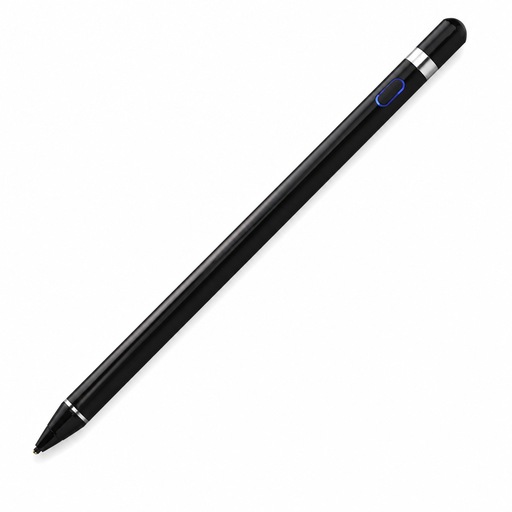
The product listing describes this stylus for drawing on tablets and other capacitive screens; check that it works with your device and design app.
The listed setup requires Bluetooth pairing and a companion app. According to the product information, keep the stylus away from water and extreme heat.
No, compatibility varies by pen version and tablet model. Apple and Samsung publish information about supported devices; check the full model and, where applicable, the software version before choosing.
According to Logitech, the Logitech Crayon (USB-C) can be used with a compatible iPad without separate Bluetooth pairing and charges via USB-C. Samsung says the S Pen Creator Edition does not need charging; check the instructions for the exact pen version and your device.
Keep important text within the safe margin, and extend backgrounds that reach the edge into the bleed area. Canva Help Centre explains what to consider; also check the export file or a proof print, as this has nothing to do with the stylus.
According to the Dutch government, online purchases from a business often come with a 14-day cooling-off period, although there are exceptions. You also have statutory rights if a product is faulty, and the seller must provide a solution. The Dutch government notes that the Netherlands does not have a fixed statutory warranty period of two years.
No. According to the European Commission, CE marking is only required when applicable harmonised EU rules say so. Specific rules apply to radio equipment, so the word ‘stylus’ alone does not mean that the same CE requirements apply to every product.