Start by checking your exact tablet model: Apple Pencil, Logitech Crayon, Samsung S Pen and Surface pens are not automatically interchangeable. Then assess handwriting and note-taking app compatibility separately, especially if you want to convert equations. With a small desk, you’ll also need to consider how much screen space you have.
Who is this choice relevant to?
iPad owner who writes lots of equations
You’re looking for a pen for your existing iPad and want to assess model compatibility, handwriting and any equation conversion separately. Apple Netherlands outlines Apple Pencil compatibility, while MyScript explains equation conversion in its note-taking app.
Galaxy Tab user looking for a pen
You want to know whether your tablet already comes with an S Pen, or which specific pen is right for it. Samsung says the Galaxy Tab S10 Lite comes with an S Pen, and that features vary by model.
Surface user with limited desk space
You want to write equations on your Surface with a pen, and are considering pen compatibility, charging and OneNote features as part of the same workflow. Microsoft describes palm rejection for the Surface Slim Pen, and says the OneNote Math Assistant mentioned requires a subscription.
What should you look for?
If you already own a tablet, check pen compatibility first. Then consider the equation app, your desk set-up and the cost of the complete workflow.
| What to consider |
What should you check? |
Who is this important for? |
| Compatibility |
Check the full tablet model and pen version against the compatibility list. Also see whether a particular software version is required. |
I want to keep using my current tablet and make sure the pen works with my exact model first. Around 36% of consumers prioritise compatibility with their existing tablet. |
| Writing and converting equations |
Try symbols, fractions and corrections in the app you plan to use. Decide whether you want to keep your handwriting or need it converted as well. |
If I write lots of equations, I want to be able to keep my handwriting and only use conversion if the app supports it. Around 29% of consumers give equation work top priority. |
| Working at a small desk |
Try completing a full calculation on the tablet in your preferred position. Check where you can put or attach the pen. |
At a small desk, I want to position the tablet so I can write out a full calculation and put my pen away. Around 21% of consumers prioritise a practical set-up. |
| Total cost |
Check what comes with the tablet and whether the app feature you want requires a subscription. |
I want to know in advance whether I only need a pen, or whether I’ll also need a tablet or a paid app feature. Around 14% of consumers prioritise the cost of the complete workflow. |
Common buying mistakes
-
Choosing a pen based only on the tablet brand
Compatibility can vary between tablet models and pen versions. Some additional features also depend on the app you use.
Look up the full model number in the manufacturer’s compatibility information, then check separately that the features you want will work.
-
Assuming magnetic attachment means the pen charges
Apple says the Apple Pencil (USB-C) can attach magnetically to an iPad, but pairing and charging both require a USB-C cable.
Check attachment and charging method as two separate features before choosing a pen.
-
Confusing a pen feature with equation recognition
A writing pen won’t automatically convert equations. Conversion depends on the software you use; Microsoft says the OneNote Math Assistant mentioned requires a Microsoft 365 subscription.
Try your equation workflow in the app you intend to use and check the requirements before relying on conversion.
The Microsoft subscription requirement applies to the OneNote feature mentioned.
Brands to compare
Apple
Apple Pencil models for compatible iPads.
- Apple Netherlands lists the compatible iPad models and required iPadOS version. The Apple Pencil (USB-C) pairs and charges via a USB-C cable.
- Check the compatibility list for your iPad; Apple Pencil versions are not automatically interchangeable.
Logitech
The Logitech Crayon (USB-C) is a pen for supported iPads.
- Logitech lists palm rejection, tilt-based line variation and USB-C charging.
- These are Logitech’s specifications, not the results of an independent performance test. Check compatibility, and don’t confuse the USB-C version with the Lightning version.
Samsung
Samsung S Pens are designed for specific supported Galaxy Tab models.
- Samsung says the Galaxy Tab S10 Lite comes with an S Pen. For the separate Tab S10 Lite S Pen, Samsung lists a 0.7 mm tip.
- S Pen features vary by model. Samsung says the S Pen for the Tab S10 Lite and some other models doesn’t support Bluetooth.
Microsoft
Surface Slim Pen for compatible Surface devices and a Windows note-taking workflow.
- Microsoft lists palm rejection and charging via certain Surface devices or keyboards.
- Check that the pen and charger are compatible with your device. Microsoft says the OneNote Math Assistant described requires a Microsoft 365 subscription.
Adonit
The Note⁺ 2 is an option for iPads specifically listed on Adonit’s compatibility list.
- Adonit lists palm rejection, tilt support and programmable buttons.
- According to Adonit, pressure sensitivity and shortcut buttons require pairing with specific supported apps. Check compatibility with your iPad model and note-taking app.
Tablet pen options at Joybuy
These product options include pens for iPads and other tablets. Check that your exact device and preferred app are supported by each pen.
 No image available
Logitech Crayon, USB-C, silver
An option if you want to write by hand on a supported iPad; check the requirements for your iPad model.
The product name specifies USB-C and silver. The product description says this version works with iPad models from 2018 onwards running iOS 12.2 or later.
Joybuy
 No image available
Apple Pencil Pro 2024 for iPad Air and iPad Pro
An option if you use a compatible iPad Air or iPad Pro; check your exact tablet model before choosing.
Joybuy
 No image available
Apple Pencil (USB-C), white
An option if you want to write or take notes on a compatible iPad; check the iPad list for this version.
Apple says pairing and charging both require a USB-C cable. Although this version attaches magnetically, it doesn’t charge magnetically.
Joybuy
 No image available
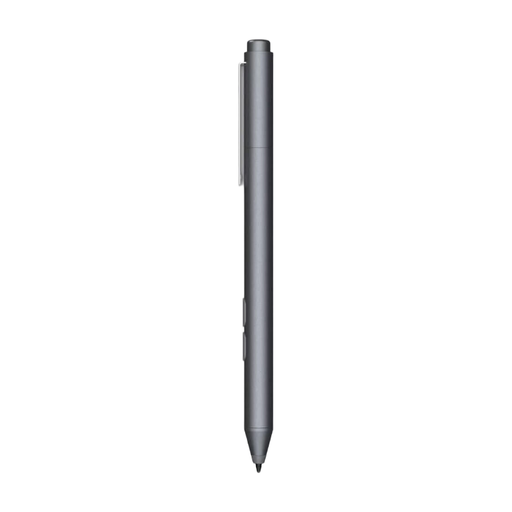
HP MPP 1.51 stylus pen, 1 replaceable tip
Only consider this pen if your device is MPP-compatible; check support for your exact model.
The product name specifies one replaceable tip.
Joybuy
 No image available
VoxorAI HL-U05, white
Before choosing, check that your tablet has a capacitive screen and that the accompanying app works on your device.
The product description says it pairs via an accompanying app.
Joybuy
Frequently asked questions
Can any tablet pen convert handwritten equations?
No. Writing with a pen and recognising equations are separate features. Microsoft describes conversion with the Math Assistant in OneNote and says this requires a Microsoft 365 subscription; MyScript describes conversion within its own note-taking app. Check the app and your device separately.
How can you avoid mistakes when converting an equation?
Check the recognised equation in the supported app before using it. Microsoft also describes a correction step for symbols that have been recognised incorrectly.
Does an Apple Pencil (USB-C) charge when it’s attached magnetically to an iPad?
No. Apple says it attaches magnetically, but the Apple Pencil (USB-C) pairs and charges via a USB-C charging cable.
What are your rights when shopping online in the Netherlands?
When you buy from a business online at a distance, you usually have 14 days to change your mind, according to the Government of the Netherlands, although exceptions may apply. You’re also entitled to a product that is fit for purpose; according to the Government of the Netherlands, the Netherlands has no fixed statutory guarantee period. If there’s a fault, contact the seller.


