
Anyone who takes seminar questions by hand
You want to jot down a question or sketch a diagram while you’re reading. Check that the pen is compatible with the tablet model and included with the version you choose.


Choose a standard tablet with a compatible pen if you want to combine handwritten questions with reading and annotating in apps. An e-paper note-taking device is a better fit if writing and reading documents are your priorities. Samsung says the Galaxy Tab S10 Lite comes with an S Pen, while Apple lists support for two Apple Pencil models for the 11-inch iPad (A16), but doesn’t include a Pencil in the box. So check the pen, what’s included and the document features you need for each version.
You want to jot down a question or sketch a diagram while you’re reading. Check that the pen is compatible with the tablet model and included with the version you choose.
You want to add comments alongside articles or course materials, then find or share them later. Check in advance how you can import, annotate and export files.
You want to assess more than just the tablet and find out which pen and accessories you might need. What’s in the box varies by model and version.
A good fit if: you want to combine handwritten questions with using tablet apps.
Bear in mind: a pen being included doesn’t automatically mean the note-taking app or export options will suit your seminar.
A good fit if: you want to work with questions and PDF notes in iPad apps. Apple lists support for Apple Pencil (USB-C) and Apple Pencil (1st generation) for the 11-inch iPad (A16).
Bear in mind: Apple doesn’t list a Pencil as included with the iPad. For Apple Pencil (1st generation), Apple specifies an adapter for pairing and charging.
A good fit if: your main priorities are writing and reading documents. reMarkable describes its screens as paper-like, while BOOX lists a colour e-paper screen with Android 13 for the Note Air4 C.
Bear in mind: check how documents and apps work on each model. reMarkable says Connect is needed to convert imported PDFs into editable notebooks.
| Consideration | What should you check? | Who is this most important to? |
|---|---|---|
| Handwriting | Check pen compatibility, the exact tablet version and what’s included in the box. | If I want to jot down a question as I read, the pen needs to work well with my tablet. Around 36% of consumers prioritise being able to capture handwritten questions quickly. |
| Working with PDFs and notes | Try using one of your own PDFs to check that you can annotate, save and share it in the way your course requires. | If I want to keep questions alongside study materials, I look at how to annotate and share them. Around 29% of consumers give the way PDFs and apps work their highest priority. |
| Complete writing setup | Compare the tablet with a compatible pen and check whether the combination requires any additional accessories. | When planning my purchase, I want to know what I need to actually write with it, not just which tablet model to choose. Around 21% of consumers prioritise the cost of a complete writing setup. |
| Reading and writing on e-paper | Try your own files to check the reading and writing experience, import and export options, and whether you need a subscription feature. | If I mainly want to read documents and jot down questions, I check whether the way documents work suits my seminar. Around 14% of consumers give comfortable reading and writing their highest priority. |
Pen compatibility and box contents vary. A separate pen may also require an adapter: Apple specifies one for pairing and charging Apple Pencil (1st generation).
Compare the tablet, compatible pen and contents of the exact offer as one complete writing setup.
Lenovo shows a Dutch Tab M11 version with a pen, but also says that configurations may vary.
Check the full version number and bundle contents before relying on a pen being included.
If the version you choose doesn’t include a pen, you may need to choose a compatible one separately.
reMarkable describes document import and annotation. The manufacturer says Connect is needed to convert imported PDFs into editable notebooks.
Decide whether annotation is enough or whether you need that specific conversion feature.
A subscription may be required for this specific Connect feature.
The Galaxy Tab S10 Lite is a standard tablet option for anyone who wants to take notes with a pen.
The 11-inch iPad (A16) is an option for anyone who wants to work with questions and PDF notes in iPad apps.
A specific Dutch Tab M11 version with a pen offers a standard tablet option for handwritten questions.
A paper tablet option for anyone who prioritises writing and reading documents over a general-purpose tablet experience.
The Note Air4 C is an e-paper option for anyone also considering installing Android apps.
This selection features standard tablets suited to handwritten notes. Check which pen is included with each version and whether its features suit your documents.
 No image available
The product name says a Tab Pen Pro is included, which could suit your need to write seminar questions by hand.
The product name lists an 11.1″ 3.2K touchscreen, Snapdragon 8 Gen 3, 12 GB LPDDR5X memory, 256 GB UFS 4.0 storage, Wi-Fi 7 and Android 15.
 No image available
The product name says a pen is included with the tablet, which could suit anyone who wants to write seminar questions by hand.
The product name lists a 12.1-inch screen, 8 GB of RAM and 256 GB of storage.
 No image available
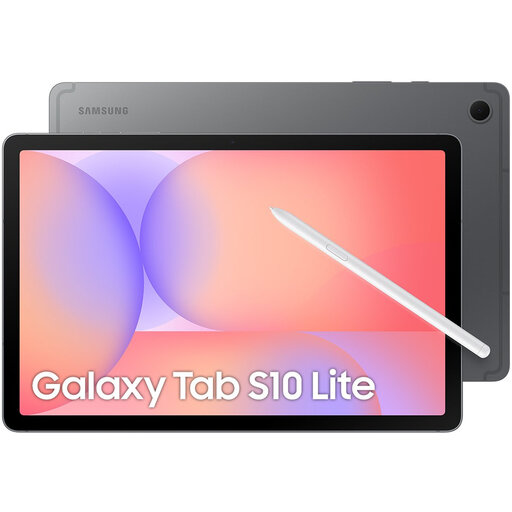
Samsung says the Galaxy Tab S10 Lite comes with an S Pen for note-taking; check that the bundle contents match the Wi-Fi version you choose.
Samsung lists a 10.9-inch screen for this model.
 No image available
The product information lists a stylus for note-taking, which could be useful for jotting down questions as you read.
The product name lists a 12.7-inch screen, Helio G99, 20 GB RAM (8 GB + 12 GB virtual), 256 GB of storage and Android 15.
 No image available
The product name lists a stylus, so this version is worth considering if you want to write questions by hand.
The product name lists 256 GB of storage, Wi-Fi and Android 15. According to the product description, the charger must be purchased separately.
Yes, as long as the workflow you choose suits your files. Apple describes annotating PDFs with Markup on iPad, while reMarkable describes importing and annotating documents. Try a sample file before buying and check how you can share your notes.
Save any documents you need to the device in advance and check where your notes are stored. Apple describes notes stored on the device or used with iCloud; reMarkable says notes sync between devices once the paper tablet is connected to Wi-Fi.
It varies by model and version. For the 11-inch iPad (A16), Apple lists the iPad and a USB-C charging cable as box contents; Samsung says the Galaxy Tab S10 Lite comes with an S Pen. Lenovo shows a Tab M11 version with a pen and says configurations may vary.
If you buy as a consumer in the Netherlands, you’re entitled to a product that’s fit for purpose. The Dutch government says there is no fixed statutory warranty period in the Netherlands; if a product is faulty, the seller must provide a solution. A manufacturer’s warranty or an extended warranty you buy separately doesn’t replace this statutory right.
According to the Dutch government, many distance purchases come with a 14-day cooling-off period, but there are exceptions and not every transaction is covered by these rules. Before ordering, check who the seller is and what return information applies to your purchase.