
Botanical detail artist
You want to draw veins, leaf edges and colour transitions with controlled brush strokes. First, check that the pen is compatible with your tablet. Apple, Samsung and STAEDTLER specify different pen and device requirements.


Start with your exact tablet model: Apple Pencil, S Pen and EMR pens are not interchangeable. For pressure-sensitive brush strokes, you need a pen that is demonstrably pressure-sensitive and compatible with your tablet; for outlines and shading, tilt control may be enough. Apple, Samsung and STAEDTLER specify different compatibility requirements, so also check whether your drawing app supports the features you want.
You want to draw veins, leaf edges and colour transitions with controlled brush strokes. First, check that the pen is compatible with your tablet. Apple, Samsung and STAEDTLER specify different pen and device requirements.
You’re looking for a replacement or additional pen and want to avoid choosing one that won’t work with your tablet model or screen technology. Apple, Samsung and STAEDTLER publish model-specific compatibility information.
You switch between quick studies and other work at your desk. Easy operation, charging, storage and a replaceable nib may all matter, alongside drawing features. Apple, STAEDTLER and Logitech describe different features for everyday use.
First, check that your tablet, pen and drawing app work together. Then decide whether you need pressure-sensitive strokes or whether tilt is enough for your botanical sketches.
| Priority | What should you check? | Who is this important for? |
|---|---|---|
| Fine lines and pressure | Check that the specific pen supports pressure sensitivity and that your drawing app supports this feature. | If I want to draw veins and colour transitions with pressure-sensitive brush strokes, I check that both the pen and app support this feature. Around 36% of consumers prioritise these details. |
| Tablet compatibility | Compare your tablet’s full model name and generation with the pen’s compatibility information. | I want to make sure a pen is designed for my existing tablet, rather than relying on the brand name alone. Around 29% of consumers prioritise finding the right match. |
| Using it at your desk | Compare how the pen charges or connects, and check whether its nib can be replaced. | For short drawing sessions alongside my work, I want to get started easily and maintain the pen without fuss. Around 21% of consumers focus on everyday convenience. |
| Outlines and shading | Check whether tilt control is enough for your brush; tilt sensitivity is not the same as pressure sensitivity. | For outlines and shading, I may want to tilt the pen without needing pressure-sensitive lines. Around 14% of consumers prioritise simple tilt control. |
Even within the same brand, pens may be designed for different models or generations. The Noris digital also requires a compatible EMR screen.
Compare your tablet’s full model name and generation with the compatibility information for the exact pen version.
If a pen doesn’t work with your tablet, you may need to buy another one.
Logitech states that the Crayon is not pressure-sensitive. If you want to control your brush strokes by pressing harder or more lightly, tilt control is no substitute.
Decide in advance whether you need pressure variation, and check that both the pen and your drawing app support it.
Apple Pencil Pro and Pencil (USB-C) are designed for different supported iPads and offer different drawing controls.
Samsung makes S Pens for specific Galaxy devices, and compatibility depends on the version.
The Noris digital classic is a pencil-shaped pen for screens with compatible EMR technology.
Crayon USB-C is designed for supported iPads if simple controls and tilt suit the way you sketch.
These Joybuy options include pens for different device types and drawing needs. Before buying, check that the specific pen is compatible with your tablet.
 No image available
For drawing on compatible Wacom devices; listed compatibility includes the MovinkPad 11 and Cintiq Pro 17, 22 and 27 (DTH271).
The title describes a battery-free EMR stylus. Check whether your device is one of the listed compatible models.
 No image available
Worth considering if your tablet has a compatible capacitive touchscreen; the product information also mentions use with Android and iOS devices.
Check that it’s compatible with your specific tablet before ordering.
 No image available
For sketching and shading on selected iPad models; the product title mentions tilt detection and palm rejection.
The title limits compatibility to selected iPads. Check your exact model before ordering.
 No image available
For pressure-sensitive drawing controls on a compatible iPad. Apple says Pencil Pro offers pressure controls and additional gestures.
The product information lists iPad Pro 13-inch (M4), iPad Pro 11-inch (M4), iPad Air 13-inch (M2), iPad Air 11-inch (M2) and iPad mini (A17 Pro); check compatibility with your exact version.
 No image available
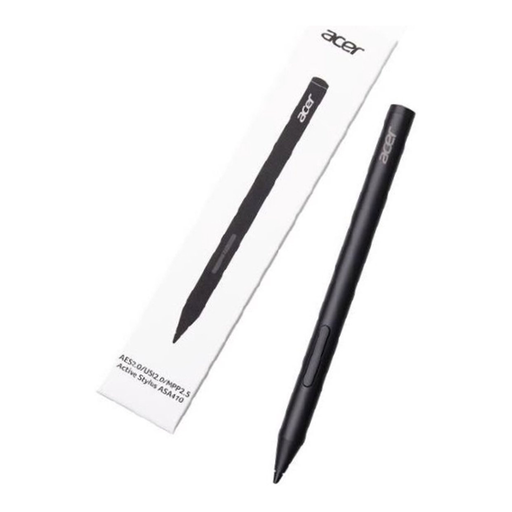
Worth considering if your device supports one of the listed pen protocols.
The product name lists AES 2.0, USI 2.0 and MPP2.5. Check which protocol your tablet uses, and note that the specified AAAA battery is not included.
No, compatibility varies by Apple Pencil version. Apple lists compatible iPad models for Pencil Pro and requires iPadOS 17.5 or later; compare the list with your exact iPad model.
No, STAEDTLER specifies a screen with EMR technology as a requirement. Also check the exact tablet version, as devices within the same model range may differ.
Follow the instructions for your specific pen. STAEDTLER says the Noris digital classic has a replaceable nib, and Samsung describes how to replace the nib on the S Pen for the Tab S11 series.
For distance purchases, you’ll usually have a 14-day cooling-off period, although exceptions may apply depending on the purchase. You’re also covered by the statutory guarantee: according to the Dutch government, the seller is your point of contact if a product is faulty and needs putting right.