
Traveller who wants to pack light
You want to be able to take your tablet out of your bag and hold it comfortably while you wait. In that case, size and weight matter more than having the largest possible screen.


First, choose a tablet that supports your platform game, then check before you leave that you can launch and play it without an internet connection. A compact model is easier to carry and hold, while a larger screen gives you more room for the controls but is less portable. A gaming-focused tablet is worth considering mainly if you also want to play more demanding games. A high refresh rate or large battery capacity alone won’t tell you how well your game will run or how long you’ll be able to play.
You want to be able to take your tablet out of your bag and hold it comfortably while you wait. In that case, size and weight matter more than having the largest possible screen.
You want to install a suitable platform game in advance and check that it launches on your tablet without a connection. Don’t assume public Wi-Fi will be available.
As well as simple platform games, you play more demanding titles. So you want to weigh up performance, storage and screen against the games you actually use.
First, check that your game is available and works without a connection. Then compare the size, battery use and specifications with how and where you want to play.
| What to consider | What to look for | Who is this important for? |
|---|---|---|
| Easy to carry | Compare the screen size and weight of the exact version you’re considering. | If you’ll often be holding the tablet while you wait, you’ll want a manageable size. Around 29% of consumers prioritise portability. |
| Playing without a reliable connection | Check that your game works on the operating system, install it in advance, then test it with Wi-Fi and mobile data switched off. | If you don’t want to rely on terminal Wi-Fi, test in advance that the installed game works without a connection. Around 22% of consumers prioritise offline play. |
| Playing without a charging point | Compare battery specifications for the exact version, charge the tablet before you leave and test your own game. | If you might not be able to charge it, you’ll want to know in advance how your game uses the battery. Around 21% of consumers focus mainly on battery use. |
| Paying for what you use | Check the version you’ve chosen, what’s in the box and any costs for the game or service. | If you don’t want to pay for features your games don’t need, compare what you’ll actually use. Around 14% of consumers prioritise the purchase price. |
| Performance and storage | Check compatibility and internal storage. Where available, look for tests of the exact tablet and try out the controls. | If you also play more demanding games, you’ll want to know how the tablet handles those titles. Around 14% of consumers prioritise gaming performance. |
Xiaomi says that not all apps support the REDMI Pad SE 8.7’s 90 Hz refresh rate. The Consumentenbond warns that specifications alone don’t show how quickly a tablet runs games.
Check the performance and controls of the games you want to play. Don’t compare only the number of hertz or look for the word ‘gaming’.
For the REDMI Pad SE 8.7, Xiaomi says microSD storage is suitable for media, but not for apps.
Choose enough internal storage for the games you want to install in advance, and check this separately for every other model.
Apple states battery life for Wi-Fi internet use or video playback; this isn’t a measurement for platform games. The Consumentenbond also distinguishes between specifications and test results.
Don’t treat a stated battery life as a promise of a particular number of gaming hours, and charge the tablet before you leave.
Games may be paid for, and Xiaomi says that what’s included in the box can vary by region. The cost of a game, subscription or suitable adapter may also be relevant.
Check the cost of the game or service you want to use, and what comes with the version you’ve chosen.
The iPad mini is a compact iPadOS option, while the 11-inch iPad (A16) has a larger screen. First, check that your game is available in the App Store.
The REDMI Pad SE 8.7 is a compact Android option that lets you weigh portability against the features you need.
The Legion Tab Gen 5 is a compact Android option to consider if you want to play more demanding games as well as platform games.
The Galaxy Tab S10 FE is a larger Android option for those who mainly play while sitting down and want more screen space.
This Joybuy selection includes compact Android tablets and larger models. Compare the size with how you want to play, and check that your game is compatible and works without a connection.
 No image available
A compact Android option to take with you. Check that your game works on this model and can be played without a connection.
64 GB storage; Silver version.
 No image available
A larger screen may suit you if you want more room for the controls. Bear in mind that an 11-inch tablet is less compact to carry and hold.
11 inches; 128 GB storage; Space Grey version.
 No image available
A larger screen may suit you if you want more room for the controls. Its 11-inch size makes it less compact to carry and hold.
11 inches; 128 GB storage; Wi-Fi version; Grey.
 No image available
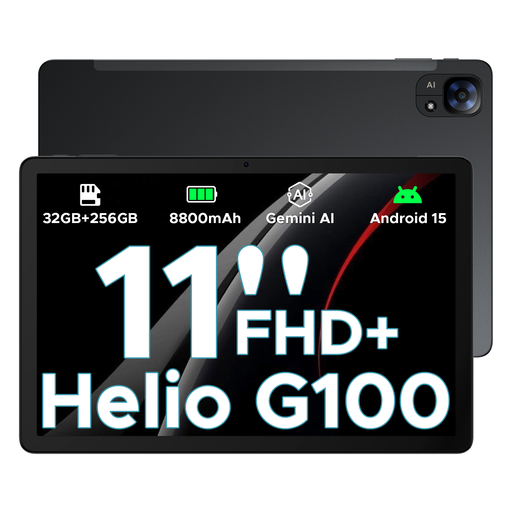
A larger Android model to compare if you also want to play more demanding games. Check how your specific game runs and how easy it is to control.
11-inch FHD+ screen; 90 Hz; Helio G100; 32GB+256GB/2TB; 8800mAh battery.
 No image available
A larger model to consider if you want more screen space. Bear in mind that an 11-inch tablet is less compact to carry and hold.
11-inch FHD+ screen; T7280; 32GB RAM + 256GB ROM/2 TB; 8000mAh battery; 4G and Wi-Fi.
No. Don’t assume that every game works offline. Google Play Help describes some games that can be played offline; when Apple Arcade launched in 2019, Apple said that Arcade games could be played offline. Check the latest information for your game, install it in advance and test it without a connection.
Don’t rely on public Wi-Fi to install or play your game. VeiligInternetten recommends using a VPN on public Wi-Fi; you can also use mobile data, for example through a phone hotspot. To play offline, install the game in advance and test it without a connection.
Install the game you want, launch it and check that you can play without a connection. Also check the available storage and update the system and game in advance if needed. You’ll need to check offline use for each title.
According to ACM ConsuWijzer, when you buy a tablet online you generally have a cooling-off period of up to 14 days after delivery, subject to legal exceptions. Your statutory guarantee is separate from any manufacturer’s guarantee: if a product breaks during normal use sooner than you could reasonably expect, the seller must offer an appropriate solution at no cost to you.
No. Google Play offers both free and paid content. Xiaomi says that whether an adapter is included with the REDMI Pad SE 8.7 may vary by region. Check the costs and terms for the game or service, and what comes in the box with the exact tablet version.