
Playing puzzles alone in the back seat
If you regularly hold and put away your tablet during the journey, consider its screen size and weight alongside its gaming features. The Consumers' Association says compact tablets are handy for travelling.


If a passenger will mostly be playing alone, start with a compact tablet and check before setting off that your preferred puzzle app works offline. A larger screen may be a better fit if clear, easy-to-see numbers or solving puzzles together matter more than ease of carrying and storage. The manufacturer's battery figures won't tell you how long your particular puzzle app will run.
If you regularly hold and put away your tablet during the journey, consider its screen size and weight alongside its gaming features. The Consumers' Association says compact tablets are handy for travelling.
If you don't want to rely on an internet connection while travelling, install your preferred game in advance and test the puzzles you need offline. Google Play Help recommends installing an app for offline use.
If you'd rather see the numbers or squares on a larger screen, you could consider a bigger model and accept that it will be less compact. The Consumers' Association and manufacturers Xiaomi and Apple provide information about tablet screen sizes and specifications.
| What to consider | What to look for | Who it's more important for |
|---|---|---|
| Offline puzzles | Check that the app is available for the operating system. Install it at home and test your preferred puzzles without an internet connection. | I want to be able to play my number puzzle even when there's no connection on the way; around 36% of consumers put offline play first. |
| Size and weight | Compare the screen size and weight of the exact model; consider whether you'll want to hold or put away the tablet during the journey. | If I regularly hold and put away my tablet, ease of handling matters to me; around 29% of consumers prioritise a compact model that's easy to take along. |
| Readability and controls | Try a similar number puzzle on a screen of the size you're considering and check that the numbers, notes and controls are comfortable to use. | When the numbers are small, I want enough space to see the puzzle clearly and tap the squares; around 21% of consumers prioritise readability. |
| Only pay for what you need | Compare the exact storage option, operating system and any apps or accessories you want to use. | I'm mainly looking for a tablet for simple puzzles and don't want to pay for features I won't use; around 14% of consumers prioritise avoiding unnecessary costs. |
Which features are available without a connection depends on the app you choose. Google Play Help recommends installing the app for offline use, but this doesn't guarantee that every feature of a particular puzzle game will work offline.
Install the app and, before setting off, try the exact puzzles you want to play on your journey with your internet connection switched off.
If the app does need a connection, you may need extra mobile data while travelling or be unable to play the puzzle; this depends on the app and your plan.
A larger screen gives you more room, but that alone doesn't tell you whether the tablet will be comfortable to hold or easy to put away. The Consumers' Association says compact tablets are handy for travelling.
Compare the screen size and weight of the exact model and, if possible, try a similar number puzzle on a screen of that size.
A case isn't a tablet, and storage options can vary. So a product name that looks like the tablet you want isn't enough to identify the exact model.
Check the product category, full model number, storage capacity and what's included in the box. Choosing the wrong item can mean extra hassle returning or exchanging it.
According to the Dutch government, you're already entitled to a product that works properly; if there's a problem, the seller must find a solution. Extra cover is only worthwhile if its terms genuinely give you more rights.
Compare the terms of any extra cover with your existing rights, and contact the seller if the product is faulty.
The Galaxy Tab A11 is a compact Android option; check the storage version carefully.
The Tab One is a compact Android option for taking with you.
The Redmi Pad 2 is a larger Android option for anyone who wants more screen space.
The 11-inch iPad (A16) could be a good fit if you use the puzzle apps you want for iPadOS.
This selection at Joybuy includes compact Android tablets and models with larger screens, including an iPad. Check that your preferred puzzle app is available for the operating system of the version you choose.
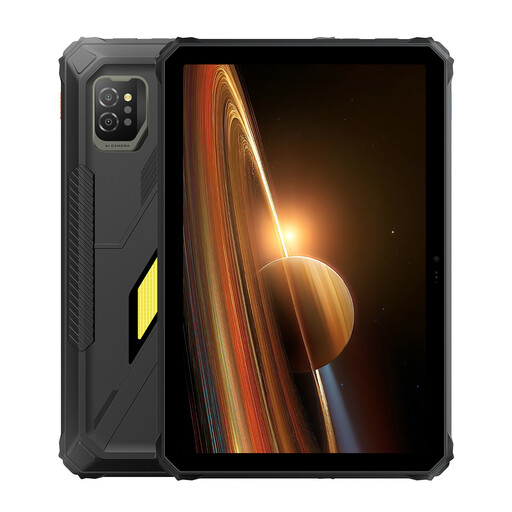 Image unavailable
An option if you'd prefer a larger screen for puzzle squares.
The product name lists an 11-inch IPS screen, Android 15 and 128 GB storage.
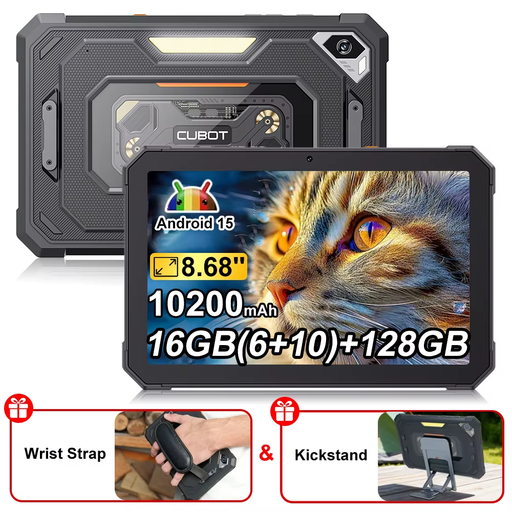 Image unavailable
A compact-screen option if you'd rather find the tablet easier to hold or put away during the journey.
The product name lists an 8.68-inch screen, Android 15 and 128 GB storage.
 Image unavailable
A larger Android screen could be a good fit if you want more room for the puzzle and plan to prop the tablet up while travelling.
The product information lists a 10.1-inch screen with 1920 × 1200 pixels, 4 GB memory and a protective case with a stand included.
 Image unavailable
A compact Wi-Fi tablet to consider if you want to hold and put away your tablet while travelling.
The product name lists 4 GB RAM, 128 GB storage and model ZAF00221GR.
 Image unavailable
An option with a larger screen if your preferred puzzle app is available for iPadOS.
The product information lists an 11-inch screen and iPadOS. A power adapter is not included.
No, don't assume it will. Google Play Help recommends installing an app for offline use; before setting off, test whether the puzzles you want from your particular game work without a connection.
Install and open your chosen puzzle app while you have an internet connection, test your preferred puzzles offline and charge the tablet. Check the battery information for the exact model, but don't treat it as a measured estimate of playing time for your app.
Not exactly: a tablet's battery figures aren't a measured estimate of playing time for your particular puzzle app. How long you can play depends on the device itself and how you use it; test the app and don't rely on a guaranteed number of hours.
Drivers must not hold a tablet while driving. The Dutch government's Get Home Safely campaign also says that playing games on a tablet in a holder can result in a fine if it puts other road users at risk. Let a passenger play and leave the driver to concentrate on driving.
Report the problem to the seller. According to the Dutch government, you're entitled to a product that works properly and the seller must find a solution if there's a problem; extra cover doesn't replace this legal right.