
Studying at a crowded desk
You want to look at a neighbourhood map while keeping your notebook or books on the desk. In that case, a compact design may matter more than seeing as much of the map as possible at once.


Start by checking how much free space you have on your desk: an 8.3–8.7-inch tablet takes up less room, while a screen of around 11 inches shows more of the map at once. If you want to make notes, check that the pen is compatible with your tablet and app. For offline use, also find out what your map app can do without an internet connection.
You want to look at a neighbourhood map while keeping your notebook or books on the desk. In that case, a compact design may matter more than seeing as much of the map as possible at once.
You want to see more of the neighbourhood at once and can make extra room on your desk. As well as screen size, compare the resolution and the text size on your map.
You want to add markings or notes. Check that the tablet works with the pen you want, whether the pen is included with that specific model, and whether your app supports the way you plan to use it.
First, measure the free space on your desk. Then decide whether seeing more of the map at once or making notes matters more to you than having the most compact design possible.
| What to consider | What should you check? | Who is this important to? |
|---|---|---|
| Desk space | Measure the available space and compare it with the tablet’s external dimensions; allow for a stand if you plan to use one. | I want to keep my notebook beside the tablet, so I compare the external dimensions first; around 36% of consumers put available desk space first. |
| Map overview | Compare the screen diagonal and resolution, and view your own map at the text size you want to use. | If I want to view several streets at once, the visible map area matters more to me; around 29% of consumers prioritise seeing more of the map. |
| Taking notes | Check which pen is compatible with the exact model, whether it is included, and whether your app supports annotation. | I want to write directly on the map, so I check that the tablet, pen and app work together; around 21% of consumers put annotation first. |
| Offline maps | Check whether you can save your area in advance and which features remain available without a connection. | If I want to open the map without internet access, I check downloads and offline features in advance; around 14% of consumers prioritise offline availability. |
The screen size doesn’t tell you how much desk space the tablet will take up. A tablet with a larger screen may show more of the map at once, but it also needs more room.
Measure the available space and view your own map at the scale you want to use. Remember to allow room for a stand if needed.
Pen support depends on specific combinations of tablet and pen. Apple lists compatible Pencil models for the iPad mini, but the stated box contents don’t include a Pencil; the Galaxy Tab S10 FE is a separate Samsung model that comes with an S Pen.
Check the exact tablet model, the pen and the packaging, and make sure your app supports the way you want to annotate.
If the pen you want isn’t included, you may need to buy a compatible one separately.
Google says you can download a map area, but walking, cycling and public transport directions aren’t available offline.
Download the area you need in advance and check which features you’ll need. Separately, decide whether you also want to be able to see your location without a connection.
The iPad mini (A17 Pro) is a compact option if you want to use a pen without opting for a larger tablet. Apple lists support for Apple Pencil Pro and Apple Pencil (USB‑C).
The Galaxy Tab A11 is a compact option; the Galaxy Tab S10 FE is a separate, larger model that Samsung lists with an S Pen.
According to Lenovo, the Tab One range offers a compact 8.7-inch alternative; configurations can vary by model and region.
The Redmi Pad 2 is an option if you want more screen space for your map and have room for its larger body on your desk.
This selection of Joybuy products includes compact tablets for a small desk and larger models for anyone who wants more map space or room to make notes.
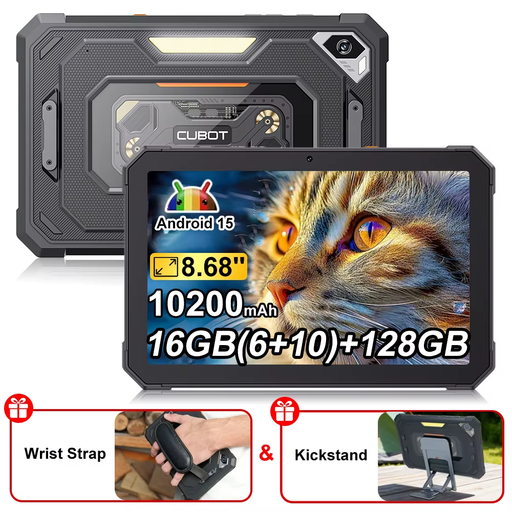 Image unavailable
The compact screen suits anyone who wants to leave space beside the tablet; you’ll see less of the neighbourhood map at once than on a larger screen.
The product title lists an 8.68-inch screen and a 90 Hz refresh rate.
 Image unavailable
The 8.7-inch size suits anyone who wants to leave space on their desk. A compact screen shows less of the map at once than a larger one.
This is the LTE model; don’t assume it is identical to the Wi-Fi version of the Galaxy Tab A11. The product title lists 4 GB of RAM and 64 GB of storage.
 Image unavailable
The included pen is handy if you want to make notes on the map. Bear in mind that a 12.1-inch screen needs extra desk space.
The product title lists a 2.5K screen, 8 GB of RAM and 256 GB of storage.
 Image unavailable
An 11-inch screen may suit anyone who wants to see more of the map at once, provided there’s enough room on the desk.
The product title lists a 2.5K screen and model code ZAFS0069CZ.
 Image unavailable
The LTE model may suit you if you also need a mobile connection while studying maps. Check which connection and any additional services you need for your intended use.
The product title lists 6 GB of RAM and 128 GB of storage.
No, an 11-inch tablet isn’t essential. If you want to keep desk space free, compare the external dimensions of compact models first. If you want to see more streets at once, check whether a larger screen will fit on your desk.
Yes. Google says you can download an area in advance and view it offline on Android and iPad, provided that area is available to download. Some features, including walking, cycling and public transport directions, aren’t available offline.
Not just to view a map you’ve downloaded in advance. If you also want to find your location without a connection, check the features of the exact model: Apple lists GPS/GNSS for the iPad mini (A17 Pro) Wi‑Fi + Cellular. Map storage, GPS and mobile data are separate features.
Check that your chosen pen works with the exact tablet model and whether it is included. Also check that your map or note-taking app supports annotation. Apple lists Pencil support for the iPad mini (A17 Pro), but the stated box contents don’t include a Pencil.
For a standard online product purchase, ACM ConsuWijzer says you generally have a statutory 14-day cooling-off period after delivery, subject to legal exceptions. In the Netherlands, the statutory guarantee depends on what you could reasonably expect from the product; don’t assume there is a fixed statutory period of exactly two years.