
Puzzle fan who holds their tablet
You play on a bus seat with nowhere fixed to put your tablet, so you want to be able to hold it comfortably. The Consumentenbond describes smaller tablets as compact and handy for travelling.


Choose a compact tablet if you’ll mainly be holding it during your bus journey; a larger screen gives you more room for a detailed grid. Then check that your puzzle app works on the operating system and does what you need without an internet connection, and consider whether the tablet will be comfortable to support in your seat.
You play on a bus seat with nowhere fixed to put your tablet, so you want to be able to hold it comfortably. The Consumentenbond describes smaller tablets as compact and handy for travelling.
You want more room for squares and clues, and can support a larger device. Also check how the grid looks in the puzzle app you actually use.
You want to be able to carry on playing when there’s no Wi-Fi or mobile reception. Check how your specific app works offline; a tablet’s network options alone won’t tell you that.
Choose this if: you mainly play while holding the tablet and have limited space on your bus seat. The Samsung Galaxy Tab A11 and Lenovo Tab One models examined each have an 8.7-inch screen.
The trade-off: the smaller screen is easier to handle, but gives you less room for large or densely packed grids.
Choose this if: you prefer a larger view of the grid and can support the tablet comfortably. Xiaomi lists an 11-inch screen and 2560 × 1600 pixels for the Redmi Pad 2.
The trade-off: more physical screen space doesn’t make the device as easy to handle as a compact model; resolution also doesn’t show how your app displays the grid.
Choose this if: your favourite puzzle app is available on iPadOS, or you already use paid iPad apps. Check in advance whether your app supports pen input.
The trade-off: a larger model is less compact than the 8.7-inch tablets mentioned; as the Consumentenbond points out, switching between iPadOS and Android may mean having to buy your paid apps again.
| What to consider | What should you check? | Who is this important for? |
|---|---|---|
| Holding it while travelling | Compare the screen size and weight of the exact version; check the grid view on a similar-sized screen. | If I’ll mainly be holding the tablet on a bus seat, a comfortable grip matters more than maximum screen space. Around 40% of consumers put ease of handling ahead of other buying priorities. |
| Seeing the whole grid | Open your favourite app on a similar-sized screen and check the text, zoom and space for clues. | If I want to see large grids clearly, enough room for squares and clues matters more than a small size. Around 40% of consumers prioritise grid space. |
| Playing offline | Install the app in advance and test whether a puzzle opens and your progress is saved without a network connection. | If I don’t want to rely on Wi-Fi or mobile reception while travelling, I want to know in advance what my puzzle app can do offline. Around 20% of consumers give playing without a connection their top priority. |
For simple grid puzzles, size, app availability and how you’ll use the tablet on the go are the key things to consider; the label ‘gaming tablet’ doesn’t answer those questions.
Start with the requirements of your specific puzzle app and how you’ll hold the tablet on your bus seat.
A puzzle or saved progress may depend on an internet connection, even if the tablet has Wi-Fi or mobile data. Some online features may need a connection while you’re travelling.
If needed, download puzzles and test a game and progress saving without a network connection before you set off.
A resolution figure doesn’t show how large your app actually displays the squares and clues.
Compare the physical screen size too, and open the puzzle app on a similarly sized screen.
A general product name doesn’t always tell you enough to confirm that the model and version match.
Before choosing, compare the full model number and key features with the manufacturer’s information.
The Galaxy Tab A11 Wi-Fi 64 GB in grey examined here is a compact option with an 8.7-inch screen.
The Tab One 8.7" (4GB 64GB) - Luna Grey is a compact Android option for travelling.
The Redmi Pad 2 is the larger Android option in this comparison, suited to anyone who values room for a grid.
The iPad (A16) is a larger iPadOS option if app availability or existing iPad purchases are important to you.
This selection of Joybuy products includes compact Android tablets to hold in your hand and larger tablets for anyone looking for more screen space for a grid, including an iPadOS option.
 No image available
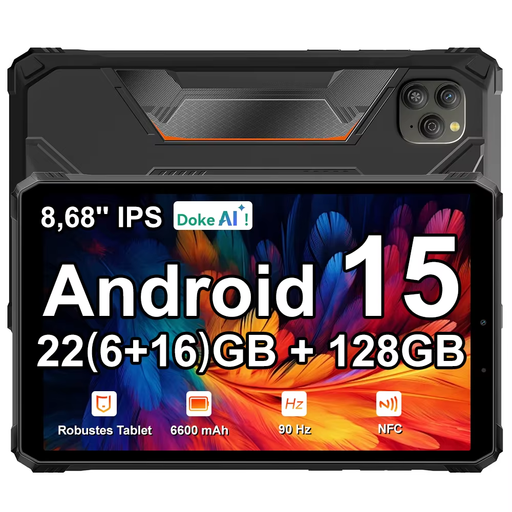
The 8.68-inch screen makes this a compact option to compare if you mainly play while holding your tablet when travelling.
The product name lists an 8.68-inch IPS screen with 90 Hz, Android 15, a 6,600 mAh battery and 128 GB of storage.
The stated 22 GB RAM consists of 6 GB plus 18 GB of expandable RAM; check what this combination means for your needs.
 No image available
An 11-inch tablet to consider if you want more physical space for a puzzle grid and can support the device.
The product name lists an 11-inch 2.5K Android tablet with MediaTek Dimensity 6300.
 No image available
The compact 8.7-inch size is worth comparing if you’ll mainly be holding the tablet while travelling.
The product name lists Wi-Fi, 4 GB RAM and 128 GB of storage.
 No image available
This iPadOS option is worth considering if your favourite puzzle app is available on iPadOS or you prefer this operating system.
The product name lists an 11-inch screen, the M4 chip, Wi-Fi and 128 GB of storage.
 No image available
The 13.4-inch screen is worth comparing if room for a grid matters more to you than being able to hold a compact tablet while travelling.
The product name lists Android 16, a 13.4-inch screen with 120 Hz, 128 GB of storage and an included folio case.
The stated 20 GB RAM consists of 6 GB plus 14 GB of virtual RAM.
Not if your puzzle app keeps the puzzles you want and your progress available offline. Download and test the content in advance without a network connection; check the connection separately for features that do need the internet.
Install the app and any puzzles in advance. Test without a network connection whether a puzzle opens and your progress is saved; this can vary from app to app.
Not necessarily. Apple lists support for certain Apple Pencils with the iPad (A16), but first check whether your puzzle app supports pen input and whether the pen you choose is compatible with your exact tablet.
For an online purchase, you generally have a statutory 14-day cooling-off period after delivery, according to ACM ConsuWijzer. If the tablet breaks too soon during normal use, the retailer is responsible for providing a solution under the statutory guarantee; this isn’t automatically limited to two years.
According to the European Commission, energy labelling rules have applied to slate tablets covered by the scheme since 20 June 2025. There are exceptions, including certain devices in a different product category and devices with a flexible main screen; check the product category and when the model was placed on the EU market.