Choose a tablet based on your language textbook’s file format and reading app. A larger screen gives you more room to view a fixed-layout PDF page, while a compact tablet may be easier to hold if you’re reading adjustable text. If you want to use listening exercises, check that the tablet works with your headphones. A reading mode doesn’t remove the need to think about screen use before bedtime.
Who is this guide for?
Readers of illustrated language textbooks
You use PDFs with fixed layouts, illustrations or exercises, and want to read without constantly zooming in. The Dutch Consumers’ Association points out that books with lots of formatting and images are often saved as PDFs.
Readers who don’t want to disturb anyone
You use pronunciation clips or listening exercises in a shared room and want to play the audio through compatible headphones. Samsung lists a 3.5 mm jack for the Galaxy Tab A11 Wi-Fi.
Readers who want a light, easy-to-hold tablet
You mainly read adjustable text and want a tablet that’s comfortable to hold, even if a full fixed-layout page takes up more of the screen. The Dutch Consumers’ Association explains the trade-off between screen size and portability.
What should you look for?
Compact tablet
Best for: adjustable text and reading when you’d rather have a tablet that’s easy to hold.
The trade-off: on a smaller screen, you may need to zoom in more to read a fixed-layout PDF page. Samsung lists a 3.5 mm jack for the Galaxy Tab A11 Wi-Fi.
Tablet with a larger screen
Best for: language textbooks with fixed-layout pages, images or exercises that you want to see more of at once.
The trade-off: a larger device takes up more space and may be less comfortable to hold for long periods. Apple lists the 11-inch iPad (A16) at 477 grams for the Wi-Fi version; Lenovo lists an 11-inch screen for the Tab M11.
Tablet with a reading-focused screen
Best for: comparing a screen designed with reading in mind against standard tablets.
The trade-off: screen specifications don’t prove any health or sleep benefits. Check that your preferred reading app works on the exact model you’re considering. TCL lists an 11.5-inch screen for the NXTPAPER 11 Plus.
Start with a sample page from your own textbook, then check the reading app and any audio features you need. That way, you can compare screen space, portability and private listening based on how you’ll actually use the tablet.
| What to consider |
What to look for |
Who is this important for? |
| How easy your language textbook is to read |
Check how a sample fixed-layout page fits on the screen and whether the file opens in your reading app. |
If I use a PDF with fixed-layout pages, images or exercises, I want to read without constantly zooming in. Around 39% of consumers give readability of their own book the highest priority. |
| Listening without disturbing anyone |
Check that the tablet works with your wired or wireless headphones and that your reading app plays your book’s audio. |
When I listen to pronunciation clips in a shared room, I want to hear the audio through compatible headphones. An estimated 31% of consumers give listening quietly the highest priority. |
| Comfort while reading |
Compare the dimensions and weight of the exact version with the way you normally like to read. |
If I mainly read adjustable text and hold my tablet, an easy-to-hold device matters more to me than seeing a full fixed-layout page. Around 15% of consumers put portability first. |
| Access to books and long-term use |
Check the title, file format, any copy protection and the required app. For applicable slate tablets, also check the EU energy label. |
If my book may be tied to a particular app or copy protection, I want to know in advance where I can open it and what support the version offers. An estimated 15% of consumers give access to books and long-term use the highest priority. |
Common buying mistakes
-
Assuming all digital language textbooks use interchangeable files
Some book services use their own copy protection. This means a title may not open automatically in every reading app or on every device.
Before you buy, check the exact title, file format, any copy protection and the required reading app. The Dutch Consumers’ Association explains that books without copy protection can be read on different devices.
-
Choosing a small screen without checking a fixed-layout PDF page
With illustrated PDFs, limited screen space may mean you need to zoom in more often. The Dutch Consumers’ Association notes that many PDFs are laid out in A4 format.
Before you decide, open a sample page from your own language textbook on a screen of a similar size.
-
Assuming reading mode removes the need to think about screen use at bedtime
Changing the screen display doesn’t alter the advice about using screens just before bed.
Thuisarts recommends putting your phone, tablet or computer away 1 or 2 hours before going to sleep. So don’t rely on tablet reading to solve sleep problems, and remember to consider your roommate.
-
Assuming accessories included with one version come with every version
Lenovo lists the components included with the Tab M11 bundle reviewed separately. That doesn’t mean every version comes with the same accessories.
Check the contents of the box and the full model or bundle code. If you need an accessory that isn’t included in your chosen bundle, you may have to buy it separately.
Brands to consider
Samsung
The Galaxy Tab A11 Wi-Fi is a compact option to compare for reading text and listening through wired headphones.
- Samsung lists an 8.7-inch screen and a 3.5 mm jack for this version.
- A smaller screen may be less suitable if you want to view a full fixed-layout page at once.
Apple
The 11-inch iPad (A16) is a larger tablet to compare for illustrated lesson pages and iPadOS reading apps.
- Apple lists the Wi-Fi version at 477 grams.
- Check whether your book’s app is available. E-books tied to a platform aren’t automatically interchangeable.
Lenovo
The Tab M11 is an Android option with a larger screen. Bundle contents may vary by version.
- Lenovo lists an anti-glare 11-inch IPS screen for the 4 GB/128 GB Wi-Fi bundle.
- Don’t assume every Tab M11 version includes the same pen, case or keyboard.
TCL
The NXTPAPER 11 Plus is worth comparing if you’re looking for a tablet with a reading-focused screen.
- TCL lists an 11.5-inch screen with 2.2K resolution.
- That specification alone doesn’t demonstrate any health or sleep benefits. Check the user experience and app support for the exact version.
Tablets on Joybuy
This selection includes tablets with larger screens for fixed-layout pages, as well as compact and reading-focused options. Always check file and app compatibility with your own language textbook.
 No image available
Samsung Galaxy Tab A11 Plus, 11 inch, 128 GB, Wi-Fi
The 11-inch screen is a good fit if you want more room for fixed-layout pages.
The product description lists a resolution of 1920 × 1200 pixels, Bluetooth 5.3 and a 3.5 mm jack. Check that your reading app and audio files work on the tablet.
View on Joybuy
 No image available
TECLAST P50, 11 inch, Android 16
The 11-inch size is worth comparing if your language textbook has larger fixed-layout pages.
The product name lists an IPS screen, Bluetooth 5.0 and 128 GB of storage. Check that your reading app and headphones work with the exact version.
View on Joybuy
 No image available
iFLYTEK AINOTE 2, 10.65 inch, E-Ink tablet
This tablet is worth including in your comparison if you’re looking for an E-Ink screen.
The product name lists a 10.65-inch screen. Before you buy, check that your language textbook’s reading app and any audio files work on this model.
View on Joybuy
 No image available
TECLAST P30T, 10.1 inch, Android 16
The 10.1-inch screen is a larger option than a compact tablet for language textbooks with fixed-layout pages.
The product description lists a 1280 × 800-pixel IPS screen; the product name mentions Bluetooth 5.0. Check that your book and headphones work with the exact version.
View on Joybuy
 No image available
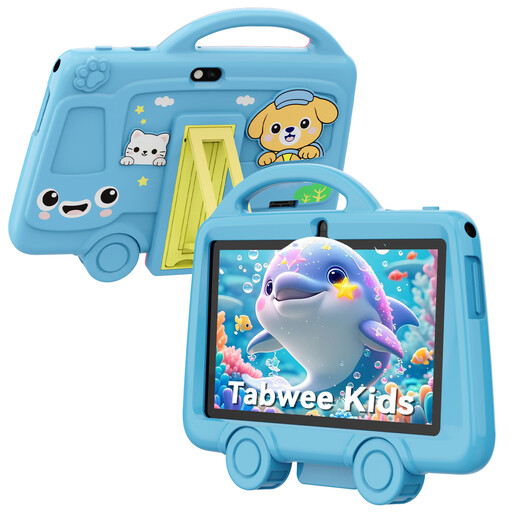
TABWEE K8 Kids tablet, 7 inch
The compact 7-inch screen may suit adjustable text if ease of handling matters more to you than viewing a fixed-layout PDF page at a larger size.
The product name lists Bluetooth 4.2, a 3.5 mm jack and a weight of 285 grams. First, compare the screen with a sample page from your own book.
View on Joybuy
Frequently asked questions
Should I choose a small or large tablet for a language textbook?
A language textbook with fixed-layout PDF pages is likely to benefit from more screen space; for adjustable text, ease of handling may matter more. Look at a sample page from your own book before you choose.
How can I use listening exercises without disturbing my roommate?
Use headphones that work with the exact tablet, and check that your reading app plays your book’s audio files. Samsung lists a 3.5 mm jack for the Galaxy Tab A11 Wi-Fi.
Does reading mode make it fine to read just before bed?
No. Thuisarts recommends putting your phone, tablet or computer away 1 or 2 hours before going to sleep. This isn’t a comparison test of reading modes, so take your bedtime and shared room into account when choosing.
What if the tablet or reading app isn’t suitable after I buy it?
For online purchases, you generally have a 14-day cooling-off period from delivery, subject to applicable exceptions. Separately, the seller is responsible if a product doesn’t do what you could reasonably expect under normal use. ACM ConsuWijzer explains these consumer rights.
Does a new tablet in the Netherlands have an EU energy label?
It depends on the product category. The European Commission lists rules for applicable slate tablets from 20 June 2025, with exceptions including tablet computers. Check the category and label for the exact version.


