What should you look for when choosing?
The percentages show consumers’ first buying priority when choosing a tablet for this workshop scenario; each row describes a different priority.
| Point to consider |
What should you check? |
Who is this important to? |
| Visibility outdoors |
Compare the stated brightness mode and, if possible, view a photo in similar lighting. Samsung lists up to 800 nits for the Galaxy Tab S10 FE in the relevant mode; Apple lists 500 nits for the iPad (A16). These are manufacturer specifications, not a field comparison. |
When I review photos outdoors, I want to see the details without relying on a nits figure alone. Around 29% of consumers name outdoor visibility as their first buying priority. |
| Opening photos offline |
Test your own camera card, card reader, file format and viewing app before you set off. Apple documents access to supported external storage through Files, and importing from a memory card into Photos. |
I want to open my own files without an internet connection, using the card reader and app I’m bringing. Offline file transfer is the top priority for around 23% of consumers. |
| Viewing together and making notes |
Decide whether you’ll mainly be viewing with others and whether you’ll use a stylus. Lenovo lists a 12.7-inch screen for the Idea Tab Pro ZAE40006SE; Samsung says the Tab S10 FE comes with an S Pen. |
When I discuss photos with participants, I want enough screen space or a stylus for making notes. Group discussion is the first buying priority for around 18% of consumers. |
| Portability and charging |
Compare the weight of the exact version and check the charging options and what’s included in the box. Try the tablet with the apps and brightness you plan to use during a similar session. |
I want to carry a tablet between the shooting location and workshop room, and know how to charge it. Portability and power are most important to around 18% of consumers. |
| Complete setup |
Check the full model number and what’s included in the bundle. Make a list of the card reader, stylus or charging equipment your workflow requires before comparing versions. |
If I want to use the tablet with the accessories I need, I look at the complete setup, not just the device. Total purchase and accessory costs are the first priority for around 12% of consumers. |
Tablets for viewing and discussing photos
These Joybuy products are suitable for viewing photos; some models also feature a stylus or a larger screen for taking notes and group discussions. Also check what workflow and accessories you’ll need to open your camera files.
 No image available
Lenovo Yoga Tab ZAG60028PL, 11.1-inch, 3.2K, 256GB, with Tab Pen Pro
The screen size and included stylus make it a good fit for viewing photos and taking notes.
The product title lists an 11.1-inch 3.2K screen, 144 Hz, 8 GB RAM, 256 GB storage and a Tab Pen Pro included in the box. Check which card reader and connection are compatible with your camera files.
View at Joybuy
 No image available
Lenovo Idea Tab Plus WiFi, 12.1-inch, 2.5K, 8 GB RAM, 256 GB, with stylus – Rose
The stated screen size and stylus are worth considering if you want to view photos together and make notes.
The product title lists a 12.1-inch 2.5K screen, 8 GB RAM, 256 GB storage and a stylus included in the box. Check that your chosen card reader and app support your own file format.
View at Joybuy
 No image available
Blackview MEGA 12, 12.2-inch 2.4K, 36 GB (12 + 24 GB) and 256 GB
The stated 12.2-inch screen is worth considering if you want a roomier display for viewing photos.
The product title lists a 12.2-inch 2.4K screen, 36 GB (12 + 24 GB) and 256 GB storage. Test that your files and viewing app work with your chosen transfer method.
View at Joybuy
 No image available
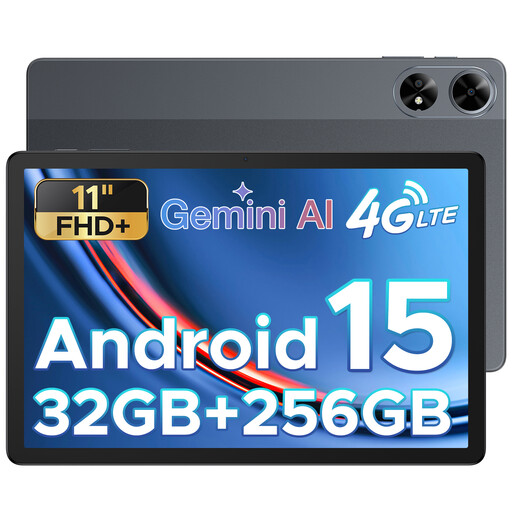
DOOGEE Tab G6 Plus, Android 15, 11-inch FHD+, 32 GB RAM and 256 GB ROM
The stated 11-inch FHD+ screen gives you a clear starting point for viewing photos on a tablet.
The product title lists Android 15, 32 GB RAM and 256 GB ROM. Check in advance that your chosen app and the way you transfer camera files suit your workflow.
View at Joybuy
 No image available
HONOR Pad 10, 12.1-inch 2.5K, 8 GB RAM and 256 GB
The stated 12.1-inch screen is worth considering if you want to view photos with workshop participants.
The product title lists a 2.5K screen, 8 GB RAM and 256 GB storage. Check that the tablet supports your own camera files and preferred app.
View at Joybuy
Frequently asked questions
How do you transfer photos from an SD card to an iPad?
Connect a compatible card reader to the appropriate port. Apple explains how to access files through Files and import photos and videos from a memory card into Photos. Test the card, reader and files you plan to use in advance.
Can you rely on the nits figure alone for outdoor use?
No. A stated nits figure doesn’t guarantee that the screen will be easy to read where you’re using it. Samsung lists up to 800 nits for the Tab S10 FE in the stated brightness mode, and Apple lists 500 nits for the iPad (A16); these are manufacturer specifications, not an independent comparison of visibility in your lighting conditions. If possible, view a test photo at the workshop venue.
Do you need to be able to insert a memory card directly into the tablet?
No. An external card reader can also be used to transfer files; Apple documents this workflow for the iPad. Samsung’s microSD specification for the Tab S10 FE relates to expandable tablet storage. Separately check that your camera card and files work with the connection and app you’ve chosen.
What rights do you have in the Netherlands when buying a tablet online?
According to ACM ConsuWijzer, consumers buying online generally have a statutory cooling-off period of up to 14 days after delivery, although exceptions apply. Your statutory guarantee is separate from any manufacturer’s warranty: if a product breaks too soon during normal use, contact the seller. The applicable rules and exceptions may depend on the circumstances.
Can you share workshop photos showing identifiable people without asking?
Don’t assume that you can. According to the Dutch Data Protection Authority, identifiable people in photos are personal data and the GDPR applies. The rules for sharing or otherwise using the images depend on the circumstances and how they’re used.


