Who is this choice relevant to?

Anyone who writes up handwritten observations

If you organise measurement notes and quick sketches later in the library, look for a stylus that’s compatible with the exact tablet model and enough room to write comfortably. Apple Netherlands, Samsung Netherlands and reMarkable outline stylus or writing options for the models mentioned.

Anyone who combines PDFs with lab notes

If you work with protocols or papers as well as your notes, check how you can annotate PDFs and then find or transfer your notes. reMarkable Support explains that some features depend on Connect.

Anyone who wants to write without distractions

If you mainly want to write and read, and don’t need many other tablet apps, digital paper could suit the way you work. Check in advance that file sharing works for your documents; reMarkable describes Paper Pro as a device with software focused on writing.

What should you consider when choosing?

Versatile Android tablet with a stylus

A good fit if: you want to switch between handwritten notes and other Android tasks as you work. Samsung Netherlands says the Galaxy Tab S10 Lite comes with an S Pen.

Bear in mind: check the exact Lenovo Idea Tab configuration and whether the stylus is included with that offer.

iPad with a compatible Apple Pencil

A good fit if: you want to combine handwriting, documents and other iPad tasks on one device.

Bear in mind: Apple Netherlands says the 11-inch iPad (A16) supports Apple Pencil (USB-C) and the 1st generation, but doesn’t list a Pencil in the box. An adapter is needed to pair and charge the 1st generation.

Digital paper

A good fit if: you mainly want to write longer observations and read or annotate PDFs, without needing many other tablet apps.

Bear in mind: reMarkable describes PDF importing and an operating system focused on writing. Connect is required for certain conversion and Word import features.

What to consider What to look for when buying Who is this most important for?
Handwriting and sketches Check the full model name, compatible stylus and what’s included in the box. If I write up observations and diagrams by hand, I want a compatible stylus and a comfortable writing surface. Around 36% of consumers say handwriting is their top priority.
PDFs and transferring notes Try annotating and transferring a sample PDF of your own to see how it works. If I need to use notes alongside protocols or papers, I want to be able to find and transfer annotations later. Around 29% of consumers put their document workflow first.
What you need for a complete writing setup Check whether you need a separate stylus, adapter or service, and what you can do without a service. If I want to put together a working writing setup, I want to know in advance which components and features I’ll need. Around 21% of consumers say this is their top priority.
Staying focused while writing Consider whether you’ll also need browsers, study apps or other files while writing. If I write for long periods in the library, a setup that puts less emphasis on general-purpose apps may suit my preferences. Around 14% of consumers prioritise an environment focused on writing.

Common buying mistakes

  • Assuming stylus support means one is included

    A compatible stylus isn’t automatically part of the setup you choose. Apple Netherlands doesn’t list a Pencil in the box with the 11-inch iPad (A16); Lenovo’s Dutch product information for one Idea Tab configuration gives conflicting details about the stylus.

    Ask the seller to confirm which stylus and any pairing accessories are included with the exact model and offer.

    A compatible stylus or the adapter you need may have to be bought separately.

  • Assuming every PDF or Word feature works as standard

    reMarkable says that certain conversion and Word import features depend on Connect. This may matter if you want to transfer files in an editable format.

    Test the import and export process you need with a document of your own, and check which features are available without Connect.

    Some features may require a Connect subscription.

  • Thinking a general-purpose tablet and digital paper are interchangeable

    A general-purpose tablet is designed for a range of tasks; reMarkable describes Paper Pro as a device with its own software focused on writing. Don’t choose based on the writing task alone if you also need other study apps.

    Make a list in advance of the apps and file types you want to use while working, and check that they suit the setup you choose.

Brands worth comparing

Apple

The 11-inch iPad (A16) is a general-purpose tablet for anyone who wants to combine handwriting with other iPad tasks.

  • Apple Netherlands lists support for Apple Pencil (USB-C) and the 1st generation.
  • The specifications don’t list a Pencil in the box. An adapter is needed to pair and charge the 1st generation.

Samsung

The Galaxy Tab S10 Lite is an Android option for note-taking and other study tasks.

  • Samsung Netherlands lists a 10.9-inch screen and an included S Pen for this range.
  • Check whether the stylus is included with the specific offer and configuration.

Lenovo

The Idea Tab is worth considering if you’re looking at an Android tablet with plenty of screen space and a stylus option.

  • For configuration ZAFR0399SE, Lenovo Netherlands lists an 11-inch screen, 8 GB of RAM and 256 GB of storage.
  • The Dutch product information says both “+ Pen” and that the stylus is optional and sold separately. Confirm what’s included with the specific offer before assuming the stylus comes with it.

reMarkable

Paper Pro is digital paper for anyone mainly looking to handwrite, read and annotate documents.

  • reMarkable lists an 11.8-inch screen and PDF importing; the manufacturer describes the software as focused on writing.
  • According to reMarkable Support, certain conversion and Word import features depend on Connect. Check whether you need these features for your document workflow.

Tablets at Joybuy for handwritten notes

This Joybuy selection features versatile tablets for handwritten lab notes and sketches. Check the stylus, screen specifications and file compatibility for each configuration.

Lenovo Yoga Tab ZAG60028PL tablet

Lenovo Yoga Tab ZAG60028PL

The product name says that a Tab Pen Pro is included for note-taking and sketching.

11.1-inch 3.2K touchscreen, 144 Hz, Snapdragon 8 Gen 3, 12 GB LPDDR5X, 256 GB UFS 4.0, Wi-Fi 7 and Android 15.

View at Joybuy

Lenovo Idea Tab Pro TB373FU tablet

Lenovo Idea Tab Pro TB373FU

The product information lists note-taking and sketching among its uses; check whether the stylus is included with this configuration.

12.7-inch 3K screen, 144 Hz, MDT 8300, 8 GB RAM, 256 GB and Wi-Fi 6E.

View at Joybuy

Lenovo Idea Tab Plus Wi-Fi tablet with stylus

Lenovo Idea Tab Plus Wi-Fi 12.1-inch

The product name says a stylus is included; the product information mentions note-taking and document annotation.

12.1-inch 2.5K screen, 8 GB RAM, 256 GB and stylus; Rose configuration.

View at Joybuy
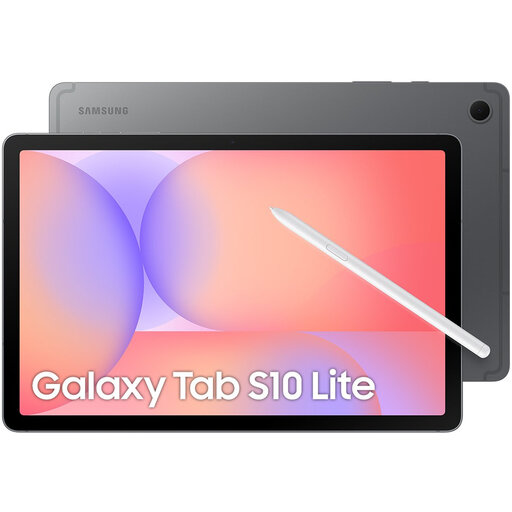
Samsung Galaxy Tab S10 Lite Wi-Fi 128 GB

Samsung Galaxy Tab S10 Lite Wi-Fi 128 GB

The product information says an S Pen is included for note-taking and sketching; check what comes with the configuration on offer.

10.9-inch screen, 128 GB storage and grey finish.

View at Joybuy

Apple 13-inch iPad Air M4 Wi-Fi 128 GB in Starlight

Apple 13-inch iPad Air (M4) Wi-Fi 128 GB

The product information lists compatibility with Apple Pencil Pro and Apple Pencil (USB-C); check whether a stylus is included with this offer.

13-inch screen, M4, Wi-Fi, 128 GB and Starlight finish.

View at Joybuy

Frequently asked questions

Can I add my lab observations directly to a PDF?

Yes. With the reMarkable workflow described, the manufacturer says you can import and annotate a PDF via the web app. Check that file transfer supports the format you need; some conversions require Connect.

Which stylus is compatible with my tablet?

It depends on the exact tablet model. For the 11-inch iPad (A16), Apple Netherlands lists Apple Pencil (USB-C) and the 1st generation. A USB-C to Apple Pencil Adapter is needed to pair and charge the 1st generation. For a Lenovo offer, check separately whether the stylus is included.

What can I do if my tablet doesn’t work properly after I buy it?

For a consumer purchase in the Netherlands, the seller must offer a solution if the product doesn’t meet what you could reasonably expect. The Dutch government states that there is no fixed statutory warranty period that applies to all products in the Netherlands; a manufacturer’s warranty doesn’t replace the seller’s obligations.

Can I try out a tablet bought online and return it?

Online purchases are generally covered by a statutory cooling-off period, which according to ACM ConsuWijzer ends 14 days after delivery. Check the official terms for unpacking, trying out the product and any exceptions before arranging a return.

Are writing and cloud features always included?

No, it varies by device and feature. reMarkable says Connect is required for certain import and conversion features; check which transfer options you need and what you can do without the service.
