Choose a compact tablet if you mainly want to hold it and put it away quickly; a bigger screen is better if you want to examine small objects in scenes clearly. Check that your game is available for the operating system, and test in advance whether downloaded scenes work in aeroplane mode. A stated battery capacity doesn’t tell you how long your game will run.
Who is this buying guide for?
For anyone who wants to see small details
You want to view scenes and objects comfortably, and would rather take a larger tablet with you. The Consumers’ Association discusses the difference between compact tablets and larger screens; Xiaomi and Apple publish specifications for models around 11 inches.
For anyone who wants to travel light
You play while waiting for short periods and want a tablet that’s easy to hold and put away. The Consumers’ Association describes small tablets as compact for travelling; Samsung and Lenovo offer examples of models with smaller screens.
For anyone who wants to play without a regular connection
You want to carry on playing when airport Wi-Fi isn’t available, but this depends on the game you choose and the content you download in advance. App Store listings for hidden object games provide information about available titles; test the features you want to use offline.
What should you look for when buying?
Compact Android tablet
Best for: short gaming sessions where easy handling and storage are priorities.
Trade-off: the smaller screen may make it less comfortable to search for fine details.
Android tablet around 11 inches
Best for: anyone who wants to view scenes on a larger screen and usually uses their tablet on their lap or on a table.
Trade-off: weigh up the larger size against how much weight you want to carry.
iPad
Best for: anyone who needs a particular hidden object app for iPad or already uses iPad apps.
Trade-off: if you’re switching from Android, check that the apps you want to use are also available for iPad.
| What to consider |
What should you check? |
Who is this important for? |
| Playing offline |
Check that the app works on your operating system, download the scenes you want and test them in aeroplane mode. |
If I want to carry on playing while waiting without Wi-Fi, I want to know in advance which scenes will open offline. Around 31% of consumers make offline play their top priority. |
| On-screen detail |
Compare a compact 8.7-inch screen with a model around 11 inches, and see whether the app lets you zoom in on scenes. |
I want to be able to spot small objects in a scene, so I compare the picture in the game I play. Around 31% of consumers make seeing detail their top priority. |
| Carrying and holding the tablet |
Compare the stated weight and dimensions, and allow for the space needed for a case, if you plan to use one. |
If I often hold my tablet and want to put it away quickly, I consider both size and weight. Around 23% of consumers make portability their top priority. |
| Apps you want and already use |
Check that the title you’ve chosen is available for the operating system and that the apps you already use will still be available. |
I want to use a hidden object app that works with my tablet and check whether my existing apps will still be available. Around 15% of consumers make app choice and access to existing apps their top priority. |
Things to consider when using your tablet
-
Assuming battery capacity guarantees play time
A figure in mAh or a stated battery life for video and browsing doesn’t tell you how long a particular hidden object game will run.
Use battery capacity as a technical specification, not a promise of hours of play. If possible, assess the tablet using the kind of activities you have in mind.
On a long journey, you may also need to plan time to charge it.
-
Assuming a game works fully offline
An app being available doesn’t automatically mean that all its scenes or features will work without a connection.
Download the content you want to use at home and try it in aeroplane mode before you set off.
Downloading content in advance takes time to prepare.
-
Confusing retailer copy with the specifications of the exact version
Samsung lists two speakers for the Galaxy Tab A11, while a Joybuy page for an A11 lists four speakers.
Check the full model code and compare important specifications with the manufacturer’s information before choosing a version.
Brands to compare
Samsung
The Galaxy Tab A11 Wi-Fi is a compact Android model to compare if you’re looking for a smaller screen.
- Samsung specifies an 8.7-inch screen, 1340 × 800 pixels and two speakers.
- The smaller screen may be less comfortable if you often look at small details; the specifications aren’t a game test.
Lenovo
The Tab One is a compact option to compare if a low stated weight is important to you.
- For the international versions described, Lenovo lists a weight of around 320 g, 4 GB RAM and a 5100 mAh battery.
- The stated battery life is based on Lenovo’s own video and browsing tests, not on hidden object games. Versions and box contents may vary.
Xiaomi
The Redmi Pad 2 is a larger Android alternative for anyone who wants more screen space to view scenes.
- Xiaomi specifies an 11-inch screen with 2560 × 1600 pixels, a weight of 510 g and a battery capacity of 9000 mAh.
- Battery capacity isn’t a measured play time; Xiaomi states that actual results may vary.
Apple
The iPad (A16) is worth considering if your chosen title is available for iPad or you already use iPad apps.
- For the Dutch Wi-Fi model, Apple specifies a screen of around 11 inches, a weight of 477 g and storage starting at 128 GB.
- Check that the app you want is available for iPad; the hardware doesn’t guarantee that a title will work offline.
OnePlus
The Pad Lite Wi-Fi is an 11-inch Android alternative to compare if storage and battery capacity are important to you.
- For the Wi-Fi version, OnePlus lists 6 GB RAM, 128 GB storage, a weight of around 530 g and a typical battery capacity of 9340 mAh.
- The stated capacity doesn’t show how many hours hidden object games will run; OnePlus notes that performance varies depending on conditions.
Joybuy tablets for hidden object games
This Joybuy selection includes compact tablets and models with larger screens for hidden object games.
 Image unavailable
Blackview Active 8 Pro, 16 GB (8 GB + 8 GB), 256 GB, 10.36-inch, Orange
The stated 10.36-inch screen may suit you if you prefer to view scenes on a larger display; test how it looks with your game.
Joybuy lists 16 GB RAM (8 GB + 8 GB), 256 GB storage, Android 13 and a battery capacity of 22,000 mAh. That capacity isn’t a measure of play time.
View at Joybuy
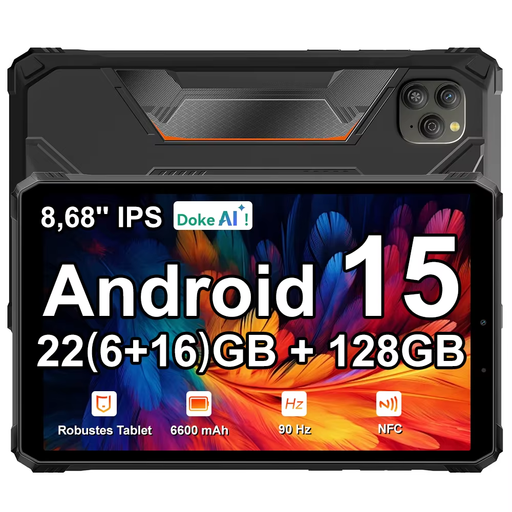 Image unavailable
Blackview Active 5, 22 GB expandable RAM (6 GB + 18 GB), 128 GB, 8.68-inch, Black
The 8.68-inch screen may suit you if you’re looking for a tablet that combines a more compact size with a screen for viewing scenes.
Joybuy lists 22 GB expandable RAM (6 GB + 18 GB), 128 GB storage, a 90 Hz IPS screen, a 6600 mAh battery and Android 15. Battery capacity isn’t a measure of play time.
View at Joybuy
 Image unavailable
Lenovo Idea Tab Plus WiFi, 12.1-inch, 2.5K, 8 GB RAM, 256 GB, with pen, Rose
The stated 12.1-inch screen may suit you if you like viewing hidden object scenes on a larger display.
Joybuy lists 2.5K, 8 GB RAM, 256 GB storage and a pen with this WiFi version.
View at Joybuy
 Image unavailable
Lenovo Tab One 8.7-inch Wi-Fi, 4 GB RAM, 128 GB, Luna Grey (ZAF00221GR)
The compact 8.7-inch size may suit you if you want a tablet that’s easy to take with you for short gaming sessions.
For this version, Joybuy lists 4 GB RAM, 128 GB storage and a screen resolution of 1340 × 800 pixels.
View at Joybuy
 Image unavailable
Samsung Galaxy Tab A11 X135, 8.7-inch LTE, 4 GB RAM, 64 GB, Grey
The 8.7-inch screen may suit you if its compact size and LTE connectivity fit the way you want to use your tablet.
Joybuy lists 4 GB RAM and 64 GB storage; the product specifications state a screen resolution of 1340 × 800 pixels.
View at Joybuy
Frequently asked questions
Do I need a special gaming tablet for hidden object games?
Not necessarily. Check that your game is available for the operating system and that you find the screen and controls comfortable to use. The tablet details given don’t indicate a specific performance threshold for these games.
How can I prepare a tablet for a wait without Wi-Fi?
Install the game you want and download any available scenes in advance. Before you set off, test the parts you want to play in aeroplane mode; an app listing doesn’t prove that every feature or new piece of content will remain available offline.
Is a bigger screen always better for hidden object games?
Not for everyone: a bigger screen gives you more room to view scenes, while size and weight may matter if you’re holding or putting away the tablet. Compare how your game looks and consider how you’ll use the tablet while you wait.
Can I take a tablet in my hand luggage on a flight?
The European Union Aviation Safety Agency advises carrying portable electronic devices with lithium batteries in the cabin; some airlines prohibit them in checked baggage. EASA also advises carrying spare batteries and power banks in your hand luggage. Check your airline’s rules too.


