What should you look for when choosing?
Start with the file format and app used for the workshop. Then weigh up screen space, stylus bundle and portability for the way you work.
| What to consider |
What should you check? |
Who will find this important? |
| Reading plans and details |
Open a representative plan at the size you’re considering and compare the physical screen space and resolution. |
If I want to view the overview and details side by side at a table, I don’t want to keep switching between cropped views. Around 33% of consumers prioritise being able to read plans clearly. |
| Taking notes with a stylus |
Check stylus compatibility and exactly what’s included in the bundle. Samsung lists an S Pen with the Galaxy Tab S10 FE version reviewed; Apple doesn’t list a Pencil in the stated iPad Air box contents. |
If I want to add comments directly to plan drawings, I want to know in advance which stylus works and whether I’ll need to buy it separately. Around 27% of consumers give annotating top priority. |
| Offline access to files |
Check which app and file format you need, then test a fully downloaded file without a network connection before you leave. For AutoCAD Mobile, Autodesk says to download files over an internet connection first. |
If the connection drops at the workshop venue, I still want to be able to open my plans. Around 20% of consumers prioritise offline access. |
| Portability and outdoor viewing |
Assess the weight and screen visibility in similar lighting conditions. The Consumers’ Association notes that extra-large tablets are less easy to carry; Samsung’s stated maximum of 800 nits applies to High Brightness Mode. |
If I want to carry the tablet between my worktable and the site, I want its size and screen to suit where I work. Around 20% of consumers give portability and outdoor use top priority. |
Tablets at Joybuy
This selection focuses on tablets for viewing and annotating harbour plans, with larger screens for use at a table and a more portable stylus option. The Consumers’ Association notes that extra-large tablets are less easy to carry, so bear this in mind if you’ll be transporting your tablet often.
 Image unavailable
Lenovo Idea Tab Plus, 12.1 inch, 2.5K, 8 GB RAM, 256 GB, with stylus – Rose
An option for viewing plans at a table and taking notes with the stylus mentioned in the product title.
The product title lists a 12.1-inch 2.5K screen, 8 GB RAM and 256 GB of storage.
View at Joybuy
 Image unavailable
TECLAST T65, 13.4 inch, 120 Hz
The large screen is suited to viewing plans at a table; bear its size in mind if you’ll be carrying it around regularly.
The product title lists a 13.4-inch screen and a 120 Hz refresh rate.
View at Joybuy
 Image unavailable
TECLAST ArtPad Pro, 12.7 inch, 2K, with stylus
A larger-screen option for viewing plans, with a stylus also listed in the product title.
The product title lists a 12.7-inch 2K screen and 20 GB RAM, shown as 8 GB + 12 GB virtual, with 256 GB of storage.
View at Joybuy
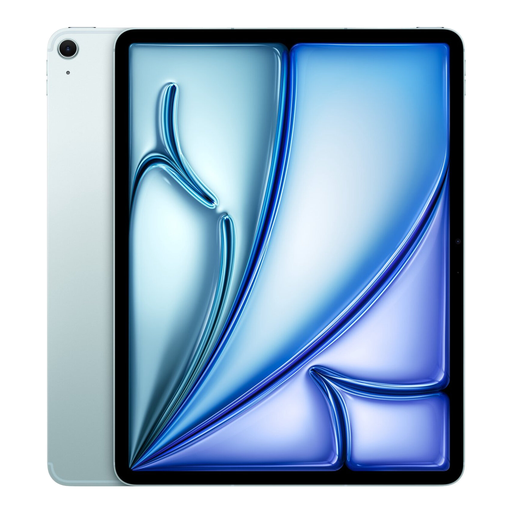 Image unavailable
Apple 13-inch iPad Air (M3), Wi-Fi + Cellular, 512 GB, Blue (2025)
A large screen for viewing plans; Apple lists Pencil support for the 13-inch iPad Air M3.
Check which compatible Apple Pencil suits the way you work. The product title lists Wi-Fi + Cellular and 512 GB of storage.
View at Joybuy
 Image unavailable
Lenovo Yoga Tab ZAG60028PL, 11.1 inch, 3.2K, 8 GB RAM, 256 GB, with Tab Pen Pro
A more portable screen option for those who want to take plans with them and make notes using a stylus.
The product title lists an 11.1-inch 3.2K screen, 8 GB RAM, 256 GB of storage and a Tab Pen Pro.
View at Joybuy
Frequently asked questions
Do you need to buy a tablet with mobile internet for the workshop?
Not just because coverage might be poor: if the app you use supports offline files, you can download them in advance over the internet. Autodesk describes this option for AutoCAD Mobile; check separately that your workshop app and files work offline.
How do you prepare a drawing in AutoCAD Mobile for offline use?
According to Autodesk, you first need an internet connection to download the drawing to your device. In file management, select ‘Download to offline’ and test that the drawing opens before you leave; any changes made offline will sync once the app reconnects.
Does a tablet always come with a drawing stylus?
No, it depends on the model and bundle. Samsung lists an S Pen as included with the Galaxy Tab S10 FE version reviewed, while Lenovo offers version ZAE40006SE as a stylus variant. The stated contents of the iPad Air box don’t include a Pencil, so check the exact version of every tablet.
What are your rights if a tablet bought online is faulty or you change your mind?
For a product that doesn’t meet requirements, the seller must offer a solution according to the Dutch government; the Netherlands has no fixed statutory guarantee period. For distance purchases, you usually have a 14-day cooling-off period, subject to the applicable terms and exceptions.


