Who is this suitable for?

Writing applications on the go

You work on longer application documents during train journeys and mainly need a comfortable keyboard and reliable document editing. The Consumers’ Association points out that a laptop can be more convenient for word processing and demanding software.

Comparing documents

You read the terms of a scheme and its appendices alongside your draft, and want to be able to open those files without a reliable connection. NS says Wi-Fi is available on almost all Intercity trains; Microsoft Support recommends downloading and opening documents before working offline.

Taking notes on the move

You’re looking for a tablet for reading, reviewing and taking notes on the go, and are weighing screen space against portability. Apple says the iPad Air supports Apple Pencil Pro, while Samsung lists an S Pen as included with the Galaxy Tab S11.

What should you look for?

iPad with a suitable keyboard

Choose this option if: you can prepare your application in mobile document apps and want a portable workstation.

Bear in mind: the 13-inch iPad Air gives you more screen space, but Apple lists the Wi-Fi model as weighing 616 grams, compared with 464 grams for the 11-inch model, without accessories. Apple does not list a keyboard among the items in the box.

Android tablet

Choose this option if: you can work with Android document apps and want to combine handwritten notes with typing.

Bear in mind: accessory compatibility does not mean it’s included with every version. Samsung lists an S Pen with the Galaxy Tab S11; Lenovo lists a pen and folio keyboard in a specific Idea Tab Plus bundle.

Windows 2-in-1

Choose this option if: your application depends on Windows software or a workflow that doesn’t work well on a mobile tablet.

Bear in mind: check that the software you need works on the version you choose, and factor the keyboard into your decision about size and accessories. Microsoft describes the Surface Pro keyboard as optional.

What to consider What to check before buying Who is this for?
Long typing sessions and the right workflow Check keyboard compatibility, layout and what’s included in the bundle. Also open a sample application document and portal on the device you’re considering. When I write a long application on the train, I want to type comfortably and edit the required document. Around 33% of consumers give typing and the necessary workflow top priority.
Offline documents Check whether the document app supports offline editing, and make your application files and appendices available before you set off. If I lose my connection, I want to be able to open and edit my draft and appendices. Around 27% of consumers prioritise offline access.
Screen space and portability Compare the size and weight of the complete set-up; a keyboard makes it bulkier than the tablet on its own. When I take my workstation on the train, I want the tablet to be easy to carry without leaving me short of space for my documents. Around 20% of consumers give portability top priority.
Complete set-up and bundle contents Check the item code to see whether the keyboard, pen and charger are included or need to be bought separately. When I put together a practical writing set-up, I want to know in advance which accessories are included. Around 20% of consumers prioritise the contents and total cost of the set-up.

Common buying mistakes

  • Comparing a tablet as if it were a complete writing set-up

    An accessory may be compatible without being supplied with the tablet. The exact contents vary by version and bundle.

    Compare the box and bundle contents for the exact item code, and check that the keyboard fits your tablet model.

  • Assuming you’ll have an internet connection on every train journey

    NS says Wi-Fi is available on almost all Intercity trains, but not every train. Editing text offline and submitting it online are also two separate steps.

    Download your draft and appendices before you set off, and plan to submit your application when you have a reliable connection. After submitting, check that you’ve received confirmation.

  • Choosing a tablet without trying the application process

    The documents you need and any sign-in method depend on the scheme. A suitable screen or keyboard doesn’t prove that the portal and all its features will work on every device.

    Before you buy, open the specific grant call, try editing a sample document and check the sign-in process. Choose a different set-up if the software you need doesn’t work on the tablet.

Relevant brands to consider

Apple

The iPad Air M4 is available in the Netherlands in 11-inch and 13-inch versions, for anyone who can work with iPad apps and a suitable keyboard.

  • Apple lists the Wi-Fi models as weighing 464 grams for the 11-inch version and 616 grams for the 13-inch version. Both sizes support Apple Pencil Pro.
  • Check the keyboard for your chosen size and version; Apple does not list one among the items in the box. These weights are manufacturer specifications and don’t, on their own, indicate how comfortable the tablet is to write on.

Samsung

The Galaxy Tab S11 is an Android option for combining typing with handwritten notes.

  • Samsung lists an S Pen as included with the Galaxy Tab S11 and names the Book Cover Keyboard Slim as a compatible accessory.
  • The keyboard cover is model-specific. Check the contents of the exact bundle; compatibility doesn’t automatically mean the accessory is included.

Lenovo

The Idea Tab and Idea Tab Plus offer Android options for document tasks, with bundle contents that can vary by version.

  • Lenovo lists a 12.1-inch tablet, pen and folio keyboard in a specific Idea Tab Plus bundle.
  • Don’t assume those bundle contents apply to another item code. Lenovo says the pen is optional with another version of the Idea Tab.

Microsoft

The Surface Pro is a Windows 2-in-1 for application work that doesn’t fit well on a mobile tablet.

  • Microsoft describes laptop mode as using an optional Surface Pro keyboard.
  • Check that the software you need works with the processor version you choose. Microsoft’s battery-life figure for the current range is based on video playback, so it doesn’t guarantee the same working time for documents and mobile internet.

Joybuy products for writing on the go

These Joybuy product picks are suited to working on documents on the go, and include Android tablets and a Windows 2-in-1. Check that the app you need works on the version you choose, and confirm whether the keyboard and accessories are included.

TECLAST P50 11-inch Android tablet

TECLAST P50 11-inch Android tablet, 128 GB

The 11-inch size is well suited to reading and reviewing on the go; check in advance that your application app works on Android.

The product title lists Android 16, 128 GB storage, 4G LTE and Dual SIM.

The title lists 32 GB RAM, made up of 6 GB RAM and 26 GB virtual memory.

View at Joybuy

Lenovo Idea Tab 11-inch Wi-Fi, 256 GB

Lenovo Idea Tab 11-inch Wi-Fi, 256 GB

The product description lists a Tab Pen for taking notes; check separately whether you’d like to add a suitable keyboard for longer documents.

This version lists Android 15, 8 GB RAM and 256 GB storage.

The product description says that a charger is not included.

View at Joybuy

HP OmniBook 5 Flip 14-fp0250ndx 2-in-1 laptop

HP OmniBook 5 Flip 14-fp0250ndx 2-in-1

This Windows 2-in-1 suits anyone who needs a physical keyboard and a Windows workflow; check that the application software works on this version.

The product title lists an Intel Core 5 120U, 8 GB RAM, 512 GB SSD and Windows 11 Home.

According to the product description, the device has a 14-inch 2K touchscreen and weighs approximately 1.60 kg.

The product description says that a compatible USB-C charger is required separately.

View at Joybuy
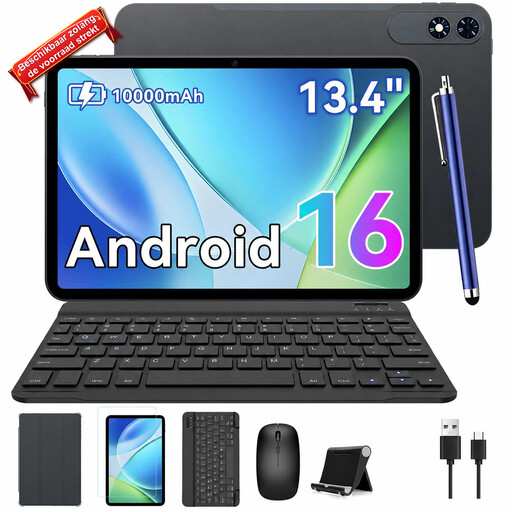
TABWEE T60Pro 13.4-inch Android tablet with keyboard bundle

TABWEE T60Pro 13.4-inch tablet with keyboard bundle

The larger screen gives you more room to review documents, but you’ll need to consider how easy it is to carry on the train.

The product title lists Android 16, a 13.4-inch screen and 256 GB storage.

The title lists a keyboard, case and mouse in the bundle, plus 8 GB RAM and 16 GB virtual memory.

View at Joybuy

TECLAST P30TCase 10.1-inch Android tablet with accessories

TECLAST P30TCase 10.1-inch tablet with accessories

The compact screen is an option for reading and typing on the go; there’s less room to view documents side by side than on a larger screen.

The product title lists Android 16, 128 GB storage, a keyboard, mouse, stylus and case.

The title lists 3 GB RAM plus 13 GB virtual memory.

View at Joybuy

Frequently asked questions

Can I work on my grant application without train Wi-Fi?

Yes, if your chosen app supports offline editing and you make the files you need available in advance. Microsoft Support recommends downloading and opening documents before you set off; Google Docs lets you make specific files available offline. Once you’re back online, check that your changes have synced.

Do I need to use a particular file format or digital sign-in method?

That depends on the grant provider and the scheme. Ondernemersplein says that most schemes have specific application documents, and that eHerkenning may sometimes be required. Check the specific call and portal before relying solely on a tablet.

Which keyboard fits the tablet?

Check the exact tablet model, keyboard layout and bundle contents. Samsung lists the Book Cover Keyboard Slim as compatible with the Galaxy Tab S11; Lenovo lists a folio keyboard in a specific Idea Tab Plus bundle. Try the set-up where you plan to write on the train to see if it feels comfortable.

How can I protect personal data in application documents while travelling?

If your organisation processes personal data, it must protect it properly in line with guidance from the Dutch Data Protection Authority; the appropriate measures depend on how the data is used. Follow your organisation’s security rules and make sure people nearby can’t read sensitive documents. The tablet brand or train Wi-Fi alone doesn’t determine whether your working practices meet these requirements.

Will every grant portal work well on a tablet?

You can’t assume so without checking the specific scheme and portal. Open the grant call, try editing the required document on the device you’re considering, and check the sign-in process. If the process depends on desktop software that won’t work on the tablet, consider a Windows 2-in-1.
