A tablet may be more convenient for biographies with photos or a fixed PDF layout. For long stretches of continuous text, with no need for other apps, an e-reader is also worth considering. When choosing a device for reading in bed, think about how comfortable it is to hold, how your books are displayed and whether you can adjust the brightness. A larger screen gives you more space for pages, but is less portable; dimming a tablet screen doesn’t guarantee better sleep.
Who is this for?
Readers who hold their device in landscape mode
If you read long passages in bed, compare the weight and size of the exact model. Apple lists the Wi-Fi iPad mini at 293 grams; Lenovo Netherlands gives the Tab One model with 4 GB RAM and 64 GB storage an approximate weight of 320 grams.
Evening readers who want to adjust the display
If you want to read in a dark bedroom, try adjusting the brightness and reading display in your chosen reading app. Xiaomi lists a reading mode for the REDMI Pad SE 8.7; this feature doesn’t show that reading improves sleep.
Readers of illustrated biographies
For books with photos or a fixed page layout, it’s important that the text and captions remain readable on your chosen screen. The Consumentenbond says a tablet is more suitable than an e-reader for many PDFs; be sure to check a sample page from your book.
What should you look for when choosing?
Compact LCD tablet
A good fit if: you want to use e-books and other apps, and regularly hold your tablet in one hand.
Consider: compared with e-readers, the Consumentenbond points to reflections, light from the screen and a battery that may run down more quickly.
Larger tablet
A good fit if: you read biographies as PDFs or want to view pages with photos and a fixed layout.
Consider: more screen space generally makes a tablet harder to hold while lying down; check how your own books are displayed.
E-reader
A good fit if: you mainly read long biographies with lots of text and don’t need tablet features.
Consider: the Consumentenbond says e-readers are less suitable for books with lots of images and A4 PDFs.
| What to consider |
What to look for |
Who should pay particular attention? |
| Handling |
Compare the listed weight and screen size of the exact model. Apple lists the Wi-Fi iPad mini at 293 grams; Lenovo Netherlands gives the Tab One model with 4 GB RAM and 64 GB storage an approximate weight of 320 grams. |
If I read lying down for a long time, I want a device that feels comfortable in my hand. Ease of handling is the top buying priority for around 40% of consumers. |
| Evening reading display |
Try adjusting the brightness and using a dark display in your chosen app. A reading mode doesn’t make an LCD screen equivalent to e-ink, nor does it prove a sleep benefit. |
In a dark room, I want to be able to read the text without an unnecessarily bright screen. Around 30% of consumers prioritise an adjustable evening display. |
| Photos and PDF pages |
Open a sample page and check whether the text, captions and photos are readable. The Consumentenbond says a tablet is more suitable than an e-reader for many PDFs. |
If my biography has photos or a fixed layout, I want to see whether the page fits well on screen. For around 20% of consumers, page layout is the most important buying priority. |
| Access to books |
Check that your titles are available in the app or file format you want to use. Bol says the Kobo via bol app works on a tablet; Kobo Plus is a separate subscription option. |
I want to be able to open the biographies I own or want to read in the app I already use. Around 10% of consumers put access to books first. |
Common buying mistakes
-
Assuming an ‘eye-friendly’ feature will prevent sleep problems
A reading mode is a screen feature, not proof that reading on a tablet improves sleep. Your evening habits may also be a factor if you have trouble sleeping.
Try the reading display for yourself and, when choosing, also compare it with a reading option that doesn’t have a light-emitting tablet screen.
-
Choosing a small tablet without opening your own PDFs
On a fixed A4 page, text and captions may need a lot of zooming on a small screen.
Look at a sample page from your biography before choosing between a compact and a larger tablet.
-
Confusing the manufacturer’s warranty with your statutory rights
According to the Dutch government, you should contact the seller about your statutory guarantee. The Netherlands has no fixed statutory two-year guarantee period; what you can expect depends on the product and the circumstances.
Keep your purchase information and check what rights, if any, an additional warranty actually provides.
Brands to consider
Apple
The iPad mini is a compact iPad option for anyone who also uses other iPad apps.
- Apple lists the Wi-Fi model with an 8.3-inch screen, 2266 × 1488 pixels and a weight of 293 grams.
- These specifications don’t determine how comfortable any particular book will be to read, or how comfortable it will be for every reader.
Lenovo
The Tab One is a compact Android tablet.
- Lenovo Netherlands lists the Tab One model with 4 GB RAM and 64 GB storage with an 8.7-inch screen and an approximate weight of 320 grams.
- The stated battery life for streaming isn’t an independent reading test.
Samsung
The Galaxy Tab A11 is a compact Android tablet. Note the difference between it and the larger A11+, and check whether you’re looking at a Wi-Fi or LTE model.
- Samsung lists the A11 Wi-Fi model with an 8.7-inch, 1340 × 800-pixel, 90 Hz screen, a headphone socket and a USB-C cable in the box.
- The 90 Hz specification doesn’t show any measured benefit when reading static text.
Xiaomi
The REDMI Pad SE 8.7 is a compact Android tablet with a reading mode listed by Xiaomi.
- Xiaomi lists an 8.7-inch screen with 1340 × 800 pixels for this product range.
- The stated weight is up to 373 grams, and configurations may vary by region. The reading mode doesn’t prove that reading improves sleep.
Tablets at Joybuy
This selection includes compact and larger tablets for reading biographies with photos or in PDF format. Compare the space available for each page with how comfortable the tablet is to hold while lying down.
 No image available
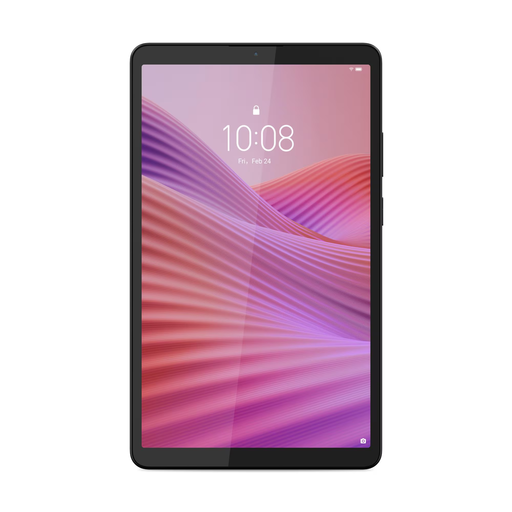
Lenovo Tab One 8.7-inch Wi-Fi, 4GB/128GB, Clear Case, Luna Grey
The tablet format may suit biographies in PDF format or with images; check a sample page to see whether the layout works well on screen.
According to the product name: 8.7-inch HD IPS touchscreen, 4 GB RAM, 128 GB storage and a Clear Case.
Joybuy
 No image available
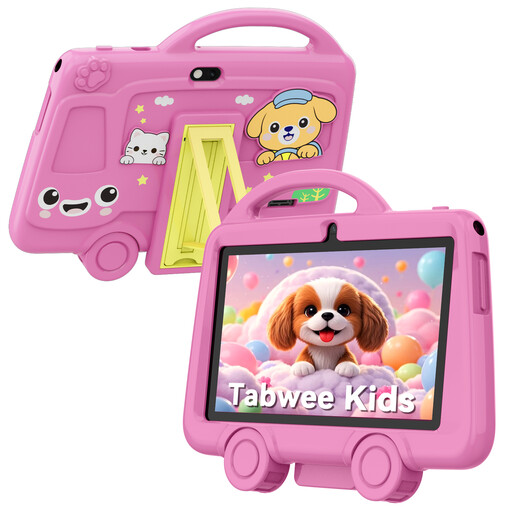
TABWEE K8 Kids’ Tablet, 7-inch, 2GB/32GB, pink
The product name lists a 7-inch screen; check a sample page to see whether your biography’s text and images are easy to use on it.
According to the product name: 2 GB RAM, 32 GB storage, 3000 mAh battery, 2.4 GHz Wi-Fi, Bluetooth 4.2 and a weight of 285 grams.
Joybuy
 No image available
HONOR Pad X8b 128GB, Space Grey
This tablet is for anyone weighing up the extra screen space for photos or PDF pages against how easy it is to hold. Check how your own book looks before making a choice.
The product name lists 128 GB storage.
Joybuy
 No image available
Lenovo Tab MediaTek, 10.1-inch, 4GB/128GB, Android 14, grey
A larger screen can give you more room for pages with photos and a fixed layout; weigh this against how easy the tablet is to hold in bed.
According to the product name: 25.6 cm (10.1 inches), 4 GB RAM, 128 GB storage, Wi-Fi 5 (802.11ac) and Android 14.
Joybuy
No image available
Lenovo Tab 4G MediaTek LTE, 10.1-inch, 4GB/128GB, Android 14, grey
A larger screen can give you more room for pages with photos and a fixed layout; also check how comfortable the tablet is to hold while lying down.
According to the product name: 25.6 cm (10.1 inches), LTE, 4 GB RAM, 128 GB storage, Wi-Fi 5 (802.11ac) and Android 14.
Joybuy
Frequently asked questions
Is a tablet or an e-reader better for a biography with lots of photos?
A tablet may be more practical for books with lots of images or A4 PDFs; for mostly continuous text, an e-reader is worth comparing. Look at a sample page from the specific edition.
How do I set up a tablet for reading in bed?
Open the app where your books are stored and try adjusting the text size, dark reading display and low screen brightness. These settings aren’t a treatment for sleep problems.
Do I need a Kobo e-reader for Kobo Plus?
No. According to bol, you can also read on a tablet using the Kobo via bol app. Check that the biography you’re looking for is in the current selection and see which subscription option you want.
Who should I contact if a tablet bought in the Netherlands develops a fault?
According to the Dutch government, you should contact the seller about your statutory guarantee. The Netherlands has no fixed statutory two-year guarantee period; what you can expect depends on the product and the circumstances.
Can I return a tablet bought online?
For distance purchases from a business, the Dutch government says you usually have 14 days to change your mind. This isn’t an unconditional right to return every transaction, such as a purchase from a private seller.


