
People with a small desk
You want to view floor plans without giving up too much workspace. Screen size and ease of handling are important things to consider first, as the Consumentenbond also explains.


For viewing floor plans on a small desk, a tablet around 11 inches is a practical choice if workspace is limited. A larger screen can show more of a drawing at once, but takes up more room. If you want to annotate plans, check that the exact version is compatible with a stylus, whether one is included in the bundle, and whether your PDF app can save annotations.
You want to view floor plans without giving up too much workspace. Screen size and ease of handling are important things to consider first, as the Consumentenbond also explains.
You add questions or changes to a plan, so you’ll want to check stylus compatibility, what’s included in the bundle and what your PDF app can do. Adobe describes PDF annotation features, while Lenovo, Samsung and Apple provide model-specific information about included styluses or compatibility.
You want to keep more of a drawing in view and weigh up the extra screen space against how much room the tablet takes up. The Consumentenbond discusses the trade-off between larger and smaller tablets.
First, compare the tablet’s size with the space available on your desk and the floor plans you’ll be viewing. If you want to write on a drawing, then check the stylus, app and what’s included in the bundle.
| What to consider | What should you check? | Which consumers should pay particular attention? |
|---|---|---|
| Workspace and size | Compare the tablet’s external dimensions with the space on your desk, and view a representative floor plan at the screen size you’re considering. | If I have limited desk space, I want a screen that’s comfortable to use without taking over my workspace. Around 33% of consumers prioritise a more compact setup. |
| Stylus and annotation app | Check stylus compatibility and what’s included with the exact version; try annotating and saving a file again in your PDF app. | If you regularly add comments to a plan, you’ll need a tablet, stylus and app that work well together. Around 27% of consumers prioritise annotating with a suitable stylus and app. |
| Seeing the details | View a representative drawing at the size you want, and weigh up the extra screen space against how much room the tablet takes up. | If I want to see more of a detailed drawing at once, I could consider a larger screen, as long as I have room for it on my desk. Around 20% of consumers prioritise a clearer overall view. |
| Total purchase cost | Compare what’s included in the exact bundle and consider which stylus or other accessories you actually need. | If you’re looking for a complete setup, you’ll want to know whether essential accessories are included before comparing offers. Around 20% of consumers focus first on the total purchase cost. |
A larger screen can give you more room to view a plan, but it also takes up more space and may be less easy to handle.
Compare the tablet’s external dimensions with your desk, and view a representative floor plan of your own at the size you’re considering.
Compatibility and box contents vary by model and version. Support for a stylus doesn’t automatically mean one comes with the tablet.
Check which stylus is compatible and what’s included in the exact offer before you decide.
Zooming in on a floor plan doesn’t, by itself, confirm its scale or the dimensions of the property. Adobe describes measurement tools for PDF documents.
Use the dimensions and scale information provided in the original file, and check them before relying on measurements to make a decision.
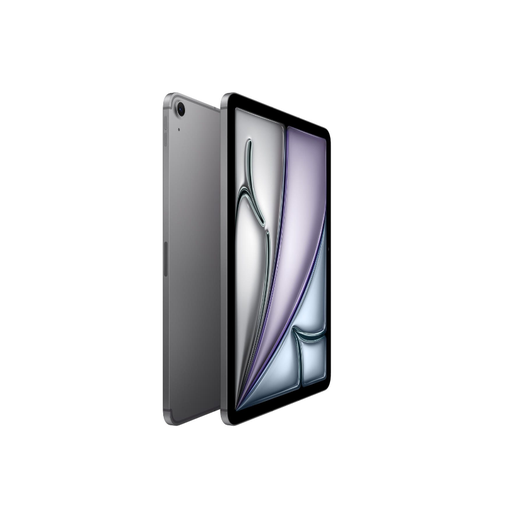
The 11-inch iPad (A16) is worth comparing if you want a tablet around this size to use with an Apple Pencil.
The Galaxy Tab S10 FE and FE+ let you choose between a more compact size and extra screen space.
A specific 11-inch Tab M11 version is worth considering if you’re comparing smaller tablets that come with a stylus.
The Pad 7 is another option to consider when comparing stylus compatibility across Android tablets.
This selection focuses on compact tablets from 10.1 to 11 inches for viewing floor plans on a small desk. Some versions mention a stylus bundle in the product name; check the exact bundle and how it works with your PDF app.
 No image available
The 11-inch size suits anyone who wants to view floor plans on a desk with limited space.
Version: Wi-Fi + Cellular, 256 GB, Space Black.
 No image available
The product name mentions a stylus bundle for anyone who wants to make notes on a tablet; check that the included accessories work with your PDF app.
According to the product name: 11-inch, 2K, 128 GB of storage, keyboard and stylus.
 No image available
The 11-inch size is an option if you’re looking for a compact tablet for viewing floor plans on a small desk.
Version: Wi-Fi + Cellular, 512 GB, Space Gray. Before buying, check which stylus is compatible with this exact version and whether it’s included.
 No image available
The 10.1-inch size suits anyone looking for a compact tablet to view floor plans on a small desk.
According to the product name: Android 16, 128 GB of storage and a 120 Hz refresh rate. The product name doesn’t mention an included stylus, so check the bundle if you want to annotate plans.
 No image available
The product name lists a stylus and Bluetooth keyboard in the bundle; check that the included accessories suit the way you annotate plans.
According to the product name: 10.1-inch and 64 GB of storage. The bundle also lists a case, Bluetooth mouse, tablet stand, charger, data cable, earphones, OTG adapter cable and camera cover.
Not from the zoom level alone. Use the dimensions and scale information in a suitable source file, and check that the PDF and measurement tools you’re using are suitable for that file.
Try the annotation features in the PDF app you want to use. Adobe describes features including text boxes, highlights, sticky notes and drawings. Check in your app and file format that the saved copy retains your comments.
That depends on the exact version and bundle. Apple doesn’t list a Pencil among the stated box contents for the iPad (A16), while Lenovo lists a stylus with a specific Tab M11 version. So compare what’s included in the offer and check which stylus works with the model you’ve chosen.
For eligible online consumer purchases, you generally have 14 days to change your mind; the Rijksoverheid lists some exceptions. Faulty products are also covered by statutory conformity rules. There’s no fixed statutory guarantee period in the Netherlands; contact the seller if there’s a problem. The right to change your mind and your legal rights if a product is faulty are separate matters.
An address can be personal data, as the Autoriteit Persoonsgegevens explains. Whether you’re allowed to share it publicly in your particular situation depends on the data and rights that apply to the document. Check these before publishing, and remove any personal data that isn’t necessary.