Who might need a tablet for local project files?

Student with local project files

Wants to store and reopen documents, datasets or map files. The file type and the tasks you need to carry out determine whether a mobile tablet will do the job. The Climate Impact Atlas and Apple Support describe map information and access to suitable external storage respectively.

Map reader and annotator

Studies flood maps with legends and wants to make notes on reports or maps, sometimes without an internet connection. The Climate Impact Atlas describes national and regional maps; Esri sets out the requirements for offline maps in Field Maps.

Student with GIS assignments

May need to do more than view maps, so should test the required desktop software, plug-ins and files on the chosen device. Esri lists the system requirements for ArcGIS Pro; Microsoft highlights the need for separate driver checks on Windows on Arm.

What should you look for in a tablet for maps and GIS files?

iPadOS

A good fit if: you can open project files in suitable viewing or annotation apps and manage them locally or using connected storage.

Bear in mind: being able to access files in the Files app does not confirm that a specific GIS app can edit the project. Also check which Apple Pencil is compatible with the model and whether it is included.

Android

A good fit if: the files and apps you need work on Android and you want to use maps, documents and, possibly, handwritten notes.

Bear in mind: file management or stylus support does not prove that your course app or project format will work. Check exactly what is included in the bundle.

Windows tablet or detachable Windows PC

A good fit if: your assignment genuinely requires Windows desktop software and you have checked that it works—including plug-ins and drivers—on the processor architecture of the device you intend to use.

Bear in mind: Windows alone does not guarantee that your project workflow will work. Windows on Arm may require a separate compatibility check for drivers.

What to consider What should you check? Who should pay more attention to this?
Local files and offline access Check the file type and size, the suitable app, and whether you can open and save a sample file offline. If I need to store project files locally and open them in the required app, I want to test the whole process; around 36% of consumers say local files are their main concern.
Required project software Check the software requirements, project file extensions, plug-ins, licence and processor architecture using a sample assignment. If I need to use an editable GIS project or specified software, I want to know in advance whether the whole workflow works; around 29% of consumers give compatibility with project software top priority.
Reading maps and legends Open a representative map with its legend on the screen you intend to use, and weigh this against how portable the model is. If I want to view map details and legends together, I want to test one of my own maps on the screen; around 21% of consumers prioritise the readability of map materials.
Stylus and annotations Check which stylus is compatible, what is included in the box and whether the annotation app works with your documents. If I want to make handwritten notes on maps or reports, a suitable stylus matters; around 14% of consumers give annotation top priority.

Common pitfalls when choosing a tablet for GIS studies

  • Confusing storing a file with editing a project

    File management and support from project software are two different things. A file stored on your tablet may still not open or be editable in the app you need.

    Test a representative file using the required task, and check whether a readable export, such as a PDF, is sufficient for your assignment.

    If the mobile workflow is not enough, you may still need access to a computer or suitable software.

  • Assuming every online map will work offline

    According to Esri, the web map must be set up for offline use in ArcGIS Field Maps, and the relevant map area must be downloaded.

    Download the area you need in advance and open it once without a network connection.

  • Assuming stylus support means one is included

    Apple lists compatible Pencil models for the iPad (A16), but does not include a Pencil in the tablet box. The product title for the Lenovo Idea Tab we looked at mentions a stylus, while Lenovo also describes it as optional and sold separately.

    Check both stylus compatibility and what is included in the box for the full model number.

    You may need to buy a compatible stylus separately if it is not included with the model you choose.

  • Choosing Windows on Arm for desktop GIS without testing the software

    A claim that Windows apps are supported does not prove that the required plug-ins and drivers will work. Microsoft lists separate driver requirements for Windows on Arm.

    Test the software, plug-ins and drivers on the processor architecture of the device you intend to use, with a sample assignment.

    If the workflow does not work, you may need access to another device or different peripherals.

Relevant brands for tablets and local project files

Apple

The iPad (A16) we looked at is an iPadOS option for documents and organising local files.

  • Apple Support explains how to access suitable external storage through the Files app, subject to connection and storage-format requirements.
  • This does not confirm that you can edit a specific GIS project. The Apple Pencil models mentioned are not listed as part of the tablet package.

Samsung

Samsung presents the Galaxy Tab S10 FE model we looked at as an Android tablet with a 10.9-inch screen and S Pen.

  • The screen size and S Pen are manufacturer specifications for the model in question, as described by Samsung Netherlands.
  • These features do not prove that your course app or project files will work. Check the storage option, what is included in the box and the full model number.

Lenovo

The Idea Tab 11-inch, 8 GB/128 GB model we looked at is an Android option for documents and notes.

  • The Lenovo product page mentioned here describes the relevant tablet model.
  • The page mentions a stylus in the title, but also describes it as optional and sold separately. Confirm what is included in the bundle; the product specifications do not confirm GIS compatibility.

Microsoft

A Windows device is worth considering when an assignment requires desktop software.

  • Esri lists the supported Windows versions for ArcGIS Pro. The Consumentenbond includes a 12-inch Surface Pro with Snapdragon X Plus in its overview of tested tablets.
  • This does not confirm that ArcGIS Pro, all plug-ins and drivers will work on this Arm model. Microsoft describes separate driver limitations for Windows on Arm.

Joybuy tablets for maps and local study files

These Joybuy options are Android tablets for studying maps and documents and storing study files. Before buying, check that the project format and required software work on the model you choose.
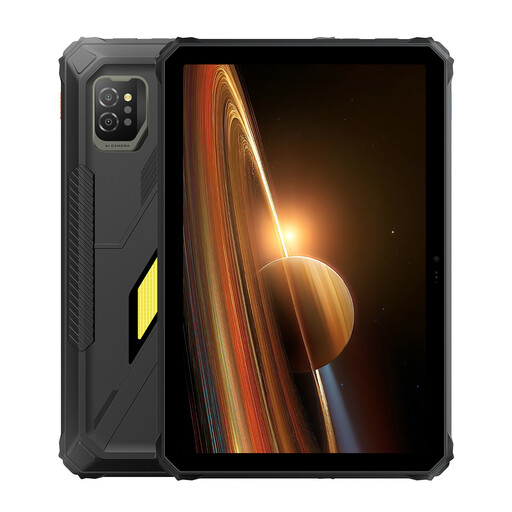
Blackview Active 7 Android tablet, 24 GB (8 + 16 GB) + 128 GB, 11-inch IPS

Blackview Active 7, 24 GB (8 + 16 GB) + 128 GB

The 11-inch IPS model mentioned here is worth comparing for viewing maps and documents; test it with your own map and project app.

The product name lists Android 15, 128 GB of storage and an 11-inch IPS screen.

Joybuy

Lenovo Tab, 128 GB, 10.1-inch, 4 GB, Wi-Fi 5, Android 14

Lenovo Tab 128 GB, 10.1-inch, 4 GB

The 10.1-inch model is an option to compare for documents and maps; check in advance that the required files open in the apps you choose.

The product name lists 128 GB of storage, a 10.1-inch screen, 4 GB and Android 14.

Joybuy

Lenovo Idea Tab Plus WiFi, 12.1-inch 2.5K, 8 GB RAM, 256 GB, with stylus

Lenovo Idea Tab Plus WiFi, 12.1-inch 2.5K, 8 GB/256 GB, with stylus

The larger screen size and included stylus mentioned here make this an option to consider for maps and annotations; test the apps and project files you need.

The product name lists 12.1 inches, 2.5K, 8 GB RAM, 256 GB and a stylus.

Joybuy

Lenovo Tab K11 Gen 2, 11-inch 2.5K Android tablet, MediaTek Dimensity 6300

Lenovo Tab K11 Gen 2, 11-inch 2.5K, ZAFS0069CZ

The 11-inch screen model mentioned here is an option to compare for maps and reports; check which files and apps your course requires.

The product name lists an Android tablet with MediaTek Dimensity 6300 and model number ZAFS0069CZ.

Joybuy

TECLAST T65, 13.4-inch, 120 Hz, Android 16, 128 GB

TECLAST T65, 13.4-inch, 120 Hz, 128 GB

The 13.4-inch screen mentioned here is an option to compare if you want a larger view of maps; test readability and portability for your needs.

The product name lists Android 16 and 128 GB of storage.

Joybuy

Frequently asked questions about tablets for local maps and GIS files

Can you keep using an online flood map without an internet connection?

Not automatically. According to Esri, a web map must be set up for offline use in ArcGIS Field Maps, and the relevant map area must be downloaded. Check your project map’s access and settings before going offline.

Can a tablet edit a local GIS project file?

It depends on the file format, the required app and the tasks in your assignment. Esri lists the Windows system requirements for ArcGIS Pro; being able to access a file through iPadOS or Android does not prove that you can edit the project there.

How do you transfer files from a USB stick to a tablet?

Apple Support explains how to access files through the Files app with a suitable connection and supported storage format. Google explains how to manage USB files with Files by Google on compatible Android devices. Also check that the app you need can open the copied file.

What can you do if your tablet does not work properly after you buy it?

For a faulty product, the seller must provide a suitable solution, according to the Dutch government. The Netherlands does not have one fixed statutory guarantee period for all products; what you can expect depends on the product and the circumstances. Many online purchases also come with a 14-day cooling-off period, subject to exceptions.

Which product rules apply to a new tablet in the Netherlands?

Electronic devices sold on the EU market must meet the applicable product safety requirements and carry CE marking, as explained by the Dutch government. According to the European Commission, EU rules for a common USB-C charging port have applied since 28 December 2024 to tablets within the defined scope, including devices with a rechargeable battery that can be charged via a cable. Compliance must be checked separately for each specific model.
