
Readers who hold their tablet
If you read long articles while lying down, compare the size and weight, including the case. Apple lists the Wi-Fi iPad mini as weighing 293 grams; this is a product specification, not a comfort test.


If you mainly read film reviews with links and colour images, start with a standard tablet: a compact model is easier to hold for longer, while a larger screen gives you more room for web pages. E-paper is an alternative if text is your priority, but first check that your favourite websites work well and that scrolling is smooth. There’s no proven evidence that a warmer screen setting protects your sleep.
If you read long articles while lying down, compare the size and weight, including the case. Apple lists the Wi-Fi iPad mini as weighing 293 grams; this is a product specification, not a comfort test.
You switch between reviews, links and film stills, and want to know whether a page remains easy to read at your preferred text size. Try a website you actually use, including its images and navigation.
You mainly read text and are weighing up screen settings, your reading habits and possibly e-paper against the convenience of a standard web browser. A browser on an e-reader may have limitations.
Choose this option: if you often hold your tablet while lying down and want to browse film websites, images and links directly.
Bear in mind: on a smaller screen, wide pages may require more frequent zooming or scrolling.
Choose this option: if you want to see film stills and wide pages at a larger size, and usually prop your tablet up.
Bear in mind: among the Apple models compared, the Wi-Fi 11-inch iPad (A16) weighs 477 grams, compared with 293 grams for the Wi-Fi iPad mini, according to Apple.
Choose this option: if you mainly read text and can access your favourite websites on the specific device.
Bear in mind: BOOX describes the Palma 2 as having a monochrome screen and a web mode for extensive scrolling; Kobo says browser features on certain e-readers are experimental.
| What to consider | What should you check? | Who is this important to? |
|---|---|---|
| Weight and grip | Compare the dimensions and stated weight of the exact model; also factor in how much the tablet weighs with its case. | If I read lying down and hold the tablet for a long time, I want to know how much it weighs in the set-up I’ll use. Around 29% of consumers say ease of holding is their top purchasing priority. |
| Websites and images | Open a film review website and test the text size, links, images and scrolling on the screen size you’re considering. | I want to read reviews with links and film stills without the navigation interrupting my reading. For around 29% of consumers, displaying websites is the top priority. |
| Evening reading and screen choice | Check the brightness and reading display settings, and decide whether you want to use a screen just before bed. | If I mainly read before bed, I weigh up my reading habits against using a backlit screen or e-paper. Around 24% of consumers give evening reading the highest priority. |
| Purchase and after-sales support | Check the connectivity, what’s in the box, the seller, and the return and warranty terms for the exact offer. | I want to choose the model I need and know in advance who to contact with questions or if there’s a fault. For around 18% of consumers, purchase costs and after-sales support are the top priorities. |
Kobo describes browser features on certain e-readers as experimental beta features. This matters if websites are your main reason for buying.
Before choosing, open the film review websites you actually read and check the links, images, text size and scrolling.
According to Apple, the Wi-Fi 11-inch iPad (A16) weighs 477 grams, while the 8.3-inch iPad mini weighs 293 grams. A case changes the weight you’ll be holding while you read.
Compare the weight of the complete model as you’ll use it, and try your usual reading position.
ACM ConsuWijzer explains that the statutory guarantee does not automatically end after a fixed period of two years. The manufacturer’s warranty and your statutory rights are not the same thing.
Keep your proof of purchase and contact the seller if something goes wrong.
The RIVM describes a link between frequent or prolonged evening use of backlit screens and disrupted sleep. This does not prove that a built-in blue-light filter prevents it.
Choose settings that make the screen easy to read, but also factor in how you use it just before bed.
The iPad mini and 11-inch iPad (A16) illustrate the trade-off between a compact tablet that’s easy to hold and a more spacious screen.
The Galaxy Tab A11 is a compact Android tablet to consider if you want to read websites.
The Tab One is a compact Android option, with versions that may differ in storage and connectivity.
The Palma 2 is a text-focused e-paper option to explore if you want to read film reviews on websites.
Kobo e-readers are an option for mainly text-based reading, but pay particular attention to the browser if websites are a priority.
These models are mainly larger LCD tablets, along with a few more compact tablets for reading and browsing. The right choice depends, among other things, on how much screen space you want and how you use the device.
 No image available
An 11-inch screen could suit you if you prefer to view articles and images on a larger display, or prop up your tablet.
11-inch LCD screen with a resolution of 1920 × 1200. The product description mentions browsing and colour.
The listed version is Twilight Blue and has LTE.
 No image available
The larger screen may suit you if you read with your tablet on a stand rather than holding it all the time.
The product information lists an 11-inch IPS screen, 2560 × 1600 pixels, 90 Hz, 500 nits and Android 15.
A Tab Pen is listed as included; according to the product description, a charger is not supplied.
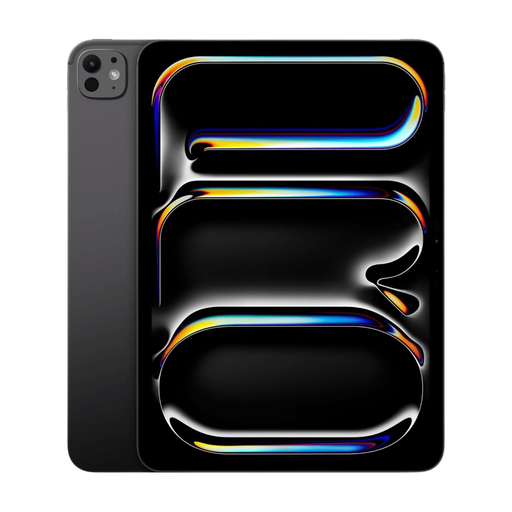 No image available
A 13-inch screen may suit you if you want to view articles and images at a larger size and usually prop up your tablet.
The product information lists a 13-inch OLED screen, Wi-Fi and 2 TB of storage.
 No image available
The more compact size may suit you if you read lying down and often hold your tablet.
8.7-inch IPS touchscreen with a resolution of 1340 × 800 pixels. The product description mentions web browsing and reading.
The listed version is Luna Grey.
 No image available
The compact screen may suit you for reading while lying down if you regularly hold your tablet.
The listed version has an 8.7-inch TFT screen with a resolution of 1340 × 800 pixels and a 90 Hz refresh rate.
The product name lists LTE and 64 GB of storage; check the exact version when choosing.
No. The RIVM describes a link between frequent or prolonged evening screen use and disrupted sleep, but says more research is needed into the effects of built-in blue-light filters. This does not guarantee anything about your sleep or a specific tablet model.
Place the charger somewhere with room for heat to escape, and don’t charge a device under a pillow or duvet. That’s the advice from the Fire Service; don’t use damaged cables either.
According to ACM ConsuWijzer, online purchases usually come with a cooling-off period of up to 14 days after the product has been delivered. Check the terms and any exceptions that apply to your purchase.
No. ACM ConsuWijzer explains that the statutory guarantee in the Netherlands depends on what you could reasonably expect from the product under normal use; the law does not set a fixed period. If there’s a fault, contact the seller.