For field observations without access to a power socket, the right choice depends largely on how you work. Long reports call for enough screen space and a suitable keyboard, while walking in rough conditions may make portability and protection more important. Battery capacity or a quoted video playback time won’t tell you how long your combination of recording, screen use and writing will last. If automatic Dutch transcription without internet access is essential, test the exact tablet, app and export process you plan to use beforehand; having a microphone or dictation feature doesn’t prove it will work.
Who is this relevant to?
Fieldwork without a charging point
You spend long sessions outdoors and want to avoid a flat battery interrupting your work. Don’t just look at battery specifications; consider how you can adapt your charging or spare-battery plan to the work you do. Samsung Newsroom Netherlands describes the Galaxy Tab Active5 Pro as having a replaceable battery.
Researcher taking voice notes
You want to work up your observations and need to distinguish between recording, dictating into a text field and automatically transcribing an existing recording. Language support varies by feature: Apple Support does not list Dutch for audio transcription in iPad Notes.
Writing up lengthy field reports
You work with a lot of text and need to weigh screen space against the carrying weight of a tablet and keyboard. Lenovo PSREF describes an 11-inch Idea Tab supplied with a pen; Microsoft Netherlands lists an optional keyboard for Surface Pro.
What to consider when choosing
First decide whether your main priority is working for longer, writing up Dutch-language notes, carrying your tablet around a lot or typing lengthy reports. Then check the specific model and apps that suit the way you work.
| Consideration |
What should you check? |
Who is this more important to? |
| Working without mains power |
Compare battery life using a suitable test method and look at charging options. If the battery is replaceable, check whether keeping a suitable spare battery fits into your routine. |
If I work outdoors for long periods, I don’t want my tasks to stop because I can’t recharge. Around 36% of consumers prioritise being able to work without mains power. |
| Working on Dutch notes offline |
Test your chosen recording, transcription and export process with your app and without an internet connection. Dictating into a text field is not the same as transcribing an existing recording. |
When I need to work up Dutch observations without internet access, I want to know in advance which steps actually work. Around 29% of consumers give language support and the transcription process top priority. |
| Protection and portability |
Check the protection rating for the exact model and assess the screen size and carrying weight for your location. The Consumers’ Association describes smaller tablets as handy for travelling and larger screens as less easy to carry around. |
If I carry my tablet around a lot and work in different locations, I want its size and protection to suit my circumstances. Around 21% of consumers rank protection and portability above other purchase concerns. |
| Editing lengthy reports |
Check whether the keyboard and pen are included with and compatible with the exact model. Also try your word-processing software and file-sharing process. |
When writing lengthy reports, I want to be able to review and edit text without constantly switching between sources and my document. Around 14% of consumers give extended writing tasks top priority. |
Common pitfalls
-
Assuming a microphone or dictation button means transcription is available
Dictating into a text field is different from automatically transcribing an existing recording. Apple Support does not list Dutch as a supported device language for audio transcription in Notes.
Test the complete recording, transcription and export process in Dutch and without internet access before relying on it.
-
Taking battery capacity or video playback hours as guaranteed working time
Battery capacity and quoted video playback time don’t measure how long your combination of screen use, recording and writing will last.
Try out your own apps and routine, and plan charging or spare-battery options around the sessions you want to complete.
-
Assuming a pen, keyboard and charger are always included
Lenovo lists a pen as included with the Idea Tab ZAFR1159SE, but not a keyboard or power adapter. Microsoft lists an optional keyboard for Surface Pro.
Check what’s included with the exact model or bundle and confirm compatibility before factoring accessories into your work plan.
Brands to consider
Samsung
The Galaxy Tab Active5 Pro is a rugged option to explore if you work in demanding outdoor conditions and a replaceable battery suits your routine.
- Samsung Newsroom Netherlands lists a 10.100 mAh battery that can be replaced without switching off the device.
- These are manufacturer specifications, not the result of an independent battery-life test or proof that your transcription app works offline.
Lenovo
The Idea Tab model ZAFR1159SE is worth considering if you’re looking for a mid-sized screen and a pen for handwritten notes.
- Lenovo PSREF lists an 11-inch screen, 256 GB storage, an included pen and IP52 for this model.
- Lenovo PSREF does not list a keyboard as included. Check the exact model, as bundles and storage options vary.
Apple
The iPad mini is worth considering if having a compact device while walking matters more than having plenty of screen space for text and source material.
- Apple Netherlands describes the current iPad mini as having an 8.5-inch screen.
- Apple Support does not list Dutch among the device languages for audio transcription in Notes. This doesn’t tell you what other apps support.
Microsoft
Surface Pro is a Windows option if you want to use existing Windows software and are considering an optional keyboard.
- Microsoft Netherlands quotes up to 15,5 hours of video playback for the Surface Pro 12th Edition shown.
- That figure doesn’t predict how long transcription work will take. The keyboard is optional, so check the configuration and accessory compatibility.
Joybuy products
These product choices are relevant to field notes taken without access to a power socket, with a focus on rugged tablets, portability and space to work up your notes. Check separately that the apps and features you need work offline.
 No image available
Blackview Active 8 Pro, 256 GB
Suited to fieldwork where you want to take a rugged tablet with a high-capacity battery.
The product title lists 16 GB RAM (8 GB + 8 GB), 256 GB storage, a 22.000 mAh battery and a 10,36-inch HD screen.
Joybuy
 No image available
Blackview Active 5, 128 GB
Suited to field notes in changing conditions if you’re considering a more compact tablet.
The product title lists 22 GB RAM (6 GB + 18 GB virtual), 128 GB storage, an 8,68-inch 90 Hz IPS screen, a 6.600 mAh battery and Android 15.
Joybuy
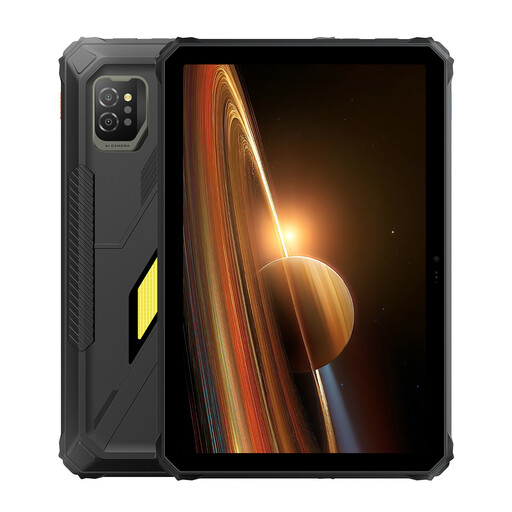 No image available
Blackview Active 7, 128 GB
Suited to fieldwork where you want a rugged tablet with a larger screen for notes.
The product title lists 24 GB RAM (8 GB + 16 GB), 128 GB storage, an 11-inch IPS screen, a 10.000 mAh battery and Android 15.
Joybuy
 No image available
TECLAST ArtPad Pro, 256 GB
Suited to working up field notes on a larger screen and making annotations with a pen.
The product title lists a 12,7-inch 2K screen, T-Pen compatibility, Helio G99, 20 GB RAM (8 GB + 12 GB virtual), 256 GB storage and a 10.000 mAh battery.
Joybuy
 No image available
iFLYTEK AINOTE Air 2
Suited to handwritten notes on a compact device with an E Ink screen and stylus.
The product title lists an 8,2-inch screen. Check the language you need and offline functionality separately before relying on speech-to-text.
Joybuy
Frequently asked questions
Can every tablet automatically transcribe my Dutch-language audio recordings?
No. The presence of a microphone doesn’t guarantee this. Apple Support does not list Dutch among the supported device languages for audio transcription in iPad Notes. Google describes voice typing in a text field with Gboard; that is not the same as transcribing an existing recording. Test the exact app, language and process before relying on it.
How do I prepare a tablet for a day without access to a power socket or the internet?
Charge the tablet and any suitable spare batteries in advance, save the files you need locally and test your chosen apps without an internet connection. Samsung Newsroom Netherlands describes battery replacement for the Galaxy Tab Active5 Pro, but that specification doesn’t predict how long your tasks will take.
Do I need to arrange a keyboard or charger separately, and who should I contact about a fault?
It depends on the exact model: Lenovo lists a pen for the Idea Tab ZAFR1159SE, but not a keyboard or power adapter; Microsoft lists an optional Surface keyboard. In the Netherlands, the retailer must provide a solution if a consumer product is faulty. The Government of the Netherlands states that there is no fixed statutory two-year guarantee for all products.
Can I record and transcribe conversations with identifiable people during fieldwork?
It depends on the purpose and how you use the recording. According to the Dutch Data Protection Authority, collecting and using personal data requires a lawful basis under the GDPR; consent is one possible basis, but it is not automatically the only one. The exception for personal or household use does not necessarily apply to professional field research. Before recording, establish which rules apply to your situation.


