
Writer of detailed field notes
You want to add and edit plenty of text during your journey. So look at the available screen space and the keyboard input that suits the way you work.


Choose based on the way you work most: for long texts, a practical screen area and a suitable keyboard matter most, while size and a pen take priority for short handwritten notes. Automatic transcription should only be a deciding factor if the language, the feature on the exact model and offline use without train Wi-Fi all meet your needs. A microphone alone does not guarantee a usable transcript.
You want to add and edit plenty of text during your journey. So look at the available screen space and the keyboard input that suits the way you work.
You want to turn audio into text that you can check later. Check the language, the software capabilities on the exact model and whether you can work without an internet connection.
You make short notes in different seats and prefer a manageable device or handwriting to a large work area.
Choose this approach: if you want to write up and edit detailed observations during your journey.
Bear in mind: a keyboard is not necessarily included; check compatibility and the layout of the complete set-up.
Choose this approach: if you mainly want to add short observations and prefer using a pen to typing.
Bear in mind: pen support does not automatically mean that a pen is included with the tablet.
Choose this approach: if you want to record observations and check the text afterwards.
Bear in mind: the language, model and software can affect which features are available. Also check whether you can work without an internet connection.
| What to consider | What should you check? | Who should give this more weight? |
|---|---|---|
| Typing long texts | Check the screen space, keyboard compatibility and the layout of the complete set-up. | If you want to edit long field notes during your journey, a comfortable typing solution is a priority; around 29% of consumers put text editing first. |
| Working offline | Try the whole process offline: save a recording, open the file, set the language, transcribe it and find the text again. NS says free Wi-Fi is available on almost all Intercity trains, but not every train. | If you want to access your notes and recordings even without train Wi-Fi, offline access is important; around 23% of consumers prioritise working offline. |
| Ease of handling | Compare the size and weight of the complete set-up, including any case, pen or keyboard. Apple lists the Wi-Fi version of the iPad mini A17 Pro as weighing 293 grams; this is a model specification. | If you make short notes in different seats, you’ll want a tablet that’s easy to handle; around 18% of consumers put portability first. |
| Handling recordings | Decide in advance who might be identifiable, where the file will be stored and who can share it. The Dutch Data Protection Authority considers identifiable audio recordings to be personal data. | If recordings may contain identifiable voices, you’ll want to take care when storing and sharing them; around 18% of consumers put confidentiality first. |
| Complete set-up | For the exact model, check what’s included, which accessories are compatible and what terms apply to any transcription software. | If you want to use the tablet with the input options you need, the complete set-up matters more than the device alone; around 12% of consumers focus mainly on their overall purchase needs. |
Recording audio, dictating and automatically transcribing a saved recording are different features. Availability can depend on the language, model and software.
Test the whole process with a Dutch-language sample of your own, including without an internet connection.
Support for a pen or keyboard does not mean that the accessory is included. The terms for a transcription service are also separate from the hardware.
Check what’s in the box and whether the accessories are compatible with the exact model you want to use.
A suitable pen, keyboard, case or software service may be part of the complete set-up.
Screen type, storage and the included pen can vary by product number. A glossy version is not automatically the same as a model with a matte screen.
Check the full model number and what’s in the box before choosing a version.
Worth considering if you’re looking for a compact iPad for handwritten notes, or a larger work area with a keyboard solution chosen separately.
The Galaxy Tab S10 FE could be worth considering if you want to combine handwritten notes with the Galaxy AI workflow described by Samsung.
The Idea Tab Pro Matte ZAE40105SE is worth considering if a larger work area matters more to you than having the most compact tablet possible.
The Pad 7 offers an 11,2-inch screen as an alternative for reading and editing text by hand.
This product selection focuses on typing, handwritten notes, and reading or editing field material. Check what input accessories are actually included with each version.
 Image unavailable
The larger screen could be useful for reading and editing text alongside field material.
The product title lists a 12,7-inch 3K screen, 144 Hz, MDT 8300, 8 GB RAM, 256 GB and Wi-Fi 6E.
 Image unavailable
The listed pen makes this version a good option if you want to write by hand as well as read.
The product title lists a 12,1-inch 2.5K screen, 8 GB RAM, 256 GB and an included pen.
 Image unavailable
The included stylus could be useful for making handwritten notes on screen.
The product title lists a 12,7-inch 2K screen, 8 GB RAM plus 12 GB of virtual expansion and 256 GB of storage.
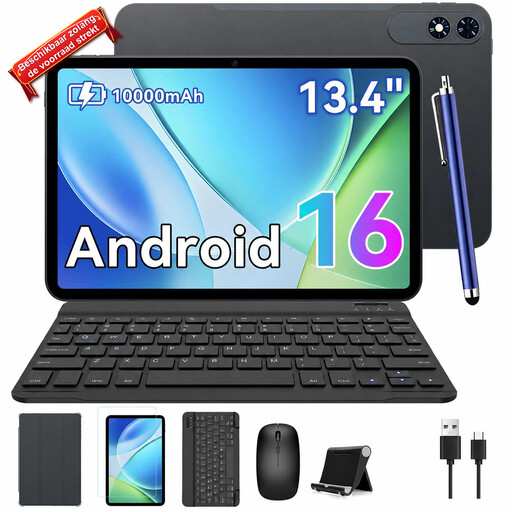 Image unavailable
The product title mentions a keyboard in the bundle, which could be useful if you want to type and edit on the go.
The title lists a 13,4-inch screen, Android 16, 24 GB RAM (8 GB + 16 GB) and 256 GB of storage. The stated bundle also includes a mouse and case.
 Image unavailable
The bundle lists both a keyboard and a stylus for typing and handwritten notes.
The product title lists a 10,1-inch screen and 64 GB of storage. The Bluetooth keyboard is described as English; check whether the layout suits you.
No. NS says free Wi-Fi is available on almost all Intercity trains, but not every train. So test whether your recording and write-up process still works when there’s no connection.
No, a recorder feature doesn’t prove that. Samsung lists the Galaxy Tab S10 FE among Galaxy AI devices, but says features may vary by model and region. Check the feature, language and offline use on the exact device; Apple’s information about Voice Memos on iPhones does not confirm this for an iPad either.
Keep the original recording, replay unclear passages and correct names and technical terms before using the text. Microsoft describes replaying audio by timestamp and editing a Word transcript; check the service’s terms and availability separately.
For a consumer purchase in the Netherlands, the seller must put right a product that, under normal use, fails to meet what you could reasonably expect under the statutory guarantee, at no cost to you. A stated manufacturer’s warranty period does not automatically limit this right; ACM ConsuWijzer explains this.
It depends on the purpose, the people involved and how the recording is used. The Dutch Data Protection Authority considers identifiable audio recordings to be personal data; if the GDPR applies to the processing, you need a valid legal basis. Consider the specific circumstances before recording or sharing.
Not if doing so disturbs the quiet. NS house rules ask passengers to keep quiet in quiet carriages and not to disturb fellow travellers with loud conversations elsewhere either. Use silent input there.