For field notes you’ll be looking at together around a table, a larger screen can be useful. The Dutch Consumers’ Association notes that extra-large tablets are less practical if you need to carry them around often. Choose the right balance between a shared reading area and portability, and check that your documents and apps work, which pen comes with the model, and which files need to be available offline. A digital notebook may suit you if your main task is reading and annotating PDFs, but not if you need full Android or iPad apps.
Who is this tablet guide for?
Looking at maps and notes together
You lay the tablet on the table so colleagues can read larger maps and note pages at the same time, making screen space more important than compactness. The Dutch Consumers’ Association describes extra-large tablets as less practical to carry around often.
Annotating field notes
You want to add to existing documents with a pen, so check that the pen works with the model and is included in the bundle you choose. Samsung, Apple and reMarkable describe pen features for their own devices.
Moving between the table and the field
You’re weighing up reading space against size and weight. If you’ll also use the tablet in wet conditions, check the protection offered by the exact model; Samsung positions the Tab Active5 Pro separately for demanding working environments.
What should you look for in a tablet for field notes?
Start with the documents and apps you need. Then compare your preferred screen size with how often you’ll carry the tablet, and check what’s included with the pen and whether you can access files offline.
| What to consider |
What to look for when buying |
Who is this important for? |
| Screen space for shared reading |
Compare screen sizes and view a representative map or PDF from the distance you expect to use it. |
If you want to read details on maps or note pages with colleagues at the same time, prioritise a shared reading area. Around 36% of consumers put screen space for shared reading first. |
| Annotating with a pen |
Check pen compatibility and what’s included in the bundle; test your own PDF and note-taking app. |
If you want to add comments directly to field notes, check that your pen and document app work together. Around 29% of consumers say pen annotation is their main purchasing need. |
| Portability and moisture |
Compare size and weight. For wet fieldwork, check the protection and terms of use for the exact model. |
If you regularly carry the tablet between the table and the field, or may encounter moisture, take portability and model-specific protection into account. Around 21% of consumers prioritise portability or protection in the field. |
| Managing files and data |
Test the apps and files you need, including offline access; restrict access to personal data on a shared device. |
If you need field files without a network connection or want to protect data on a shared tablet, check the file workflow and access settings in advance. Around 14% of consumers say file and data management is their main purchasing concern. |
Common pitfalls when choosing a tablet
-
Assuming pen support means the pen is included
Pen support doesn’t automatically tell you what’s in the box. Samsung lists an S Pen with the Tab S10 FE and FE+, while Apple names compatible Apple Pencil models for the iPad (A16).
For the exact version, check both pen compatibility and what’s included in the bundle. Apple also lists an adapter for pairing and charging the Apple Pencil (1st generation).
You may need to buy a compatible pen or adapter separately, so check before comparing models.
-
Assuming a larger screen is automatically better for fieldwork
Extra screen space is helpful for reading together at a table, but the Dutch Consumers’ Association says larger tablets are less practical if you carry them around often.
Choose based on where you’ll use the tablet most, and view your own map or PDF on the size you’re considering.
-
Assuming one model’s ruggedness claims apply to other tablets
Samsung positions the Tab Active5 Pro for demanding working environments. That doesn’t confirm that the Galaxy Tab S10 FE or other models offer the same protection.
If you’ll use the tablet in wet conditions, check the protection and terms for the exact version. Don’t assume that a protection claim rules out damage in all circumstances.
Relevant brands to consider
Samsung
The Galaxy Tab S10 FE and FE+ offer smaller and larger screen sizes for this mix of table-based and field note-taking.
- Samsung lists screen sizes of 10.9 inches for the Tab S10 FE and 13.1 inches for the FE+, and an S Pen included with both models.
- The Tab Active5 Pro is a separate model. Claims about its working environment don’t automatically apply to the FE models.
Lenovo
The Idea Tab Pro is an Android option with a large screen for reading at the table.
- Lenovo specifies a 12.7-inch screen for the Idea Tab Pro.
- Check whether the pen you need is included with the exact version.
Apple
The 11-inch iPad (A16) may suit you if the apps you need work on iPadOS and this screen size fits the way you’ll use it.
- Apple lists support for Apple Pencil (USB-C) and Apple Pencil (1st generation).
- Pen support doesn’t mean the pen is included. Also check which adapter you need for the Apple Pencil (1st generation).
reMarkable
The Paper Pro is a specialist digital notebook for reading and annotating, not a general-purpose Android or iPad tablet.
- reMarkable describes an 11.8-inch colour display and support for importing PDFs.
- The device uses its own operating system. Check that its file workflow, the apps you need and any cloud terms suit the way you work.
Tablets for shared field notes on Joybuy
These Joybuy products are large Android tablets for looking at maps and field notes together. For models with a pen, the details below specify what’s included in the bundle.
 No image available
Lenovo Idea Tab Pro TB373FU
Well suited to looking at and annotating maps together; the product description says a Tab Pen Plus is included.
12.7-inch 3K screen, 144 Hz, 8 GB RAM, 256 GB storage and Wi-Fi 6E.
The listed configuration is Luna Grey.
View on Joybuy
 No image available
Lenovo Idea Tab Plus WiFi 12.1-inch with Pen
A large screen for reading together, with a Lenovo Pen that the product description says is included.
12.1-inch 2.5K screen, 8 GB RAM and 256 GB storage.
The listed version is Rose.
View on Joybuy
 No image available
TECLAST T65 Tablet
The 13.4-inch screen is well suited to looking at maps and note pages together.
13.4-inch screen, 120 Hz and Android 16.
The product title lists a folio case and Dual SIM 4G plus Wi-Fi 5G.
View on Joybuy
 No image available
TECLAST ArtPad Pro 12.7-inch 2K
May suit shared reading and pen annotations; the product title says a stylus is included.
12.7-inch 2K screen, 256 GB storage and 20 GB RAM, listed as 8 GB + 12 GB virtual memory.
View on Joybuy
 No image available
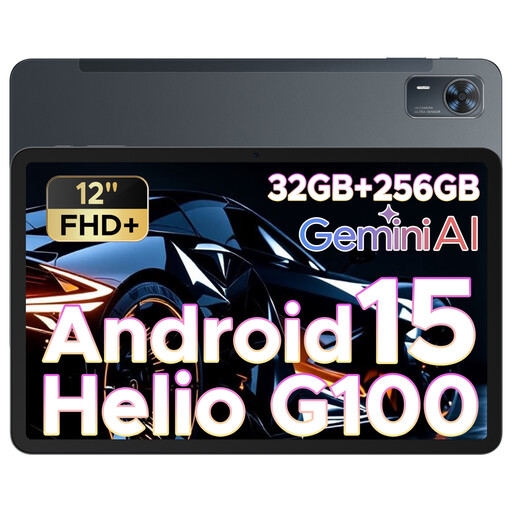
DOOGEE Tab E3+ 12-inch
The 12-inch screen is one size to consider for reading together.
12-inch FHD+ screen, 90 Hz and Android 15.
The product title lists a SIM card slot.
View on Joybuy
Frequently asked questions
Should you choose an extra-large screen for field notes?
Not necessarily. According to the Dutch Consumers’ Association, a larger screen gives you more room for detailed pages, but an extra-large tablet is less practical if you carry it around regularly. View your own map or PDF from the distance your tablemates will need to read it.
How do you set up a shared tablet for field notes?
Test in advance that the documents and apps you need work. If files contain photos, names or locations of people, the Dutch Data Protection Authority recommends measures including a passcode, carefully chosen app permissions and up-to-date software. This advice doesn’t mean that all ecological field notes fall under the GDPR.
Who can help if a product develops a fault after a consumer purchase in the Netherlands?
According to the Dutch government, you should contact the retailer about your statutory guarantee. The Netherlands doesn’t have a fixed statutory guarantee period of two years; what you can expect depends, among other things, on the product and the information provided. Check the terms separately if you’re buying for business use.
Do privacy rules apply if field notes include identifiable people?
That depends on the content and how it’s used. The Dutch Data Protection Authority states that identifiable people in photos count as personal data, and that taking or publishing such images professionally may fall under the GDPR. It describes an exception for strictly personal or household use. The choice of tablet doesn’t in itself determine the legal status.


