
Reader of archive scans
You open records and other historical documents and want to see the details on screen. The CBG provides access to online genealogy collections, and the screen space available varies between tablet sizes.


When researching your family tree on the train, first decide whether you’d prefer more space for scans or a more compact tablet that’s easier to hold. Apple lists the Wi-Fi iPad mini as having an 8.3-inch screen and weighing 293 grams, compared with 11 inches and 477 grams for the Wi-Fi iPad (A16). A Wi-Fi tablet may be enough if the train’s Wi-Fi, a mobile phone hotspot or files saved for offline access meet your needs. If you want to look up new online sources while travelling without those options, check the mobile data version, its plan and coverage along your route.
You open records and other historical documents and want to see the details on screen. The CBG provides access to online genealogy collections, and the screen space available varies between tablet sizes.
You want to look up new sources during your journey, so you’ll need to think about your connection. NS says Wi-Fi is available on almost all Intercity trains, but not every train.
You save documents and make notes so you can find your sources again later. Check the storage capacity and stylus options for each version.
| What to consider | What should you check? | Who is this important for? |
|---|---|---|
| Reading archive scans | Try a scan you actually use on the screen size you’re considering. Apple lists the Wi-Fi iPad mini as having an 8.3-inch screen and the Wi-Fi iPad (A16) an 11-inch screen; screen size alone doesn’t determine how easy your source will be to read. | If I want to view the details of records on screen, I look for enough room to display my documents. Around 33% of consumers say scan readability is their top priority. |
| Looking up new sources online | Decide whether train Wi-Fi or a mobile phone hotspot will be enough, or whether you need mobile internet of your own. NS says Wi-Fi is available on almost all Intercity trains; Xiaomi notes that actual 4G use also depends on the local provider. | If I want to look up new online sources during my journey, I don’t want to rely on train Wi-Fi or a hotspot being available. Around 27% of consumers prioritise having their own connection. |
| Portability | Compare the dimensions and weight of the exact version, and try reading your own documents on it. Apple lists the Wi-Fi iPad mini at 293 grams and the Wi-Fi iPad (A16) at 477 grams. | If I often hold my tablet on the train, I want it to be easy to carry, even if that means having less screen space. Around 20% of consumers say portability is their top priority. |
| Saving and annotating documents | Check the storage version, whether storage can be expanded, stylus compatibility and what’s included in the offer. Apple offers the iPad (A16) with different storage capacities; Samsung lists expandable storage and S Pen use for the Galaxy Tab S10 Lite. | If I want to save documents and find my research again later, I want to choose storage and note-taking options that suit the way I work. Around 20% of consumers prioritise saving and annotating. |
A Wi-Fi tablet needs a working connection to look up new online sources while travelling. NS says Wi-Fi is available on almost all Intercity trains, but not all trains.
Decide in advance whether a hotspot or files saved for offline access will be enough, or whether you need a tablet with mobile data.
A mobile data version requires a suitable plan; using a hotspot draws on your phone’s data allowance.
More screen space can be useful for scans, but a larger device is less compact to hold. Apple lists the Wi-Fi iPad mini as lighter than the Wi-Fi iPad (A16).
View a typical record on the sizes you’re considering, and think about how you’ll want to hold the tablet during your journey.
Apple lists support for specific Pencil models for the iPad (A16), but compatibility doesn’t mean a stylus is included with every offer.
Check stylus compatibility and what’s in the box for the exact version you’re considering.
A compatible stylus may be an additional purchase.
ACM ConsuWijzer distinguishes between commercial warranties and statutory guarantees. With normal use, a product must do what you could reasonably expect it to do.
Check what any additional cover includes and keep your proof of purchase.
Paid additional cover may be unnecessary if it doesn’t offer relevant extra protection.
The iPad range includes the compact iPad mini and larger iPad models, with Wi-Fi and mobile data versions to help you balance portability and screen space.
The Galaxy Tab S10 Lite is an Android option with a screen of around 11 inches for viewing documents and taking notes.
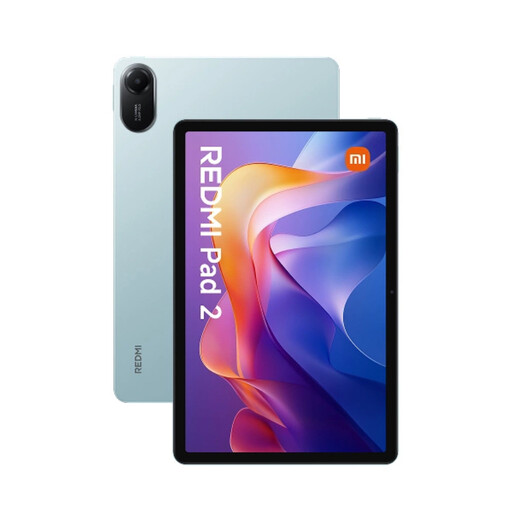
The Redmi Pad 2 range includes a Wi-Fi tablet and a separate 4G version for those who want to use mobile internet while travelling.
These tablets are suited to viewing scans and taking or saving notes: mostly larger Wi-Fi models, plus one 4G version.
 No image available
A larger Wi-Fi tablet for viewing scans and taking notes; the product name lists a Tab Pen Pro as included.
11.1-inch 3.2K screen, 256 GB storage and Wi-Fi 7.
Snapdragon 8 Gen 3, 12 GB LPDDR5X and Android 15.
 No image available
A Wi-Fi version for viewing and saving documents; decide in advance how you’ll access online sources while travelling.
11-inch screen with a resolution of 2560 × 1600 pixels.
128 GB storage, expandable with microSD.
 No image available
A larger Wi-Fi tablet for viewing scans and saving documents; get online using available Wi-Fi or a hotspot.
11-inch screen and 128 GB storage.
Storage expandable via microSD up to 2 TB.
 No image available
A version with mobile connectivity for looking up online sources while travelling; check that the provider and coverage suit your route.
11-inch screen, 128 GB storage and 4G LTE with dual SIM.
6 GB RAM plus 26 GB virtual RAM.
 No image available
A larger Wi-Fi tablet for viewing documents; check that available Wi-Fi or files saved for offline access suit the way you travel.
11-inch IPS screen and 128 GB storage.
3 GB RAM plus 13 GB virtual RAM, 5 GHz Wi-Fi and an 8000 mAh battery.
No. NS says free Wi-Fi is available on almost all Intercity trains. Look for the Wi-Fi logo to identify a train with Wi-Fi. Save any files you need locally in advance, or arrange another connection if you want to look up online sources during your journey.
Decide in advance which CBG online sources you want to consult, and check that any documents you’ll need without an internet connection are available locally. Organise your notes so you can find your sources again later; whether a particular scan can be saved locally depends on the service.
No. ACM ConsuWijzer distinguishes between any manufacturer’s or seller’s warranty and your statutory rights. With normal use, the product must do what you could reasonably expect it to do; a fixed two-year period doesn’t fully describe those rights.
Not without considering the rules. The Dutch Data Protection Authority says that, in most cases, you need consent to publish someone else’s personal data online. The exception for personal or household use applies under certain conditions, including visibility being limited to a small group; a publicly searchable family tree doesn’t automatically qualify.
For online consumer purchases, ACM ConsuWijzer says you generally have a statutory cooling-off period of up to 14 days after delivery, with some exceptions. Before buying, check the return conditions and the rules on using the product during the cooling-off period.