
Readers of historic newspapers and scans
You’re looking for family notices and background in digitised sources, and want to view and enlarge pages. The KB describes Delpher as a database of historic newspapers, books and magazines.


For family history research in the library, a tablet of around 11 inches is a sensible starting point if you want to read digital newspapers and documents on one portable screen. Check readability using a similar page. Choose a model with a pen if you take handwritten notes, and check exactly what comes in the box. If you move between locations often, weight matters too, while Wi-Fi availability and rules on photography vary from place to place.
You’re looking for family notices and background in digitised sources, and want to view and enlarge pages. The KB describes Delpher as a database of historic newspapers, books and magazines.
You make a note of names, dates and references as you read, and want to know in advance whether a suitable pen comes with the model you choose.
You often take your tablet with you, so you need to balance screen space against size and weight. The National Archives has rules for photographing documents, which may differ from those at other research locations.
Start with a digital page similar to the sources you use. Then decide whether note-taking, portability, access to online sources or the accessories you need matter most to you.
| What to consider | What to look for | Who should give this extra thought? |
|---|---|---|
| Scan readability | View a similar digitised page on the screen and try zooming in. Screen size alone doesn’t tell you whether small text will be comfortable to read. | If I want to enlarge old newspapers and archive scans, the text needs to be easy to make out on screen. Around 28% of consumers put readability first. |
| Taking notes | Check pen compatibility and what’s included in the box for the exact model. Samsung Netherlands lists an S Pen in the box with the Galaxy Tab S10 FE; information about the pen included with the Lenovo model mentioned is conflicting. | If you want to write down names, dates and source references by hand as you read, pay particular attention to the pen. Around 22% of consumers give note-taking top priority. |
| Portability | Compare the weight of the exact model and, if possible, try holding the tablet with its case on. | If I take my tablet between libraries, I want plenty of screen space without an awkward device. Around 17% of consumers put portability first. |
| Digital sources and files | Check whether Wi-Fi is available and how you can take files away with you. The KB describes Delpher as an online database; the National Archives saves scans from its book scanner to your own USB stick. | If you want to consult online sources and keep files, check the location’s connection and procedures in advance. Around 17% of consumers put access to sources first. |
| Accessories and storage | Check which pen, keyboard or other accessories you need for the model, and whether expandable storage requires a separate memory card. | If I only want to take features I’ll actually use, I check the bundle and storage options before choosing. Around 16% of consumers put the accessories and storage they need first. |
Compatibility and box contents aren’t the same thing. The title of the Lenovo model mentioned lists a pen bundle, while the product information also describes the pen as optional.
Check the full model number and confirm exactly what’s included in that particular box.
You may need to buy a pen separately or choose a different bundle.
More screen space can be useful for scans, but a larger device is less convenient to take between locations. The Consumers’ Association notes that tablets measuring 12 to 14 inches are less portable.
View a source page and hold the tablet as you would in the library; compare the weight of the exact model.
At the National Archives, you can take photos or scans of public archive documents yourself, but not of documents with restricted access. The book scanner saves images to your own USB stick.
Check the location’s rules, whether the material is publicly accessible and how you can take files away with you.
According to the Dutch government, there is no fixed statutory warranty period in the Netherlands. A commercial warranty period therefore doesn’t, by itself, determine how long you can expect a product to be fit for purpose.
Keep your purchase and product information, and contact the seller if something goes wrong.
The iPad (A16) is an option around 11 inches for anyone who wants to read documents on iPadOS and may want to use a compatible Pencil.
The Galaxy Tab S10 FE range includes a 10.9-inch model and a larger FE+ version. Your choice will depend in part on how you balance screen space, portability and pen use.
The Idea Tab model ZAFR0405SE is an 11-inch Android option for anyone weighing up screen space and pen input.
The Redmi Pad 2 is an Android option around 11 inches for reading and saving digital sources.
These Joybuy products are tablets for reading digital sources and taking notes or files with you.
 No image available
The included Tab Pen Pro is ideal if you want to make handwritten notes as you read.
11.1-inch 3.2K touchscreen; 12 GB RAM; 256 GB storage; Tab Pen Pro included.
 No image available
The LTE version is worth considering if you want to use mobile internet when Wi-Fi isn’t available.
6 GB RAM; 128 GB storage; LTE; colour: Twilight Blue.
 No image available
The 11-inch screen is a good fit if you want to view digital documents on a portable tablet.
256 GB storage; Wi-Fi; colour: Space Grey.
 No image available
The listed 4G LTE connection may be useful if you want mobile internet access while you’re out and about.
11-inch IPS screen; 128 GB storage; 4G LTE; 32 GB RAM (6 GB + 26 GB virtual); dual SIM.
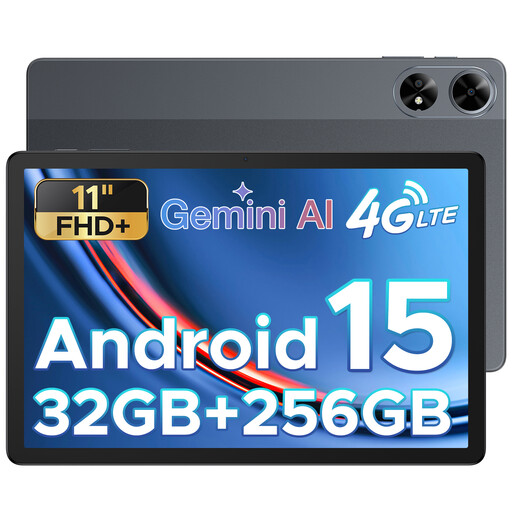 No image available
The SIM card slot is handy if you need mobile connectivity.
11-inch FHD+ screen; 32 GB RAM; 256 GB storage; SIM card slot.
In the National Archives reading room, you can take photos or scans of public archive documents yourself, but not of documents with restricted access. This isn’t blanket permission for every library or archive, so check the rules at the location you’re visiting.
The book scanner in the National Archives reading room saves images to your own USB stick. Direct transfer to a particular tablet isn’t guaranteed, so you may need to plan another way to transfer files.
Not necessarily. Delpher from the KB is an online source, but you’ll need to check the connection at your research location. A model with mobile connectivity may be useful if you don’t want to rely on Wi-Fi; you can view files saved in advance offline.
There is no fixed statutory warranty period in the Netherlands. You’re entitled to a product that is fit for purpose; what’s reasonable when something goes wrong depends, among other things, on the problem and what you could reasonably expect from the product. The seller is your point of contact.
Don’t assume you can publish this information just because you found it while researching your family history. According to the Dutch Data Protection Authority, information about other people can in principle only be published online with their permission; consider each case individually.