What should you look for when choosing?
First decide whether you’ll mainly be updating documents, managing participant details or needing to stay online during the event. Then choose the size, accessories and network version.
| What to consider |
What should you check? |
Who is this important for? |
| Event schedule and communication |
Test the apps and file formats you need. Check that a keyboard works with the exact tablet version and is included. |
If I’m updating the event schedule and messages at a table, I want to be able to read documents and type efficiently. Around 31% of consumers prioritise event schedules and communication. |
| Registration and privacy |
Decide what data you need, who will have access and the legal basis for processing it. Ensure access is secured appropriately for the processing involved. |
When I manage registrations or contact details, I want to know in advance who can open the list and how the data will be used. Around 25% of consumers prioritise registration and privacy. |
| Staying online |
Ask what Wi-Fi and sign-in process the hotel provides. If you’re considering a mobile version, check the exact variant and the service you’ll need. |
If my event schedule or registration app needs to be online, I want to know whether I’ll have a connection at the venue. Reliable connectivity is the top priority for around 19% of consumers. |
| Complete work set-up |
Compare the contents of the exact package with the accessories you need, and check that it has the right storage capacity. |
I don’t want to buy an accessory I don’t need, but I also don’t want to find that a stylus or keyboard I need for the task is missing. Around 13% of consumers prioritise the total cost of their work set-up. |
| Portability and notes |
Consider the size and weight for the way you’ll use it. Check that the stylus you want works with that exact version and is included. |
If I’m moving between tasks and want to jot something down quickly, ease of carrying matters more than maximum screen space. Around 12% of consumers prioritise portability and quick note-taking. |
Joybuy products
These options are aimed at event schedules, documents and note-taking. They vary in size, accessories and network connectivity. For each model, check that the listed features, accessories and connectivity suit the way you work.
 No image available
Lenovo Yoga Tab ZAG60028PL 11.1" 3.2K 144Hz, 8 GB RAM, 256 GB, Luna Grey, with Tab Pen Pro
An option for taking notes and viewing documents on your tablet.
The product title lists an 11.1-inch screen, 256 GB storage, Wi-Fi 7, Android 15 and a Tab Pen Pro.
View at Joybuy
 No image available
Lenovo Tab K11 Gen 2 11" 2.5K, ZAFS0069CZ
An option for viewing documents at a table. Check that the apps you need for the event work on this tablet.
The product title lists an 11-inch Android tablet with a 2.5K screen and MediaTek Dimensity 6300.
View at Joybuy
 No image available
Blackview MEGA 12 5G, 12.2", 36 GB (12 + 24 GB) + 256 GB, black
A larger tablet with mobile connectivity to consider if you need to work online away from the hotel’s Wi-Fi.
The product title lists 5G, a 12.2-inch screen and 36 GB (12 + 24 GB) plus 256 GB storage.
View at Joybuy
 No image available
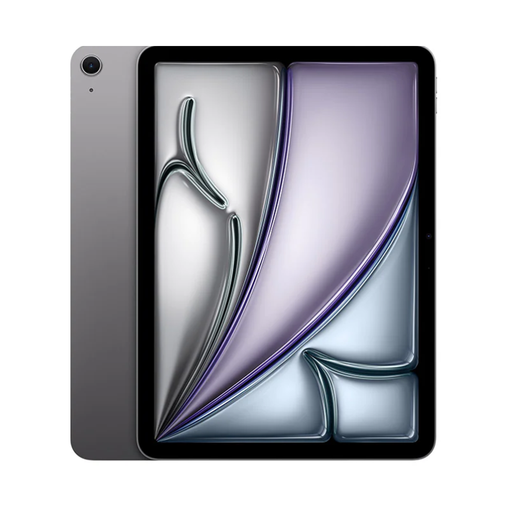
Apple 11-inch iPad Air (M4) Wi-Fi, 256 GB, Space Grey
A Wi-Fi version to consider if you use your planning tools over Wi-Fi and want to add accessories for note-taking or typing.
This is the Wi-Fi version; mobile data isn’t listed as a connectivity option. Check the compatibility and contents of the accessories you choose.
View at Joybuy
 No image available
Lenovo Idea Tab Plus Wi-Fi, 12.1", 2.5K, 8 GB RAM, 256 GB, Rose, with stylus
A larger version for documents and note-taking. The product information lists a stylus with this variant.
The folio keyboard is sold separately. Check whether you need this extra accessory for your event schedule work.
View at Joybuy
Frequently asked questions
Can I work using only the hotel’s Wi-Fi?
That depends on the hotel network and the apps you use. Check in advance that you can connect and that essential event schedule information is also available offline. Not every tablet version has mobile internet.
How do I set up the tablet for several organisers?
Test the apps and documents you need in advance, and set up appropriate access. If they contain personal data, secure access in a way that reflects the processing involved and the privacy risks. The Dutch Data Protection Authority describes security as something that should be tailored to the situation.
Can I store visitors’ contact details on the tablet or share a participant list?
If an organisation processes personal data, it needs a valid legal basis under the GDPR, and the data must be protected appropriately. When sharing a participant list, the Dutch Data Protection Authority advises asking visitors in advance which contact details they’re happy to share. Whether a particular approach is lawful depends on its purpose, legal basis and set-up.
Can I photograph visitors with the tablet and publish the images?
Attending an event does not, by itself, amount to general consent for identifiable photographs or their publication. The Dutch Data Protection Authority explains the requirements for consent and information, and notes that another legal basis may be possible in certain situations. Assess the specific photographs and publication separately.
Do I need to buy an extended warranty?
No. You don’t need to pay for an extended warranty to have a legal guarantee when buying as a consumer in the Netherlands. According to ACM ConsuWijzer, the seller may be responsible if a product doesn’t perform as you could reasonably expect under normal use. Consider separately whether additional insurance offers any benefit.


