
Schedule reader
You want to view and read through an event programme or detailed PDF in your hotel room. Screen size and text display matter more to you than stylus features.


For a detailed schedule or PDF, a screen of around 11 inches is a sensible choice. Choose a more compact model if you plan to carry your tablet around often, as smaller tablets are easier to handle (Consumentenbond). Save your final notes locally and test them without Wi-Fi. Apple Support explains how to save a PDF on an iPad; for other tablets, check that your chosen app has an offline feature.
You want to view and read through an event programme or detailed PDF in your hotel room. Screen size and text display matter more to you than stylus features.
You want to be able to check your notes if the hotel connection drops out. That’s why you check in advance that a local copy is available.
You make changes to your notes, so you check that the stylus is compatible and that your document app can save your annotations.
First decide whether screen space or portability matters most. Then check that your schedule opens offline and whether you want to make notes as you work.
| What to consider | What should you check? | Who is this important for? |
|---|---|---|
| Reading notes clearly | Open one of your own documents on the screen size you’re considering and check the text size, zoom and reflections. | If I want to view a full schedule or PDF in my hotel room, I prioritise screen space over stylus features. Around 36% of consumers say readability is their main reason for choosing a tablet. |
| Access without Wi-Fi | Check your app’s storage and offline features. Download the final file and open it with Wi-Fi switched off. | If I need my notes without reliable hotel Wi-Fi, I want to make sure in advance that the local copy opens. Around 29% of consumers prioritise offline access. |
| Changes and annotations | Check stylus compatibility and test whether your document app saves annotations. | If I want to make handwritten changes while preparing, I check both the stylus and the app. For around 21% of consumers, annotation is their main need. |
| Portability and cost | Compare screen sizes and check which accessories are included with each version. | If I often carry my tablet between my hotel room and the event venue, I weigh ease of carrying against having enough screen space to read a full page. Around 14% of consumers prioritise portability and cost. |
If a schedule hasn’t been saved on your device, you may not be able to access it without a usable connection.
Save a final copy locally and test it in advance with Wi-Fi switched off. Also agree who will manage any later versions.
Stylus support and what’s included in the box vary by model.
Check compatibility and the bundle for the exact version. If you only need to read, you may not need a stylus.
For the Galaxy Tab A11, the Joybuy product page lists four speakers, while Samsung lists two for this model.
If details differ, check the full model number and the manufacturer’s specifications. A similar product name doesn’t prove that it’s the same version.
The iPad (A16) is an option if you’re looking for a screen of around 11 inches and may want to use an Apple Pencil.
The Galaxy Tab A11 is more compact, the A11+ has a larger screen, and the Tab S10 Lite is an option if you want to annotate documents.
The Idea Tab is an Android tablet with an 11-inch screen, designed for reading and optional stylus or keyboard use.
The Redmi Pad 2 is an option with an 11-inch screen for viewing documents.
This Joybuy selection includes tablets for reading event notes, with some versions also suitable for handwritten annotations. Check which stylus and accessories are included with the version you choose.
 No image available
An option if you want to read a detailed schedule on a large screen and annotate it by hand.
The product information lists a 12.7-inch screen with 3K resolution and a Lenovo Tab Pen Plus included. The title lists 256 GB of storage and Wi-Fi 6E.
 No image available
An option if you want to check your notes on a tablet that you can stand on a table or bedside cabinet.
The title lists a 10.1-inch screen, 128 GB of storage, Wi-Fi 5 and Android 14. The product information mentions a protective case with a built-in stand.
 No image available
An option if you want to view notes on a larger screen and make handwritten changes.
The product name lists a 12.1-inch screen with 2.5K resolution, 256 GB of storage and a stylus. According to the product information, a charger isn’t included as standard.
 No image available
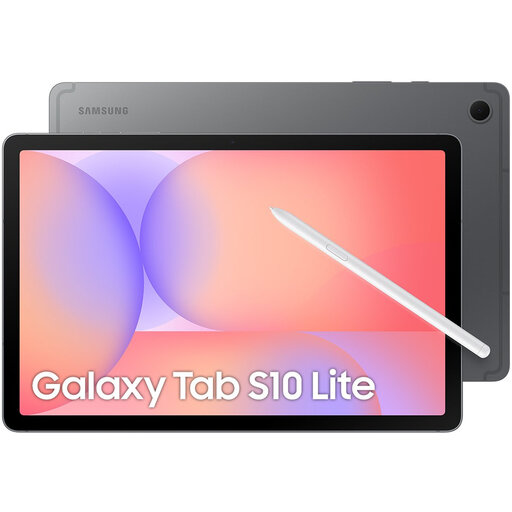
An option if you want to view notes on a screen of around 11 inches and make handwritten annotations.
The product information lists a 10.9-inch screen and 128 GB of storage. Samsung lists an S Pen with the Galaxy Tab S10 Lite.
 No image available
An option if you want to view detailed documents on a large screen.
The product name lists a 13-inch screen, 128 GB of storage and Wi-Fi.
Save the final PDF on your tablet in advance and open it once with Wi-Fi switched off. Apple Support explains how to save a PDF on an iPad. For another tablet, check how to save files locally in your chosen app.
Not if you’re using a schedule saved locally in advance. If you want to download updated files while you’re out and about, check whether the exact tablet version supports a mobile connection and which mobile service you’ll need.
Use a strong passcode or password and install software updates. This follows the Dutch government’s advice on staying safe online, but doesn’t mean that a particular hotel connection is secure.
When you buy online from a business, you’re often entitled to a 14-day cooling-off period, according to the Dutch government. In the Netherlands, the seller must provide a solution if there’s a problem with a product; there is no fixed statutory two-year warranty period.