
Student who types their plan
Mainly creates and rearranges headings and arguments. Look for keyboard compatibility and a layout you can type comfortably on. For example, Apple lists a Dutch layout for the Magic Keyboard Folio.


If you mainly create headings and arguments by typing and moving them around, choose a tablet with a compatible keyboard and the right layout. For mind maps and handwritten notes, pen compatibility matters more. Also check that you can comfortably use your sources and document side by side, and edit your files offline.
Mainly creates and rearranges headings and arguments. Look for keyboard compatibility and a layout you can type comfortably on. For example, Apple lists a Dutch layout for the Magic Keyboard Folio.
Starts with arrows, mind maps or handwritten notes. Check that the pen is compatible with the exact tablet model and whether it’s included with the version you’ve chosen. Samsung and Lenovo list pen support for specific models and versions.
Wants to consult sources while keeping their plan open. Check how your document and source apps work on the screen you’ve chosen, and test in advance which files you can open and edit offline.
First decide whether typing or handwritten sketches will be your main way of working. Then check that the screen layout and offline options suit the sources and documents you use in the library.
| What to consider | What should you check? | Who is this important for? |
|---|---|---|
| Typing and rearranging | Check model compatibility, keyboard layout and whether the keyboard is included with this version. | If I often move headings and sections of text around while thinking, I want to be able to work with a compatible keyboard. Around 36% of consumers put typing first. |
| Sketching and annotating | Check pen compatibility and whether the pen is included in the bundle you’ve chosen. | If I work through my arguments first using arrows or handwritten notes, I want to know whether the pen is compatible with this exact tablet model. Around 29% of consumers prioritise handwriting. |
| Sources and offline working | Try your document and source apps on the screen size, and test whether you can also edit files offline. | If I want to consult sources alongside my plan or keep working without an internet connection, I need a screen layout and offline workflow that suit my apps. Around 21% of consumers prioritise working with sources. |
| Total cost and bundle | Compare which accessories are included with each version and what layout the keyboard has. | If I don’t want to find that anything is missing or end up with an unwanted keyboard layout, I want to compare everything included with each version in advance. Around 14% of consumers prioritise the purchase cost. |
Apple’s listed iPad box contents include the iPad and a USB‑C charging cable; the Magic Keyboard Folio is a separate product. So the tablet price alone doesn’t tell you which input accessories you’ll need.
Make a list of the tablet, pen, keyboard and case. Check that each item works with the exact model and that the keyboard is available in your preferred layout.
Microsoft’s OneDrive instructions describe different offline options for iOS and Android. For Office files marked as available offline on iOS, Microsoft says you can edit them in connected Office apps. The Android instructions we consulted describe these OneDrive files as read-only.
Make the files you need available offline before you leave, then test with a copy of your own document to check whether you can edit it and find it where you expect later.
For the Tab M11 bundle we looked at, Lenovo lists a wireless keyboard with a US International layout. Xiaomi specifies US English for the Focus Keyboard; neither layout is the same as a Dutch keyboard layout.
Read the keyboard specification for the exact offer you’re considering, especially if you type in Dutch a lot.
The iPad (A16) is an option for a typed plan when paired with the model-specific Magic Keyboard Folio.
The Galaxy Tab S10 FE range is worth considering if you want to use a pen for sketching or annotating.
The Tab M11 is an option if you’re looking for a tablet with a pen. A bundle with a wireless keyboard is also listed.
The Pad 7 is an option if you want to put together a compatible pen and keyboard separately.
This selection of Joybuy products includes tablets for typing and for handwritten plans. Compare the listed accessories, screen features and storage with the way you put your plan together in the library.
 No image available
An option for planning an essay digitally at a table; the product information lists a case with a kickstand.
10.1-inch WUXGA touchscreen, 4 GB RAM, 128 GB storage, Wi‑Fi 5 and Android 14.
 No image available
An option if you want to create handwritten plans; the product information lists an included Lenovo Pen for notes, sketches and annotations.
12.1-inch 2.5K screen, 8 GB RAM and 256 GB storage.
 No image available
An option for a handwritten plan or mind map; the product name lists an included stylus pen.
12.7-inch 2K screen, 20 GB RAM (8 GB + 12 GB virtual) and 256 GB storage.
 No image available
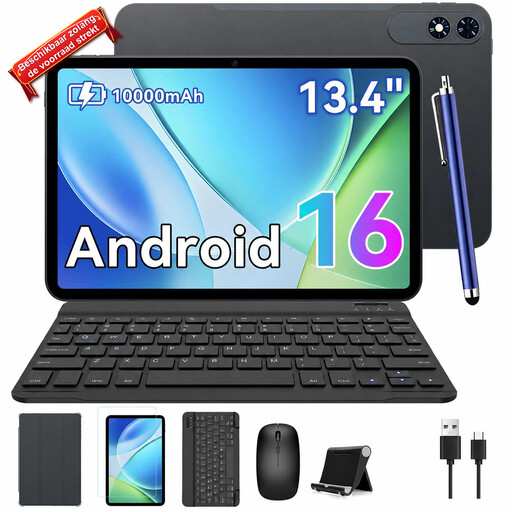
A bundle option if you want both a keyboard and a stylus pen with your tablet; check the included accessories and keyboard layout for the version on offer.
13.4-inch screen, Android 16, 2K resolution, 24 GB RAM (8 GB + 16 GB) and 256 GB storage. The product name also lists a case and mouse.
 No image available
An option for a typed plan; the product name lists a keyboard with the tablet. Check the layout of the included keyboard.
Android 16, 90Hz IPS screen, 16 GB RAM (3 GB + 13 GB virtual), 128 GB storage and 8000 mAh battery.
Choose a compatible keyboard if you mainly type and rearrange text; check pen compatibility if you mainly sketch. Apple lists a Magic Keyboard Folio for the iPad (A16), while Samsung lists S Pen support for the Galaxy Tab S10 FE.
Make the files you need available offline in advance, then test whether you can both open and edit them. Microsoft says that Office files marked as available offline on iOS can be edited in connected Office apps. The OneDrive instructions we consulted for Android describe files marked as available offline as read-only.
Contact the seller to discuss a solution. ACM ConsuWijzer states that if a product breaks sooner than you could reasonably expect under normal use, the seller must put it right free of charge, for example by repairing or replacing it, or giving you your money back.
For online purchases, you generally have up to 14 days after delivery to change your mind, according to ACM ConsuWijzer. Check the applicable exceptions and returns terms; any longer returns policy offered by a shop is separate.