
Camper who mainly reads novels
Reads long fantasy stories, often outdoors, and wants to weigh up whether a tablet is suitable or an e-reader would be a better choice. The Consumentenbond says e-readers are better suited to reading in sunlight.


A compact tablet suits campers who want to use apps, maps or images as well as reading long fantasy novels. If you mainly read long stretches of text in the sun and charging is difficult, consider an e-reader too. The Consumentenbond says it is better suited to reading in sunlight and typically lasts longer, but a tablet may be more practical for colour, other apps and image-heavy PDFs.
Reads long fantasy stories, often outdoors, and wants to weigh up whether a tablet is suitable or an e-reader would be a better choice. The Consumentenbond says e-readers are better suited to reading in sunlight.
Wants to use illustrated books, maps, PDFs or other apps as well as reading novels, and is weighing up screen space against portability.
Wants to have books ready in advance and plan when to charge. Whether a title works depends on the reading service, app and device you use.
Suitable for: anyone who switches between novels and apps, maps, images or video, and wants a small device to take along.
Trade-off: tablets offer colour and versatility, but glare in direct sunlight can make reading less comfortable, according to the Consumentenbond.
Suitable for: anyone who also reads illustrated books or PDFs with a fixed page layout, and often props the device up.
Trade-off: more screen space means a larger device that is less convenient to hold or carry.
Suitable for: anyone who prioritises long texts and reading in the sun over colour, apps and PDF viewing. The Consumentenbond says e-readers are better suited to reading in sunlight.
Trade-off: an e-reader is less versatile for image-heavy PDFs. Also check that your chosen books are available for the device and service you plan to use.
| What to consider | What to check when buying | Who is this important for? |
|---|---|---|
| Readability outdoors | Try the screen in bright ambient light and, if you mainly read text, compare it with an e-ink screen too. A stated brightness level is no guarantee that the screen will be readable in direct sunlight. | If I mainly read in daylight, I want to be able to follow the text without constantly looking for a shady spot. Around 31% of consumers give outdoor readability their highest priority. |
| Reading between charges | Compare the testing conditions behind battery-life figures and plan when you can charge; other tablet features use power too. | Without a reliable socket, I want to know when I can charge the device and how much I’ll use its other features while travelling. Around 25% of consumers put charging options first. |
| Portability during long reading sessions | Compare the screen size and weight of the exact model, and try the position you’ll use when reading on the campsite. | If I’m holding the device for a long time or carrying it in a small bag, a manageable size matters a lot. Around 25% of consumers choose portability as their main consideration. |
| Books and apps | Check that the specific titles and reading app work on the device, and test them before you set off. A tablet may be better suited to image-heavy PDFs than a small e-reader. | I want to be able to open the fantasy books I’m looking for, and sometimes use other apps or image-heavy files too. Around 19% of consumers prioritise book access and features. |
Glare can make a tablet difficult to read, even if the manufacturer quotes a brightness level or says it is visible in sunlight. That specification is not an independent reading test.
If possible, assess the screen in similar outdoor light. Also compare an e-reader if reading in the sun and long stretches of text are your priorities.
Generations, Wi-Fi or LTE connectivity, and storage can vary between models. For example, the announced iPad mini with A20 Pro is a different generation from the iPad mini with A17 Pro; Galaxy Tab A11 models also have different model codes.
Before buying, compare the full model code, generation, connectivity and storage with the product page.
The Online Library says that not every e-book is available on every type of device.
Check the specific titles and the device information before choosing a reading service or device.
Depending on the title and service, you may need a different subscription or to buy the book separately.
The Galaxy Tab A11 is a compact Android tablet; compare the Wi-Fi and mobile models separately.
The Tab M11 has a larger screen for images and other tablet activities; bear in mind that it is less compact.
The iPad mini is a compact iPad with a colour screen and apps; make sure you check the generation.
An e-reader is an alternative worth comparing if long texts and reading outdoors matter more than tablet features.
This selection includes compact tablets for anyone who also wants to use apps or images on the campsite, plus e-readers as an alternative if long texts and reading outdoors matter more.
 No image available
The compact screen size may suit anyone looking to take a small tablet on the campsite.
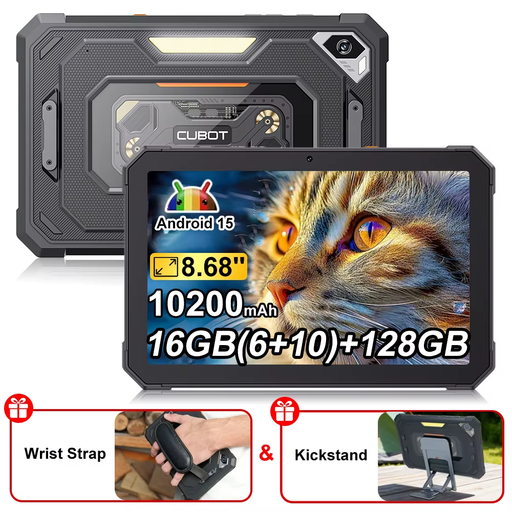
8.68 inches, 90 Hz, Android 15, 128 GB storage and a 10,200 mAh battery. The product name also mentions 16 GB (6 + 10 GB) and a camping light.
 No image available
The compact screen size is worth considering if portability matters; the stated screen specifications don’t tell you how comfortable it is to read in bright sunlight.
IPS screen, 90 Hz, Android 15 and a 6600 mAh battery. The product name lists 22 GB expandable RAM (6 + 18 GB virtual) and 128 GB ROM. The screen description flags glare as a consideration in direct sunlight.
 No image available
The 8.7-inch model suits anyone looking for a compact tablet; this X135 LTE is not the same model as the Galaxy Tab A11 Wi-Fi version.
The product information lists a 1340 × 800-pixel TFT screen, 90 Hz, expandable storage and a 3.5 mm jack. Glare can make reading in direct sunlight less comfortable.
 No image available
An e-reader worth comparing if you mainly read long texts; the Consumentenbond says e-readers are better suited to reading in sunlight than tablets.
7-inch colour e-ink screen, 64 GB storage and a front light with 36 levels.
 No image available
An e-reader to consider alongside a tablet if long texts and reading outdoors come first; the Consumentenbond says e-readers are better suited to reading in sunlight.
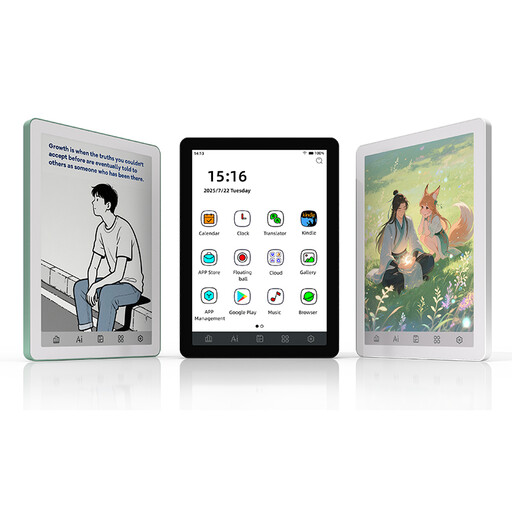
6-inch e-ink screen, Android 14, Google Play and an adjustable front light. The product information lists 300 ppi for monochrome content and 150 ppi for colour content.
Start by comparing an e-reader if long stretches of text and reading in the sun are your priorities; the Consumentenbond says e-readers are better suited to reading in sunlight. A tablet may be a better fit if you also want colour, apps or image-heavy PDFs, but glare and charging are still worth considering.
Before you set off, check that your chosen titles are available through your service and on your device, install the app and test how you’ll open the books. Availability varies by title, device and service, so don’t assume a particular book will work offline without testing it first.
Plan when to charge and protect the tablet from prolonged direct sunlight. Apple recommends using iPhones and iPads at 0–35 °C and warns that charging may slow down or stop if they overheat. This advice applies to Apple devices and is not a general temperature limit for all tablets.
According to the Dutch government, distance purchases usually come with a 14-day cooling-off period, although exceptions apply and should be checked for each purchase. If there’s a problem with the product, the seller is your point of contact for the legal guarantee.