
Café reader who wants to travel light
You take novels with you and want a tablet that’s easy to hold or place on a small table. So compare the screen size and weight of the exact model; Samsung and Lenovo list compact models with 8.7-inch screens.


A compact tablet is the best choice if you often hold it in your hands or have limited table space. A larger model may suit you better if you also use websites or view images as well as reading novels. If you mainly read novels, consider an e-reader too: the Consumers’ Association describes tablets as more versatile, but that doesn’t automatically make them more comfortable for long reading sessions. Before buying, check that your titles and reading app are available, and that the screen is comfortable to read on where you usually sit.
You take novels with you and want a tablet that’s easy to hold or place on a small table. So compare the screen size and weight of the exact model; Samsung and Lenovo list compact models with 8.7-inch screens.
You want to read adventure novels through the online library and check in advance that your preferred title, reading format and app are compatible with the device. The online library lists availability for each title and provides books through its app.
You want to use websites, other reading apps or view images as well as reading e-books. The Consumers’ Association describes tablets as more versatile than e-readers; weigh up these extra features against size and portability.
First, check that your books and reading app are available. Then choose a screen size and model to suit your café spot and how long you’ll be holding the tablet.
A good fit if: you have limited table space or often hold the tablet while reading.
Consider: a smaller screen gives you less space than an 11-inch model; specifications don’t tell you how comfortable it will be to read by a window.
A good fit if: you want to view websites, magazines or other images on the same device as well as reading novels.
Consider: a larger screen takes up more table space and may be less comfortable to hold for a long time.
A good fit if: reading books is almost your only goal, and your chosen e-book service and titles work on the device.
Consider: an e-reader is less versatile for other apps and images; check compatibility for each device and title.
| What to consider | What should you check? | Who is this important for? |
|---|---|---|
| Reading comfort in changing light | Compare the screen display and brightness settings; if possible, try reading text in similar lighting conditions. | If I read in changing café light, I want to be able to follow the text comfortably without relying on a single specification. Around 29% of consumers say reading comfort is their top priority. |
| Portability and ease of holding | Compare the screen diagonal and weight of the exact model; remember to account for a case, if you’ll be using one. | At a small table, or when holding the tablet, what matters most is how easy it is to handle. Around 24% of consumers put portability and ease of holding first. |
| Access to the novels you want | Look up the titles and check the reading format, the app required and compatibility with your chosen device. | If I want to borrow or buy particular adventure novels, I need to know whether they’re available through my reading service. Around 23% of consumers say access to books is their main concern when choosing. |
| Purchase and running costs | Compare models with the same storage and connectivity, and only include services or accessories you need. | I want to be able to weigh up the cost of the device alongside the books or services I use. Around 12% of consumers put total costs first. |
| Use for other content | Decide which other apps or images you’ll actually use, then compare screen size and app availability. | If I want to use other apps or websites as well as reading novels, versatility will influence my choice. Around 12% of consumers say this is their main reason for choosing a device. |
A suitable tablet doesn’t guarantee that a particular title will be available in your reading app or library service. The online library lists availability for each title.
Before you buy, look up a few books you really want to read and check which app and reading format you’ll need.
Manufacturers quote figures under different conditions. They don’t necessarily show how text and reflections will look at your café spot.
Compare the conditions stated and, if possible, try reading text by a window yourself.
Connectivity and storage options can vary, even when model names look similar.
Before buying, check the full model number, connectivity and storage.
A model with mobile connectivity may also require a mobile subscription.
The Wi-Fi Galaxy Tab A11 with 64 GB is a compact model to compare in terms of screen size and ports.
The Tab One with 4 GB of RAM and 64 GB of storage is a compact option to compare.
The Redmi Pad 2 offers a larger-screen option for anyone who wants to view other content as well as reading novels.
The 11-inch iPad (A16) is a larger option if you’re looking for an iPad for other uses as well as reading.
This selection of Joybuy products includes compact and larger tablets, as well as e-readers, for reading novels on the go.
 No image available
The 8.7-inch size suits anyone looking for a compact tablet for a small café table.
The product title lists LTE, 4 GB RAM and 64 GB of storage.
The stated screen specifications are 1340 × 800 pixels, 90 Hz and 179 ppi; these figures aren’t a real-world test of reading comfort.
The stated weight is 337 g.
 No image available
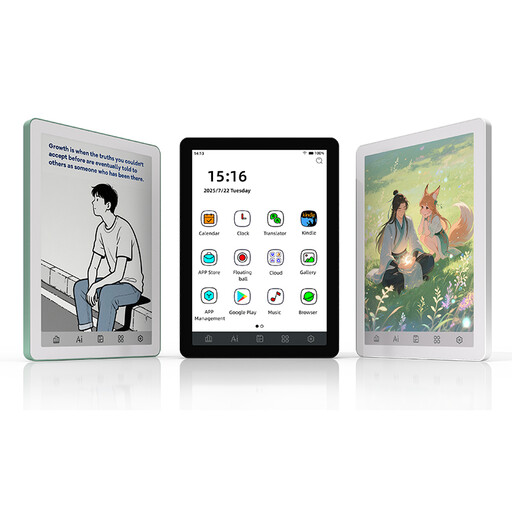
This e-reader is an option if reading novels is almost your only goal and your preferred titles and reading service work on the device.
The product description lists an E Ink screen, an adjustable 36-level front light and Android 14 with Google Play.
For monochrome content, the description lists 300 ppi.
 No image available
This compact e-reader is designed for anyone who wants to read novels on an e-paper display and is also looking for a colour screen.
The product description lists a Kaleido 3 colour screen and Android 14.
For black-and-white content, the description lists 300 ppi; for colour content, it lists 150 ppi.
 No image available
This e-paper option is worth comparing if you want to read novels or PDFs and are looking for a device with a stylus.
The product description lists support for e-books and PDFs, an adjustable two-colour reading light and a stylus.
The stated weight is 230 g and the thickness is 5 mm.
 No image available
The larger screen suits anyone who wants to read novels at a table and view other content on the tablet too; bear in mind that it needs more space.
The product details list a 10.1-inch IPS screen with 1920 × 1200 pixels, 128 GB of storage and microSD expansion.
This model has Wi-Fi 5 and Android 14. The product description also mentions a protective case with a kickstand.
The stated weight is 425 g.
Yes. You can read e-books in the online library app on a tablet if your preferred title is available and the reading format is compatible with your device. You’ll need a suitable membership to borrow books.
It depends on your reading app and whether the book is available offline. Check how to download the title and test whether it opens without an internet connection afterwards; this can vary by app and title. You’ll need an internet connection to get new books while you’re out.
It depends on how you get your books and which accessories or services you need. As of 29 October 2026, the online library lists a standard digital membership at € 45 per year; local library membership costs vary by location. Also check whether you need a case or charging accessory.
For online orders from a business, you’ll usually have a 14-day cooling-off period, although there are exceptions. The Dutch government also distinguishes between your statutory rights if a product is faulty and any manufacturer’s warranty; the warranty doesn’t replace your statutory rights.
According to the Dutch government, electronic devices sold in the EU must meet the applicable safety requirements and carry a CE mark. Check the product information and who is responsible for the product with the seller, especially if it’s imported directly from outside the EU. A statement on a product page is not, in itself, an independent safety test.