What should you look for when buying?
For editing newsletters on the train, your choice mainly depends on how you type, which features your editor offers and how much you can rely on a connection while travelling. Try out your own workflow and check the complete tablet-and-accessories setup before you decide.
| What to consider |
What should you check? |
Who is this most important for? |
| Entering longer passages of text |
Check that the keyboard fits the exact model and that the setup is comfortable to use in your usual workspace. |
If I’m editing a lot of text during my journey, I want to type comfortably without an awkward setup. Around 33% of consumers give comfortable text entry top priority. |
| How the editor works |
Test text, images, previews and the publishing steps you need in your own newsletter service. |
I want to check my own template and layout before relying on a tablet. Around 27% of consumers prioritise how the editor and layout work. |
| Staying connected on the move |
Check whether drafts are saved offline and sync later; consider whether Wi-Fi-only or mobile data suits your workflow. |
If my drafts are online or need to sync straight away, I need a connection while travelling. Around 20% of consumers give working through an unreliable connection top priority. |
| Space and battery life |
Compare the tablet’s size and weight with the accessories you want to take, and set off with enough charge. |
I want enough room to check my layout, but I also need a setup I can carry and keep charged. Around 20% of consumers say portability, screen space and battery life are the deciding factors. |
Tablets at Joybuy
This selection includes tablets for working on newsletters while travelling: a compact LTE option, models with a keyboard bundle and iPad Air versions that are sold without a keyboard. Check whether the editor and complete setup for each product are right for your train journey.
 Image unavailable
Lenovo Tab 4G LTE 128 GB
The listed LTE connection may be useful if you need mobile data during your journey; check that your newsletter editor works on this model.
The product information lists a 10.1-inch screen, 425 grams, Android 14, 128 GB of storage and 4G LTE with a Nano-SIM slot. It also mentions a case with a stand and Wi-Fi 5.
Joybuy
 Image unavailable
Teclast P33 10.1-inch, 64GB, keyboard bundle
The bundle includes a keyboard for typing on the move. Check in advance that the English keyboard layout suits you and that your editor works.
The product title lists Android 16, 64 GB of storage and 9GB* RAM (3GB + 6GB virtual expansion). The bundle includes an English Bluetooth keyboard, mouse, case, stand, stylus and charger.
Joybuy
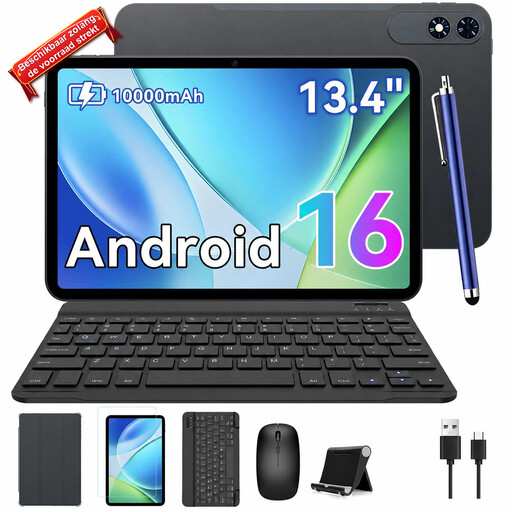 Image unavailable
TABWEE T60Pro 13.4-inch, 256GB, keyboard bundle
The larger screen may suit you if you want more room to view text and layouts; bear in mind how much space the setup will take up on the train.
The product title lists Android 16, a 13.4-inch 2K screen, 24GB (8+16) RAM and 256GB of storage, plus a keyboard and mouse.
Joybuy
 Image unavailable
Apple 11-inch iPad Air (M4) Wi-Fi 128GB - Blue
This 11-inch iPad Air may suit you if you’re looking for an iPadOS tablet to work on while travelling; check that your editor supports the tasks you need to do.
The product information lists iPadOS and support for Magic Keyboard. The keyboard is sold separately. Apple specifies a weight of 464 grams for the 11-inch Wi-Fi model without a keyboard.
Joybuy
 Image unavailable
Apple 13-inch iPad Air (M4) Wi-Fi 128GB - Blue
The 13-inch screen gives you more room to view text and layouts, but takes up more space in your train setup than the 11-inch model.
The product information lists iPadOS and support for Magic Keyboard; the keyboard is sold separately. Apple specifies a weight of 616 grams for this 13-inch Wi-Fi model without a keyboard.
Joybuy
Frequently asked questions
Can I edit a newsletter from start to finish on a tablet on the train?
You can use the features your newsletter service offers in its app or browser. Mailchimp explains how to edit on mobile devices, but directs users to the browser for features not available in the iOS app. So test your own draft, preview and the publishing steps you need.
Can I rely on train Wi-Fi and a plug socket?
No, don’t assume they’ll be available on every journey. NS recommends having an alternative, such as a hotspot, and warns that charging may not always be possible. The plug sockets NS mentions on the ICNG are specific to that type of train and aren’t necessarily available on every train.
Will any Surface keyboard fit the 12-inch Surface Pro?
No. Microsoft lists a specific Surface Pro 12-inch Keyboard and says that the 13-inch Keyboard and 13-inch Flex Keyboard, among others, aren’t compatible with the Surface Pro 12-inch (1st Edition).
What should I check when buying a tablet with a keyboard bundle?
Check the exact version, the keyboard layout and which accessories are actually included in the bundle. Also test the features you need in your newsletter editor: an included keyboard doesn’t mean the editor will work fully.
What rules apply if I send a marketing newsletter from the train?
Being on a train doesn’t change the rules for direct digital marketing. The Dutch Data Protection Authority says recipients must be given a clear and explicit way to object. Before sending, check which rules apply to your mailing list and situation.


