
Readers with limited bag space
You read sitting or standing during your journey and want to compare the size and weight of a compact tablet. Apple and Lenovo’s specifications give you specific models to compare.


If you mainly read continuous text, compare an e-reader with a tablet first; a tablet is more versatile for colour photos, PDFs and other apps. Among tablets, a compact model is better when space is limited on the train, while a larger screen can be more convenient for pages with a fixed layout. Download your biography in advance and check that your chosen title works with the reading app and device you select, as recommended by Consumentenbond, NS and Rakuten Kobo.
You read sitting or standing during your journey and want to compare the size and weight of a compact tablet. Apple and Lenovo’s specifications give you specific models to compare.
You want to have your biography ready in your reading app before setting off, so you don’t have to rely on train Wi-Fi. NS and Rakuten Kobo explain the relevance of Wi-Fi on trains and offline reading.
Your biography includes images or pages with a fixed layout, so screen space and zooming matter more than they do for continuous text. Consumentenbond discusses the difference between reading PDFs and e-books.
Choose this if: you want a tablet that’s easy to carry and use in a crowded seat.
Bear in mind: you may need to zoom in more often to read a full-page PDF on a small screen.
Choose this if: you mainly view PDF pages or photos and value screen space over a compact size.
Bear in mind: a larger device takes up more space in your bag and on a train seat.
Choose this if: you mainly read long, continuous e-book texts and have little need for tablet apps, photos or full-page PDFs.
Bear in mind: check with each book and provider that the title is available on your chosen device.
| Consideration | What to look for | Who is this most important to? |
|---|---|---|
| Easy to handle on the go | Compare the screen size, dimensions and weight of the exact model, including the case you plan to use, if applicable. | If I want to read while getting on or off the train, or in a crowded seat, a device that’s easy to handle is a priority for me. Around 33% of consumers prioritise ease of handling. |
| Reading without train Wi-Fi | Check that the title is available in your reading app, then download and open the book before setting off. | If I don’t want to have to look for a connection while travelling, I want to be able to open my chosen biography in advance. Around 25% of consumers prioritise offline access. |
| Purchase and running costs | Compare the tablet with the cost of your preferred books or service, and check which accessories are included. | If I mainly want to weigh up the total cost of the device, books and any extras, I focus on what I’ll actually use. Around 25% of consumers prioritise cost. |
| Photos and PDFs | Check the file format and view a sample page on the screen size you’re considering. | If my biography includes photos or pages with a fixed layout, I want to view them without having to zoom in repeatedly to see the whole page. Around 17% of consumers prioritise images and PDFs. |
NS says that free Wi-Fi is available on almost all Intercity trains, but not on every train or journey. Without a book downloaded in advance, access while travelling may depend on your connection.
Get your biography ready in the app you want to use before setting off, and check that you can open it without an internet connection.
If you need to get online to access a book you haven’t downloaded in advance, you may use mobile data.
A full-page PDF may require a lot of zooming on a small screen. And an e-book isn’t necessarily available on every device.
Check the file format, view a sample page and ask the provider which devices support the specific title.
You may be able to access titles through individual purchases, a library service or a subscription. Accessories can also vary between models.
Compare the tablet with the book access option you actually want to use, and check which accessories are included.
Books, a subscription or a charging adapter sold separately can mean extra costs and an additional purchase.
Worth considering if you’re looking for a compact tablet with iPadOS and a colour screen.
The Galaxy Tab A11 is a compact Android option; the Dutch Wi-Fi version is listed with an 8.7-inch screen and 64 GB of storage.
The Tab One is a compact Android tablet to compare for reading text and using everyday tablet apps.
The Redmi Pad SE 8.7 is a compact Android option with a colour screen.
These tablets are suitable for reading on the go: compact models that are easy to carry, and larger models for anyone who wants more screen space for photos or PDF pages.
 No image available
A compact tablet that’s easy to carry if you want to read on the train.
Version: X135, 64 GB, silver.
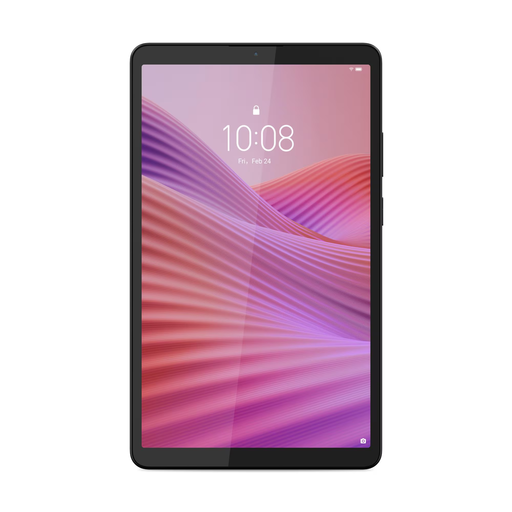 No image available
A compact version for anyone who wants to take a tablet with a case on the go.
8.7-inch HD IPS screen, Wi-Fi, 4 GB RAM, 128 GB storage and a clear case. The USB power adapter isn’t included and must be purchased separately.
 No image available
An option to compare if you prioritise screen space for music biographies with photos or pages in a fixed layout.
128 GB storage.
 No image available
A larger version to compare if you want more screen space for pages with a fixed layout.
10.1-inch screen, 128 GB storage, 4 GB RAM, Wi-Fi 5 (802.11ac), Android 14 and grey.
No image available
A larger tablet to compare if screen space matters to you and you’re also considering a mobile connection.
10.1-inch screen, 128 GB storage, 4 GB RAM, LTE, Wi-Fi 5 (802.11ac), Android 14 and grey.
No, not if you’ve downloaded and opened the book in advance. NS says that free Wi-Fi is available on almost all Intercity trains, so get the title ready in the right app before setting off and check the book service’s offline access terms.
No, availability varies by title and device. According to the online Bibliotheek, an e-book’s information page states which devices it’s available for; also check that you can install the required app.
Charge the tablet, download the title and check that it opens before setting off. Also check which accessories come with the version you’ve chosen; Xiaomi says that the adapter supplied with the Redmi Pad SE 8.7 may vary by region.
According to ACM ConsuWijzer, with a standard online purchase you usually have a cooling-off period of up to 14 days after delivery, although legal exceptions may apply. The seller must also resolve problems if a product, when used normally, fails to meet what you could reasonably expect under the statutory guarantee. This right isn’t automatically limited to a fixed two-year warranty period.