Choose a compact tablet if you want to use reading apps, illustrated books or other media as well as novels. If you mainly read continuous text, an e-reader is also worth considering, but check first that your chosen library title is available on it. Download books before you set off: NS offers Wi-Fi on almost all Intercity trains, but not on every train.
Who is this choice for?
Reader with short train journeys
Wants to open a science fiction novel quickly and hold or put away the device with ease. NS lists Wi-Fi on almost all Intercity trains; Apple and Lenovo publish screen sizes and weights for the compact models reviewed, so you can compare them when making your choice.
Library and app reader
Wants to switch between e-books, a reading app and possibly audiobooks while travelling, so checks that the reading service and chosen title work on the device. The online Library explains how to read on tablets and e-readers, with availability varying by title.
Reader of illustrated stories
Also reads science fiction with images or a fixed page layout, and weighs up screen space against portability. The online Library notes that some illustrated e-books are not available on e-readers; according to Kobo’s list of countries, its built-in Libby feature is not listed for the Netherlands.
What should you consider when choosing?
Compact tablet
Choose this option if: you want to use reading apps, illustrated books or other media as well as novels.
Bear in mind: a compact screen gives you less room for large images or pages with a fixed layout.
E-reader for mostly text
Choose this option if: you mainly read novels and do not need the features of a general-purpose tablet.
Bear in mind: not every e-book is available on an e-reader; and do not assume you can use a Dutch library account directly through Kobo’s built-in Libby feature.
| What to consider |
What should you check? |
Who is this important for? |
| Portability during your journey |
Compare the screen size and weight of the exact version, and think about how you will hold the device with a case, if you plan to use one. |
If I want to read during the journey and quickly put the device away at a stop, how easy it is to handle matters a lot to me. Around 40% of consumers name portability as their main purchasing concern. |
| Books without train Wi-Fi |
Check that your title is available on your chosen device, then download or open the book before you set off. NS offers Wi-Fi on almost all Intercity trains, but not on every train. |
I want to be able to open my novel even when there is no Wi-Fi on the way. Around 30% of consumers name access to books without train Wi-Fi as their main purchasing concern. |
| Text and illustrated pages |
Check the layout of your books and whether the reading app lets you adjust settings such as font size; this may not be possible with some illustrated e-books. |
If images or a fixed page layout matter, I want to see in advance how my titles will look on screen. Around 20% of consumers name the readability of text and illustrations as their main purchasing concern. |
| Device and access to books |
Compare the version and storage capacity with how you plan to use the device, and check the terms for your book source, such as a library subscription or local membership. |
I want to know in advance what costs are involved in buying the device and accessing my books. Around 10% of consumers name the total cost of the device and books as their main purchasing concern. |
Common pitfalls
-
Assuming train Wi-Fi is always available
NS lists Wi-Fi on almost all Intercity trains, but that does not mean you will have a connection on every journey to download a book.
Before you set off, check that the book is on your device and opens properly.
If you only download a book while travelling, you may use mobile data.
-
Thinking every e-book works on every e-reader
According to the online Library, some books with lots of images are not available on e-readers. The reading format can vary by title.
Search the catalogue for the science fiction titles you want and check which reading formats are available before choosing a device.
-
Buying an extended warranty because you think the legal guarantee lasts only two years
The Dutch government states that there is no fixed statutory guarantee period in the Netherlands. A set period of two years is therefore not the benchmark for your rights.
Check what additional terms a warranty package offers, and report any product fault to the seller.
Brands to compare
Apple
The iPad mini reviewed is a compact tablet option for anyone weighing up an 8.3-inch screen and access to iPad apps.
- For the Wi-Fi version reviewed, Apple lists a weight of 293 grams, 128 GB as the smallest stated storage option and an anti-reflective coating.
- These specifications do not prove that the screen is more comfortable to read on in every train carriage; compare the version with your own reading habits.
Samsung
The Galaxy Tab A11 Wi-Fi with 64 GB reviewed is a compact Android option with an 8.7-inch screen.
- Samsung lists a resolution of 1340 × 800 pixels, a 3.5mm jack and expandable storage for this model.
- Check which version you are looking at: the maximum capacity for the product range does not automatically apply to the 64GB model.
Lenovo
The Tab One ZAF00255SE reviewed is an 8.7-inch Android tablet to compare for size and everyday use.
- For this version, Lenovo lists 4 GB of RAM, 64 GB of storage, a resolution of 1340 × 800 pixels and a weight of around 320 grams.
- Lenovo’s battery life claim is based on YouTube streaming, not a train journey using a reading app.
Xiaomi
The REDMI Pad SE 8.7 is a compact Android option, with storage versions you can compare separately.
- Xiaomi lists an 8.7-inch LCD screen, a resolution of 1340 × 800 pixels and a maximum weight of 373 grams.
- Xiaomi notes that configurations may vary by region; these specifications are not an independent assessment of reading comfort.
Kobo
The Clara BW is an e-reader option for anyone who mainly reads text rather than looking for a general-purpose tablet.
- Kobo lists ComfortLight PRO for the Clara BW.
- According to Kobo’s list of countries, the built-in Libby feature is not available in the Netherlands. For library books, check the separate e-reader method and whether your chosen title is available in that format.
Tablets for reading on the train
These Joybuy products are tablets to compare for reading on the train, from compact models for novels to larger screens for anyone who wants more room for the page.
 No image available
Samsung Galaxy Tab A11 X135 64GB Silver
A compact tablet option to compare if you want a handy screen for your train journey.
8.7-inch screen; weight 337 g; 64 GB storage; microSD support.
Joybuy
 No image available
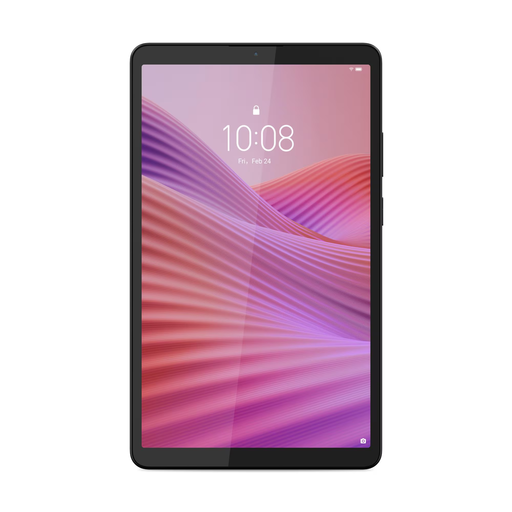
Lenovo Tab One 8.7-inch Wi-Fi, 4GB RAM, 128GB Storage, Clear Case, Luna Grey
A compact option if you want a smaller screen with storage for your books.
8.7-inch screen; 4 GB RAM; 128 GB storage; microSD slot. USB power adapter not included.
Joybuy
 No image available
Lenovo Tab Mediatek 10.1-inch, 4GB, 128GB, Wi-Fi 5, Android 14, Grey
A larger screen may suit you if you want more room for the page while reading; bear in mind its size when holding and putting it away.
10.1-inch screen with 1920 × 1200 pixels; 4 GB RAM; 128 GB storage; microSD expansion; Android 14. USB power adapter not included.
Joybuy
No image available
Lenovo Tab 4G Mediatek LTE 10.1-inch, 4GB, 128GB, Wi-Fi 5, Android 14, Grey
This larger tablet is worth comparing if extra screen space matters more to you than a compact size for travelling.
10.1-inch screen with 1920 × 1200 pixels; 4 GB RAM; 128 GB storage; microSD expansion; 4G LTE and Wi-Fi 5. USB power adapter not included.
Joybuy
 No image available
Samsung Galaxy Tab A11 Plus 11-inch 128GB Wi-Fi Grey
A larger screen can give you more room to view pages, but it is less compact to hold and put away during a train journey.
11-inch screen; 128 GB storage; weight 477 g.
Joybuy
Frequently asked questions
Can I rely on Wi-Fi to open a book on every train journey?
No. NS lists free Wi-Fi on almost all Intercity trains, but not on every train journey. Put the book on your device in advance and check that it opens.
Can I read a book from the online Library on my tablet?
Yes, the online Library supports e-books on tablets. You need a suitable subscription or local library membership to borrow books; check which reading formats are available for each title.
Can I use my Dutch library account directly through Libby on a Kobo Clara BW?
Do not assume so: according to Kobo, the Netherlands is not on the list of countries supported by the built-in Libby feature. The online Library explains a separate method for compatible e-reader books; also check whether your title is available on an e-reader.
What are my rights when I buy a tablet online?
According to the Dutch government, with a distance sale you usually have 14 days to change your mind. You are also entitled to a product that is fit for purpose; if there is a fault, contact the seller to resolve it. There is no fixed statutory guarantee period of two years in the Netherlands.


