If you mainly read continuous text in bright sunlight, start by looking at an e-ink device with a non-reflective screen. For language guides with lots of images, tables or fixed PDF layouts, a tablet is often more practical, according to the Consumers’ Association. However, check how the screen handles reflections where you plan to read: a stated maximum brightness does not guarantee readability in direct sunlight.
Which option is right for you?
Outdoor reader of long texts
You mainly read text in direct sunlight and want to minimise reflections and carrying weight. First, check that your language guides work well on an e-reader and that the screen size suits them. The Consumers’ Association discusses the trade-offs between e-readers and tablets, while Kobo describes the Libra Colour as having a non-reflective screen.
Reader of illustrated PDF guides
Your guides have fixed page layouts, tables or lots of images. In that case, a larger tablet screen that’s easy to use may matter more than e-ink; the Consumers’ Association points out that PDFs are easier to read on a tablet.
User of interactive language guides
You combine reading with apps, audio or exercises. So check that your specific app and guide work on the device you choose. BOOX mentions Android app support for the Go Color 7 (Gen II), but that doesn’t confirm that every app will work.
What should you consider when choosing?
E-ink e-reader
Best for: mainly reading continuous text in bright sunlight, provided your guides work well on the screen.
Trade-off: a small screen can be awkward for A4 PDFs with fixed layouts and lots of images.
E-ink with Android apps
Best for: combining e-ink with certain Android apps, once you’ve checked that your apps work.
Trade-off: even with app support, a 7-inch screen is still limited for A4 PDFs.
Conventional tablet
Best for: guides with images, fixed PDF layouts or interactive features.
Trade-off: direct sunlight and reflections can affect readability; a maximum nit rating is no substitute for testing it where you plan to read.
| What to consider |
What to look for |
Who is this important for? |
| Reading in bright sunlight |
Check the screen type and assess reflections where you’ll actually be reading. A maximum brightness figure alone doesn’t tell you how the screen performs in direct sunlight. |
If I mainly read continuous text outdoors, I want to assess reflections where I’ll be reading. Around 36% of consumers prioritise readability in sunlight when choosing what to buy. |
| PDFs with fixed layouts |
If possible, open a representative page and check text size, zooming, tables and images. The Consumers’ Association recommends a tablet for lots of PDFs with fixed layouts. |
If my guides contain A4 pages, tables or images, I want to view the original page clearly. Around 29% of consumers prioritise PDF viewing. |
| Apps, audio and exercises |
Check which app you need and try an exercise, an audio clip and your guide file on the device. |
If I need apps or audio while reading, I want to make sure in advance that the features I use will work. Around 21% of consumers prioritise interactive features. |
| Portability and offline use |
Compare the weight and check whether you can open the guide without an internet connection. Also check which features remain available offline. |
If I read on the go, I want to take my guide with me and open it without an internet connection. Around 14% of consumers prioritise portability and offline reading. |
Common mistakes when choosing
-
Assuming maximum brightness guarantees readability in sunlight
A stated peak brightness isn’t a measure of how readable the screen will be where you plan to use it. The Consumers’ Association highlights reflections and direct sunlight as points to consider with tablets.
As well as brightness, assess how reflective the screen is and view a real page in similar daylight.
-
Choosing a compact e-reader without checking your PDFs
A4 PDFs with fixed layouts and lots of images can be awkward to use on a small e-reader screen.
Try a representative PDF on the screen size you’re considering before you choose.
-
Assuming every Lenovo Idea Tab has the same screen finish
Lenovo lists different screen finishes across the Idea Tab range. The exact version matters if you’re looking for a matte or paper-like screen.
Check the full model code and screen finish of the version you’re considering.
Brands to compare
Kobo
Worth considering if you’re looking for an e-reader for text-focused reading and a non-reflective screen is important to you.
- Kobo specifies a 7-inch, non-reflective colour screen for the Libra Colour.
- The Consumers’ Association points out that small e-readers are less suitable for lots of A4 PDFs.
BOOX
An option to explore if you want to combine e-ink with Android app support.
- BOOX lists a 7-inch screen, a weight of 195 g and app support for the Go Color 7 (Gen II).
- Check that your specific apps and PDFs work; these manufacturer specifications aren’t an independent real-world test.
Xiaomi
The Pad 7 is a conventional tablet worth comparing if larger PDFs and interactive content matter to you.
- Xiaomi specifies an 11.2-inch screen and a maximum brightness of 800 nits for the Pad 7.
- That maximum brightness doesn’t confirm that the screen will be easy to read in direct sunlight.
Lenovo
The Idea Tab range is worth considering if you’re looking for an Android tablet for documents and notes.
- Lenovo’s range specifications list different screen finishes, including a paper-like anti-glare option.
- Check which screen finish is available for the model number you’re considering.
Apple
The 11-inch iPad (A16) is a tablet option if you want to use other tablet features as well as reading documents.
- Apple specifies a 500-nit IPS screen and a weight of 477 g for the Wi‑Fi model.
- The Consumers’ Association warns that tablets can generally be affected by reflections in direct sunlight.
Joybuy products for reading and language guides
This selection includes e-ink readers for text-focused reading and tablets for guides that need more screen space. If you use a tablet in bright sunlight, assess reflections and, if possible, test your own PDF.
 No image available
Bigme B751C S 7-inch colour e-ink e-reader
An e-ink reader to consider if you mainly read continuous text; the screen size may be limiting for A4 PDFs with fixed layouts.
7-inch colour e-ink screen; 4+64 GB; 300 ppi; 36-level frontlight.
Joybuy
 No image available
Bigme HiBreak Pro Color Display 6.13-inch e-ink reader
A compact e-ink reader to consider if you want to focus on reading and need certain Android apps; check in advance that your apps work.
6.13 inch; Android 14; 8 GB + 256 GB; 5 MP/20 MP camera.
The small screen can be awkward for lots of A4 PDFs with fixed layouts.
Joybuy
 No image available
Blackview Active 8 Pro 10.36-inch tablet
A tablet option if you want more screen space for a language guide; bear in mind that reflections may be an issue in direct sunlight.
10.36-inch HD screen; Android 13; 16 GB (8 GB + 8 GB) and 256 GB; 22,000 mAh battery.
Joybuy
 No image available
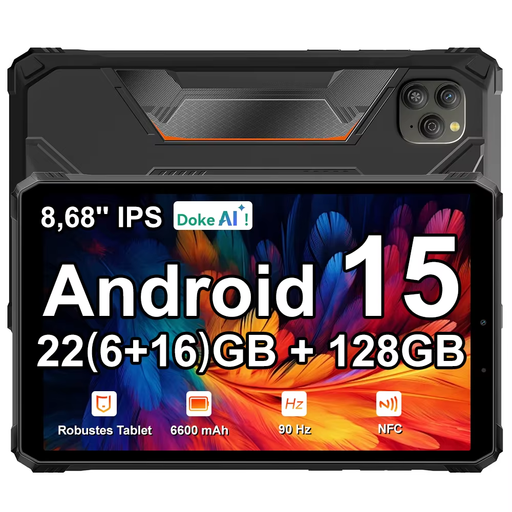
Blackview Active 5 8.68-inch tablet
A tablet option for viewing language guides; if you use it outdoors, check whether the reflections are acceptable to you.
8.68-inch IPS screen; 90 Hz; Android 15; 22 GB expandable RAM (6 + 18) and 128 GB ROM; 6,600 mAh battery.
Joybuy
 No image available
Lenovo Idea Tab Plus WiFi 12.1-inch, with pen, Rose
A tablet option if you want more screen space for documents and guides; check the screen finish if you need a paper-like surface.
12.1-inch 2.5K screen; 8 GB RAM; 256 GB; pen included.
Joybuy
Frequently asked questions
Is an A4 language guide in PDF format better to read on a tablet or an e-reader?
For lots of PDFs with fixed A4 layouts, the Consumers’ Association recommends a tablet. Zooming can be awkward on a small e-reader, and reflowing text can disrupt the original layout. Try your own file before you choose.
How do I prepare a device for offline reading?
Before you go offline, open a representative guide in the app you plan to use, save it locally and test it without an internet connection. Also check that images, dictionary features and any audio work offline; this can vary between guides and apps.
How long is the warranty in the Netherlands, and can I return an online purchase?
According to the Government of the Netherlands, statutory warranty in the Netherlands doesn’t have a fixed two-year term. It depends on what you can reasonably expect from the product, and the retailer is your point of contact if something is wrong. For online purchases from a business, you’ll often have a 14-day cooling-off period; check the relevant terms and exceptions.


