Start by looking at how you open and store photos and project folders locally. Check that the tablet, any card reader or external storage, and the apps you need work with your files. Then choose a tablet to suit how you’ll use it: a handy model, more screen space or one designed for more demanding use in the field. Stated brightness levels and protection ratings don’t guarantee good visibility or protection in sun, sand or salt water.
Who is this choice for?
Manager of local project folders
You want to store, find and transfer photos and existing project files locally. Check that your file formats and the apps you need are compatible. Apple Support and Samsung Netherlands explain how to access compatible external storage or copy files.
Reviewing photos in the field
You take your tablet outdoors and weigh up visibility, weight and protection. Manufacturers’ brightness and water-resistance claims don’t tell you exactly how a screen or tablet will perform in your dune conditions.
Comparing photo details
You mainly review images at a fixed workstation and value screen space over a compact size. Also consider the weight and stated brightness if you sometimes take the tablet with you.
What should you look for when buying?
First check that the tablet suits your files and workflow. Then weigh up screen space, portability and how you expect to use it outdoors.
| What to consider |
What to check before buying |
Who is this important for? |
| Opening and organising local files |
Check the ports and card readers, as well as support for your storage and project files in the app you need. |
If I want to view photos from a camera, card or drive without relying on cloud access, I need to know that my files and folders will be accessible. Around 33% of consumers rank local file access as their top priority. |
| Reviewing photos outdoors |
Check the conditions attached to brightness and protection claims, and bear in mind the sun, sand and any exposure to water. |
If I want to view photos on location, I weigh up visibility and protection against the conditions I work in. Around 27% of consumers prioritise outdoor use. |
| Room to see photo details |
Compare the screen size with the weight and, if possible, try your own photos at the size you’re considering. |
When I mainly compare details and documents in one place, I value a larger screen more than a tablet that’s easy to carry around. Around 20% of consumers give photo detail top priority. |
| Portability and longer working sessions |
Check the weight and battery life or charging options of the exact version you’re considering. |
If I work between locations, I want to factor in the weight I’ll be carrying and whether I can keep working. Around 20% of consumers put portability and battery life first. |
Common buying mistakes
-
Looking only at internal storage
Storage capacity doesn’t tell you how you’ll get photos from a camera, card or drive onto the tablet. Depending on your workflow, you may need a compatible card reader, adapter or extra storage.
Before you buy, check your camera, card or drive against the ports and apps on the exact tablet you’re considering. Also make sure you can open and copy your project files.
Your chosen workflow may require a compatible card reader, memory card or adapter. Check what’s included with the version you’re buying.
-
Assuming maximum brightness guarantees visibility in sunlight
A stated maximum may apply only in a specific mode; it doesn’t measure visibility in every lighting condition. Samsung states that the Galaxy Tab S10 FE reaches up to 800 nits in High Brightness Mode. Xiaomi lists different brightness levels for standard use and HBM on the Redmi Pad 2 Pro.
Compare brightness figures along with the conditions they apply to, and, if possible, view your own photos in lighting similar to where you’ll be working.
-
Assuming IP68 means protection in all dune conditions
Samsung says the Galaxy Tab S10 FE was tested in a laboratory using fresh water. This isn’t a promise of protection against salt water or every beach condition.
Read the conditions for the exact version and make sure its protection suits how you expect to use it.
Tablet brands to consider
Apple
The iPad (A16) has USB-C and is an option if you want to use compatible local files in iPad apps.
- Apple lists the Wi-Fi model at 477 g, with a screen brightness of 500 nits. Apple Support explains how to access compatible external storage using the Files app.
- You may need to buy a compatible card reader separately to use an SD card. Check that your project app and file formats work.
Samsung
The Galaxy Tab S10 FE range supports microSD cards, while the Galaxy Tab Active5 Pro is a separate business model for more demanding field use.
- Samsung lists microSD expansion up to 2 TB and up to 800 nits in High Brightness Mode for the S10 FE. The Active5 Pro has a replaceable battery, according to Samsung.
- The S10 FE’s IP68 rating is based on a laboratory test using fresh water. The features of these models don’t automatically apply to every Samsung tablet.
Xiaomi
The Redmi Pad 2 Pro is an option if screen space and expandable storage matter to you.
- Xiaomi lists a 12.1-inch screen, a weight of 610 g and expandable storage up to 2 TB. Its stated brightness is 500 nits in standard use or 600 nits in HBM.
- The expansion card is sold separately. These stated figures don’t measure performance in your field conditions.
Lenovo
The Tab P12 version reviewed, ZACH0112SE, has a large screen for reviewing photos at a fixed workstation.
- Lenovo lists a 12.7-inch screen and brightness of 400 nits for this version.
- These specifications apply to the version named and don’t, by themselves, indicate how easy the screen is to read in bright outdoor light.
Tablets at Joybuy
This selection at Joybuy includes tablets with compact screens, models described as rugged and larger screens for reviewing photos. Check that each version supports the workflow and conditions you need the tablet for.
 No image available
Blackview Active 8 Pro, 256 GB
The storage capacity may suit you if you want to keep local photos and project files on the tablet.
The product information lists 256 GB of storage, expandable up to 1 TB with a TF card, a 10.36-inch screen and a 22,000 mAh battery. The title describes the 16 GB RAM as 8 GB + 8 GB.
Check that the card you need, your file formats and your project apps suit your workflow.
Joybuy
 No image available
Blackview Active 5, 128 GB
The screen size may suit you if you value a more manageable format. Check separately whether the tablet is suitable for the conditions you’ll use it in.
The product information lists an 8.68-inch 90 Hz IPS screen, 128 GB of storage expandable up to 2 TB and a 6,600 mAh battery. The title states 22 GB RAM, comprising 6 GB plus 18 GB of virtual RAM.
Check the protection conditions for this version and make sure it supports your project files.
Joybuy
 No image available
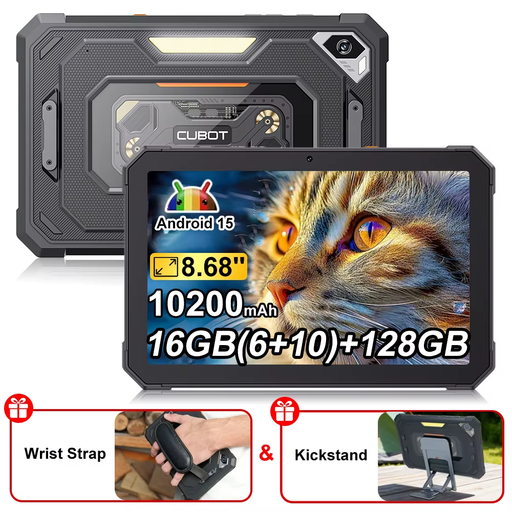
CUBOT Tab KingKong Mini, 128 GB
The compact screen size may suit you if you want to take local files with you and view them on the go.
The product information lists 128 GB of internal storage, expandable up to 1 TB via a TF card, an 8.68-inch 90 Hz screen and a 10,200 mAh battery. The title states Android 15.
Check that the storage expansion and apps you need are suitable for your project files.
Joybuy
 No image available
TECLAST T65 Plus, 256 GB
The 13.4-inch screen may suit you for reviewing photos in a spacious workspace.
The product title lists 256 GB of storage and a 13.4-inch 120 Hz screen.
The product information advises against use in dusty conditions and prolonged exposure to sunlight. This is an important limitation for use in the dunes.
Joybuy
 No image available
TECLAST P30T, 128 GB
This screen size may suit you if you want to take a tablet with you and view local files.
The product title lists a 10.1-inch screen and 128 GB of storage with MicroSD expansion. The instructions for this version advise against use in dusty environments.
Bear this limitation in mind when using it in the dunes, and check that your project files and apps work.
Joybuy
Frequently asked questions
Can I view photos from an SD card on an iPad without cloud storage?
Yes. You can connect an SD card using a card reader or adapter that’s compatible with your iPad model. Apple Support explains how to access compatible storage using the Files app. Also check the card’s format and that your project files open in the app you’ve chosen.
How can I keep project folders organised on a Galaxy tablet?
Samsung explains how to copy and move files using My Files, including to external storage if supported by the tablet and its connection. Test the transfer using a copy of a project folder before relying on the tablet for your entire workflow.
Do I always need to buy a memory card for a tablet with microSD?
Only if you want to use the extra storage. Xiaomi states that the expansion card for the Redmi Pad 2 Pro is sold separately. Check what’s included with each version.
What are my rights in the Netherlands if an online-purchased tablet doesn’t meet reasonable expectations?
According to ACM ConsuWijzer, the seller is responsible if a product breaks down too soon under normal use; a shorter manufacturer’s warranty doesn’t remove your statutory rights. ACM ConsuWijzer also explains that online purchases generally come with a 14-day cooling-off period after delivery, subject to applicable exceptions.


