
Reading diagrams at the table
You want to see fine details and captions without constantly moving the image or zooming in; screen space matters more to you than portability.


Choose a tablet based on how much room you need for diagrams and notes: a larger screen gives you more space to work, but is less convenient to carry around, according to the Consumentenbond. Also check which stylus comes with the exact model, and remember that the tablet itself won’t block out conversations around you. So treat any headphones you might buy as a separate decision.
You want to see fine details and captions without constantly moving the image or zooming in; screen space matters more to you than portability.
You study diagrams while other people are talking and want to consider your tablet choice separately from any decision about reducing background noise.
You write directly on diagrams or in your study notes, and want to know which stylus is included with the exact tablet model and bundle.
| What to consider | What should you check? | Who does this matter most to? |
|---|---|---|
| Keeping diagrams easy to read | Look at one of your own diagrams and check the labels, reflections and how much you can see at once. | If I want to read details without constantly zooming in, I choose based on my diagram and study space; around 36% of consumers say readability is their priority. |
| Concentrating around conversations | Consider whether you can find a quieter place; compare headphones separately for noise cancellation, comfort and voice clarity. The Consumentenbond highlights these features in headphones for studying or working. | If voices interrupt my studies, I want to assess how to manage the sound separately from the tablet specifications; around 29% of consumers prioritise dealing with background conversations. |
| Taking notes with a stylus | Check which stylus is compatible, what’s included in the exact bundle and whether your document app can save annotations. | If I want to write directly on diagrams, I first check which stylus is compatible with my tablet; around 21% of consumers prioritise annotating. |
| Portability and extras | Weigh the size against the screen space, and check the accessories and update information for the model you’re considering. | If I take my tablet out with me often, I also want to know which extras I’ll need and what update information is available; around 14% of consumers prioritise portability and other usage considerations. |
A larger screen can show more of a diagram, but a bigger tablet is less convenient to carry around, according to the Consumentenbond.
View one of your own diagrams at the size you’re considering, and think about how often you’ll actually take the tablet with you.
Stylus support doesn’t automatically mean one is included with every model. Apple lists the compatible Pencil types for the iPad (A16), while Samsung says the Galaxy Tab S10 Lite comes with an S Pen. Lenovo models may differ in what’s included in the bundle.
Check the exact model and bundle to see which stylus is included before choosing accessories.
The Lenovo Idea Tab Pro ZAE40105SE has a matte screen, while the ZAE40020SE is listed with a glossy screen. The model code and screen type can therefore matter.
Before choosing an alternative, compare the full model code, screen type and bundle contents with the manufacturer’s information.
The Galaxy Tab S10 Lite is one option to compare if you’re considering a tablet of around 11 inches with stylus support.
The iPad (A16) is an iPadOS option if the study apps you need work on that system.
The Idea Tab Pro is a larger Android tablet to consider if you mainly work with diagrams at a table.
These tablets are options to compare for viewing diagrams and taking notes. Check the screen details, bundle contents and stylus you need for each model.
 No image available
The listed 12.7-inch screen is an option to compare if you mainly view diagrams at a table; check whether the stylus you want is included with this model.
Product name lists: 3K screen, 144Hz, 8GB RAM, 256GB storage and Wi-Fi 6E.
 No image available
This model is listed with a stylus in the product name and may be worth comparing if you want to annotate diagrams; check exactly which stylus is included.
Product name lists: 12.1-inch screen, 2.5K, 8GB RAM and 256GB storage.
 No image available
The product name lists a stylus; check that the model described suits the way you annotate and the apps you use.
Product name lists: 12.7-inch 2K screen, 20GB RAM (8GB + 12GB virtual), 256GB storage and a stylus.
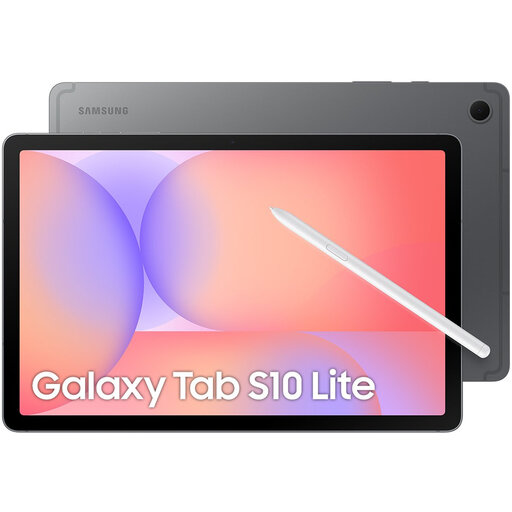 No image available
Samsung lists a 10.9-inch screen and an included S Pen for the Galaxy Tab S10 Lite; check the bundle for the exact model.
Product name lists: Wi-Fi, 128GB storage and a grey finish.
 No image available
The product name lists a stylus and stand; check which accessories are included in your chosen bundle if you want to annotate at a table.
Product name lists: 10.1-inch screen and 9GB RAM, made up of 3GB plus 6GB virtual expansion, with 64GB storage. The bundle also lists a case, English Bluetooth keyboard, Bluetooth mouse, stand, charger, data cable, earphones, OTG adapter cable and camera protection.
No. A larger screen can give you more room to view a diagram, but a bigger tablet is less convenient to carry around, according to the Consumentenbond. View one of your own diagrams in the light you usually study in.
No, stylus support doesn’t automatically mean one is included. Apple lists the Pencil types supported by the iPad (A16), while Samsung says the Galaxy Tab S10 Lite comes with an S Pen. Check the exact model and bundle.
First check that your document app can open the file format and save annotations. Then choose a stylus that’s compatible with your exact tablet, and try annotating a copy of a diagram to see whether the labels remain readable alongside your notes.
Don’t assume that a tablet’s specifications mean it will block out sound. If conversations distract you, assess any headphones separately for noise cancellation and comfort; the Consumentenbond covers these features in headphones for studying or working.
That depends on the operating system and whether the app is supported. Check that the apps you need are available for the tablet you choose and that you can use your existing purchases on it.