
The essay writer
You work on lengthy arguments and rebuttals while travelling, and are weighing up typing on a tablet against using a laptop. The Dutch Consumers’ Association notes that a laptop can be more convenient for word processing.


Choose based on your main task. If you’re writing long arguments, a tablet with a suitable keyboard is worth considering; for brief notes on sources, a stylus may be a better fit. The Dutch Consumers’ Association notes that a laptop can be more convenient for word processing. Also compare screen size, accessories and how comfortable the device is to use on your lap. Save any sources you’ll need on the way for offline access before you set off: NS offers Wi-Fi on almost all Intercity trains, but not every train.
You work on lengthy arguments and rebuttals while travelling, and are weighing up typing on a tablet against using a laptop. The Dutch Consumers’ Association notes that a laptop can be more convenient for word processing.
You read sources on the train and mainly make brief notes alongside passages. Apple and Samsung describe stylus support for their respective tablet models; check which stylus is compatible with or included with each configuration.
You want to be able to open existing sources and notes when there’s no Wi-Fi. NS says Wi-Fi is available on almost all Intercity trains, while Google explains how to save specific documents for offline use.
Start with your main task: typing long texts or annotating passages. Then check that the size and offline features suit your train journey.
| What to consider | What should you check? | Who is this important for? |
|---|---|---|
| Typing long arguments | Check that a keyboard fits the exact tablet model, what’s included in the box and whether the combination is comfortable to use on your lap. | If I’m writing out and rearranging long arguments during the journey, I want to be able to type comfortably. Around 33% of consumers put efficient typing first. |
| Annotating sources | Compare the supported stylus model with what’s included in the box, and test your annotation app with your own documents. | When reading source passages, I want to highlight quotations and jot down brief counterarguments with a stylus. Around 25% of consumers give annotating their top priority. |
| Portability and reading space | Try the tablet in your hand and on your lap; include any case or keyboard in your assessment. | If I’m taking the tablet on the train and using it on my lap, I want it to remain easy to handle. Portability matters most to around 25% of consumers. |
| Offline access | Save essential files locally or offline in the app in advance, then test them with Wi-Fi and mobile data switched off. | If I want to open sources and notes on the way without Wi-Fi, I prepare my files in advance. Around 17% of consumers put offline access first. |
A model may support certain styluses without one being included with every configuration or offer.
Check both the supported stylus model and what’s included in the package you’ve chosen.
You may need to buy a compatible stylus separately.
A larger screen gives you more room to read, but is less convenient to carry around. According to Lenovo, the Keyboard Pack’s availability varies by country or region.
Try the tablet, case and keyboard together in a position similar to working from a train seat.
A suitable keyboard or keyboard case may be sold separately.
NS offers Wi-Fi on almost all Intercity trains, but not every train. Offline access also depends on the app and on whether files have been made available in advance.
Save your sources for offline use before you set off, and check that you can open them without a connection.
An important specification could affect your choice, so compare it with the manufacturer’s information before weighing up the models.
Check that the information relates to exactly the same configuration.
The iPad (A16) is an option if you’re looking for a screen of around 11 inches and want to use compatible Apple Pencil or keyboard accessories.
The Galaxy Tab S10 Lite is an Android option for reading sources and making notes with a stylus.
The Idea Tab Pro is worth considering if you’d prioritise a larger screen for documents over having the smallest tablet possible.
The Surface Pro for Business 12-inch is an example of a Windows tablet for anyone who needs Windows productivity software.
This selection includes tablets for carrying and reading debate materials, with options for stylus annotations and Wi-Fi or mobile connectivity.
 Image unavailable
An option for carrying and reading debate materials on a tablet; check that the screen size and input method suit the way you work.
128 GB storage.
 Image unavailable
The Wi-Fi version may suit you if you want to read sources saved on the tablet in advance; test your documents and apps without a connection before you set off.
10.1 inch; WUXGA screen; 128 GB storage; 4 GB; Wi-Fi 5 (802.11ac); Android 14.
Image unavailable
An option if you may need a mobile connection on the go as well as material saved in advance; check separately what your apps require and whether you have a suitable data plan.
10.1 inch; WUXGA screen; 128 GB storage; 4 GB; 4G LTE; Wi-Fi 5 (802.11ac); Android 14.
 Image unavailable
The listed stylus and larger screen are suited to annotating source passages and viewing documents; consider whether this size is comfortable to carry on the train.
12.1 inch; 2.5K; 8 GB RAM; 256 GB storage; with stylus.
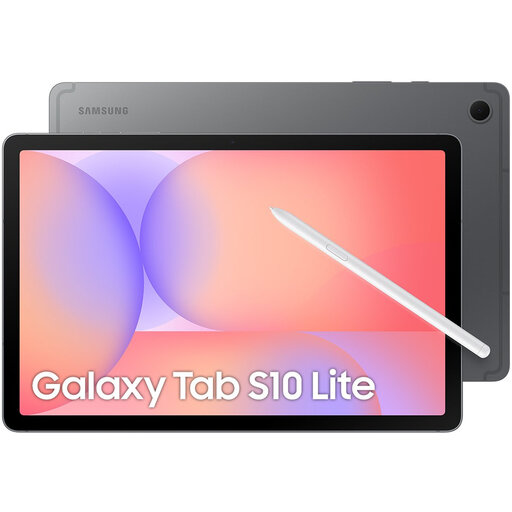 Image unavailable
The included S Pen makes this version worth considering if you want to make brief notes on sources; the Wi-Fi version doesn’t have a mobile data connection.
10.9-inch screen; 128 GB storage; S Pen included.
Not on every train: NS says free Wi-Fi is available on almost all Intercity trains. So save essential sources for offline use before you set off, and test that your chosen app opens them without a connection.
For Google Docs on Android, Google describes an ‘Available offline’ option for each file. Before you set off, check in the app that the files you need appear under ‘Offline’; other apps may work differently.
It depends on the exact model and package. Samsung lists an S Pen included with the Galaxy Tab S10 Lite; Apple specifies which Pencil models the iPad (A16) supports and lists the Magic Keyboard Folio as an accessory. Check separately what’s included with the configuration you choose.
According to the Dutch government, consumers buying at a distance are often entitled to a 14-day cooling-off period; exceptions and the seller’s status are relevant. There is no fixed general warranty period for statutory guarantees in the Netherlands: if a product is faulty, contact the seller.