What should you look for when choosing?
First decide whether you’ll mainly be reading, annotating by hand or working on longer pieces of writing. The Consumentenbond points out that extra-large tablets are less convenient to carry around.
| What to consider |
What should you check? |
Who should pay particular attention? |
| Marking feedback |
Check that your feedback app supports annotations and that the pen is included with the exact model. |
If I want to mark feedback and write short notes, I’ll check the pen and app. Around 36% of consumers prioritise annotation. |
| Comparing documents |
View a representative document at the screen size and check whether the app offers the side-by-side layout you want. |
If I want to read feedback alongside my own work, I’ll weigh screen space against portability. Around 29% of consumers prioritise space for reading and comparing. |
| Typing and software |
Ask which app, browser or desktop software your course requires and check that it works on the system you’ve chosen. |
If I’m turning comments into longer pieces of writing or need specific software, I’ll check the system requirements first. Around 21% of consumers prioritise typing or specific software. |
| Accessories and long-term use |
Check what’s in the box, which accessories you’ll need, and what support and repair options are available. |
If I want to use a tablet for a long time, I’ll want to know which accessories and services I’ll need. Around 14% of consumers prioritise accessories and long-term use. |
Tablets at Joybuy
These tablets are intended for reading and working with course feedback. Check that the apps and accessories for each model suit your needs.
 No image available
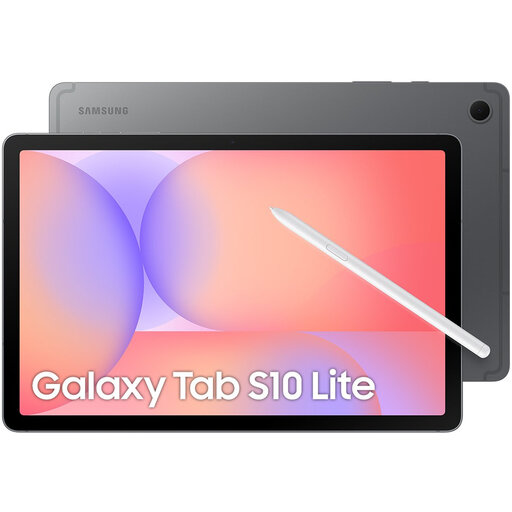
Samsung Galaxy Tab S10 Lite, Wi-Fi, 128GB, Grey
A good fit for reading and handwritten annotations if your feedback app supports Android. Samsung lists a 10.9-inch screen and an included S Pen for the Galaxy Tab S10 Lite.
View at Joybuy
 No image available
Apple 11-inch iPad Air (M4), Wi-Fi, 128GB, Blue (2026)
An option for reading feedback on an 11-inch iPadOS tablet. Before buying, check that it works with your course’s feedback platform and any pen setup you may need.
Model as listed in the product name: M4, Wi-Fi and 128GB.
View at Joybuy
 No image available
Samsung Galaxy Tab A11 Plus, 11-inch, 128GB, Wi-Fi, Grey
Worth considering for reading feedback if the apps you need work on Android.
Model as listed in the product name: 11-inch, 128GB and Wi-Fi.
View at Joybuy
 No image available
Lenovo IdeaTab, Dimensity 6300, 8GB, 128GB, 11-inch IPS
An Android tablet worth considering for reading feedback. Check that your app works and that the pen you want is included with this model.
Model as listed in the product name: 11-inch IPS screen, 90Hz, 500 nits and Android 15.
View at Joybuy
 No image available
TECLAST P50, 11-inch Android 16, 128GB ROM
An option for reading course feedback. Check that the feedback platform you need works on this device.
Model as listed in the product name: 11-inch IPS screen, 90Hz, 128GB ROM and 4G LTE Dual SIM.
View at Joybuy
Frequently asked questions
Do I need a pen to view course feedback?
No, not if you only want to read the text. If you want to annotate documents by hand, check that your feedback app supports this and that the right pen is included with the model. Apple lists compatible Apple Pencils for the iPad (A16), while Samsung says the Galaxy Tab S10 Lite comes with an S Pen.
Can a tablet replace my laptop when working with feedback?
It depends on how much typing you do and which software your course requires. The Consumentenbond says a laptop is more convenient for word processing; the Surface Pro has an optional keyboard. Before buying, check that the software you need works on your chosen device.
What should I check when using course feedback in the library?
Test access to the feedback platform, document display and annotation features before relying on the tablet. If the feedback contains other people’s personal data, follow your educational institution’s rules on access and storage. The Dutch Data Protection Authority highlights the need to handle educational data carefully.
What are my rights when buying a tablet online in the Netherlands?
When a consumer buys online, they generally have a statutory cooling-off period of up to 14 days after delivery, with some exceptions, according to ACM ConsuWijzer. In addition, under the statutory guarantee, the seller must put right a product that, under normal use, doesn’t meet what you could reasonably expect. This isn’t automatically limited to a fixed manufacturer’s warranty period.
Does a tablet need an EU energy label in the Netherlands?
That depends on the product category. The European Commission says the energy labelling rules have applied since 20 June 2025 to slate tablets covered by the regulations, and also lists product types that are excluded, including tablet computers. Check whether the specific model is covered and, if it is, which label applies.


