For continuous text that you’ll be reading throughout the journey, a compact tablet is an obvious choice. For illustrated guides and PDFs with a fixed layout, a larger screen gives you more room to view each page, though it’s less easy to hold. The Consumers’ Association of the Netherlands says small tablets are handy for travelling. Google Play Help explains how to read books offline after downloading them to Google Play Books; check separately whether this works with your own guide or app.
Which tablet is right for you?
Readers who hold their tablet
If you mainly read continuous text during the journey and hold your tablet for long periods, a more compact size may suit you better. The Consumers’ Association of the Netherlands says small tablets are handy for travelling.
Readers of illustrated guides
If you use maps, images or PDFs with a fixed page layout, you may benefit from a larger screen. The Consumers’ Association of the Netherlands notes that many PDFs are laid out for A4 pages.
Travellers who want to read offline
If you can’t rely on a consistent internet connection during the journey, it’s worth downloading your guide in advance and testing it in your reading app. Google Play Help explains how to read books offline after downloading them to Google Play Books.
What should you look for when choosing?
First, consider your guide’s layout and how you want to hold your tablet during the journey. Then decide whether you’ll download content in advance or want to access new content while travelling.
| What to consider |
What should you check? |
Who should prioritise this? |
| Portability |
Compare the screen size and weight of the exact model; if possible, try your own guide on a screen of that size. |
If I’m holding the tablet for a long time during the journey, a compact size matters more to me than a large viewing area. Around 36% of consumers prioritise portability. |
| Maps and PDFs |
Open a representative page and assess the text, maps and how much you need to zoom in. |
For a guide with maps or a fixed page layout, I want to see the whole page clearly, even if the tablet is less comfortable to hold in one hand. Around 29% of consumers prioritise having enough room to read pages like these. |
| Offline access |
Check whether your reading app supports downloads and, before setting off, test that the right guide opens without an internet connection. |
If I can’t rely on internet access during the journey, I want to be able to open my saved guide. Around 21% of consumers prioritise offline access. |
| Costs and existing apps |
Check the full model specification, included accessories, any mobile data requirements and whether the apps you already use are available. |
If you want to understand the total cost of the device, connection and existing apps, compare these points in advance. Around 14% of consumers prioritise weighing up these costs. |
Common mistakes
-
Comparing screen sizes alone
A PDF with a fixed layout or lots of images may require you to zoom in more often on a smaller screen. A larger screen, on the other hand, is less comfortable to hold for long periods.
Open a representative page on the size you’re considering, then weigh up how clearly you can view it against how you want to hold the tablet during the journey.
-
Assuming every guide is available offline
To read offline, the book must actually have been downloaded. The offline feature described by Google Play Help applies to books in Google Play Books; other guide apps may work differently.
Download the specific guide in advance and test that it opens without an internet connection.
-
Treating Wi-Fi and LTE models as the same product
A tablet may be available in separate Wi-Fi and LTE models. The accessories included may also vary by market and configuration.
Compare the full model number, connectivity and what’s included with the specific model you’re considering.
Brands to consider
Samsung
The Galaxy Tab A11 is available in compact Wi-Fi and LTE models.
- For the 8.7-inch models shown, Samsung lists a screen resolution of 1340 × 800 pixels and microSD expansion.
- Samsung claims the screen is visible in sunlight; this isn’t an independent test of readability through a coach window. Check the full model number too.
Lenovo
The Tab One is a compact Android option; the model and bundle may vary.
- Lenovo lists the Tab One as weighing around 320 grams and having a microSD slot.
- Lenovo says included accessories may vary by market and configuration, so check what comes with the model you’re considering.
Apple
The 11-inch iPad (A16) gives you more screen space; the iPad mini (2024) is a separate compact model.
- For the Wi-Fi version of the 11-inch iPad (A16), Apple lists a weight of 477 grams and 128 GB as the smallest storage capacity mentioned.
- Don’t confuse the iPad mini (2024) with the newly announced model: Apple gives 6 November 2026 as its availability date.
Xiaomi
The Redmi Pad SE 8.7 is a compact Android product range.
- For the model described globally, Xiaomi lists an 8.7-inch LCD screen and microSD support.
- Xiaomi warns that configurations may vary by region and that external storage isn’t for apps. Check the exact model you’re considering.
Tablets at Joybuy
These Joybuy products include compact Wi-Fi and LTE tablets, as well as models with 10.1- or 11-inch screens, so you can choose between easy-to-hold reading and more space for your guides.
 No image available
Lenovo Tab 4G, 10.1-inch, 128 GB, grey
The larger screen is a good fit if you want more room to view pages and access new content while travelling.
10.1-inch; 128 GB storage; 4 GB RAM; 4G LTE; Wi-Fi 5; Android 14. LTE requires a suitable mobile connection.
Joybuy
 No image available
Lenovo Tab One 8.7-inch, Wi-Fi, 4 GB RAM, 128 GB, Luna Grey
This compact Wi-Fi model is a good fit if you want to read a guide saved in advance while holding the tablet.
8.7-inch; Wi-Fi; 4 GB RAM; 128 GB storage.
Joybuy
 No image available
Samsung Galaxy Tab A11 X135, 8.7-inch, LTE, 4 GB RAM, 64 GB, grey
This compact model is a good fit if you want a tablet that’s easy to hold and lets you access new guides while travelling.
8.7-inch; LTE; 4 GB RAM; 64 GB storage. LTE requires a suitable mobile connection.
Joybuy
 No image available
Samsung Galaxy Tab A11 Plus, 11-inch, Wi-Fi, 128 GB, grey
The 11-inch size is a good fit if you want to view maps or PDFs with a fixed layout on a larger screen.
11-inch; Wi-Fi; 128 GB storage.
Joybuy
 No image available
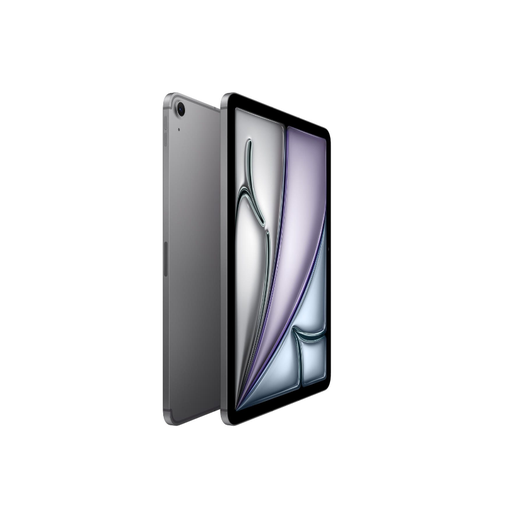
Apple iPad Air 11-inch (M3), Wi-Fi + Cellular, 512 GB, Space Grey
The 11-inch screen is a good fit if you want more room to view pages and the option of using a mobile connection.
11-inch; Wi-Fi + Cellular; 512 GB storage. A suitable mobile connection is required.
Joybuy
Frequently asked questions
Do you need a tablet with a SIM card to read on a coach?
Not if you can download your guide in advance and open it offline afterwards. Google Play Help explains how this works with Google Play Books; check separately whether it works with your guide or app. An LTE model is most useful if you want to access new content while travelling and have a suitable mobile connection.
How do you get your tablet ready for the journey?
Download the guide in advance and open it without an internet connection before setting off to check that the right file works. If needed, keep important personal files in a backup too.
Can you return a tablet bought online in the Netherlands, and what if it breaks too soon?
For a standard online consumer purchase in the Netherlands, you generally have a statutory cooling-off period that, according to ACM ConsuWijzer, ends 14 days after delivery. This is separate from your right to a product that works as you could reasonably expect under normal use: if it develops a fault too soon, the seller must offer an appropriate remedy free of charge, according to ACM ConsuWijzer. This is not the same as a fixed statutory warranty of exactly two years.


