
Student with several devices
Charges a tablet alongside, for example, a phone or earbuds at a dedicated desk space, and wants to know how many ports and how much combined power are needed.


If you regularly charge a tablet and other devices together in one place, a desktop charging station with several ports could be useful. If you only need to charge a tablet, a smaller charger may be enough. Check your tablet’s connection and charging requirements, and look at the power available per port when charging several devices at once. Before buying, also check the required safety information and CE marking for the specific mains charger.
Charges a tablet alongside, for example, a phone or earbuds at a dedicated desk space, and wants to know how many ports and how much combined power are needed.
Wants to charge a tablet without taking up much room on the desk, and is comparing a compact wall charger with a charging station that has a mains cable.
Primarily needs a charger that works with their tablet and wants to avoid letting extra connections or the stated total power dictate their choice.
Choose this if: you regularly charge your tablet and other devices together at a dedicated desk space.
Bear in mind: the total power doesn’t tell you how much power each port gets. Also check the cable length and where you’ll put the charger.
Choose this if: you usually connect your tablet and no more than a couple of other devices, or want to take the charger with you.
Bear in mind: the available power may be shared when charging several devices at once, and a wall charger doesn’t give you a separate charging point on your desk.
Choose this if: you only connect a tablet and it supports USB-C Power Delivery.
Bear in mind: you can’t connect a second device directly at the same time, and the maximum wattage doesn’t guarantee that every tablet will use that much power.
| What to consider | What should you look for? | Who is this important for? |
|---|---|---|
| Compatibility | Check your tablet’s connection, cable and charging requirements, and compare them with the output you’ve chosen. | If I’m looking for a charger for my tablet, I want to be sure that the connection and charging technology are compatible. Around 36% of consumers prioritise tablet compatibility. |
| Charging several devices at once | Count the devices you’ll connect at the same time and check how power is shared across that combination of ports. | If you charge your tablet alongside, for example, a phone, you’ll want enough suitable ports and power. Around 29% of consumers prioritise charging several devices at once. |
| Desk space | Check where the socket is, how much space the charger takes up and the cable length for that model. | If I have limited desk space, I want a charging setup that works with my desk and socket. Around 21% of consumers say the layout of their charging space is their main consideration. |
| What you need to buy | First check whether your existing charger and cable will do the job, and see what’s included with the new model. | If I mainly charge one tablet, I don’t want to pay for ports I won’t need. Around 14% of consumers first check what they actually need to buy. |
Electrical appliances placed on the EU market must meet the applicable requirements and carry the required CE marking, according to the Dutch government. Check this for the specific mains charger; a general product description doesn’t automatically tell you whether the item you’re buying carries the marking.
A multi-port charger may share its power between ports when you connect several devices. So the maximum total output alone won’t tell you how much power your tablet will receive.
Check the specifications for the combination of ports you’ll actually use and compare them with your tablet’s charging requirements.
The USB-C ports on a hub may be intended for data or pass-through power, and may not charge a tablet and phone directly from a mains socket.
Check whether the product itself connects to mains power and what each port is designed for.
You may need a separate power adapter and cable to use a hub for charging.
According to the Dutch Fire Service, chargers and devices need room to release heat. Damaged cables must not be used.
Charge your device in a clear space, not under a pillow or duvet, and replace any damaged cables.
The Nexode Desktop GaN Charger 65W we reviewed has five ports and is designed for a dedicated charging spot for several USB devices.
The Maxo models we reviewed include a compact 65W charger with two USB-C ports and a desktop charger with four USB-C ports.
The Prime 67W Charger A2669 we reviewed is a compact charger with two USB-C ports and one USB-A port.
The CH-2022 we reviewed is a USB-C charger with one output, for charging a compatible device on its own.
These products are designed for a dedicated charging spot on or near a desk, from multi-port charging stations to compact chargers and a tablet dock. Before buying, check your tablet’s connection and charging requirements, the specifications for using several ports at once, and the required safety information for the specific mains charger.
 No image available
For a dedicated spot where you want to connect your tablet and other devices at the same time.
320 W according to the product name; two integrated retractable USB-C cables and four extra ports. The product description says it can charge up to six devices at once.
 No image available
For a dedicated desk space where you want to connect a tablet and other USB devices.
Five mains sockets and four USB ports, including two USB-C and two USB-A ports. The product information states 35 W PD and a 2 m cable.
 No image available
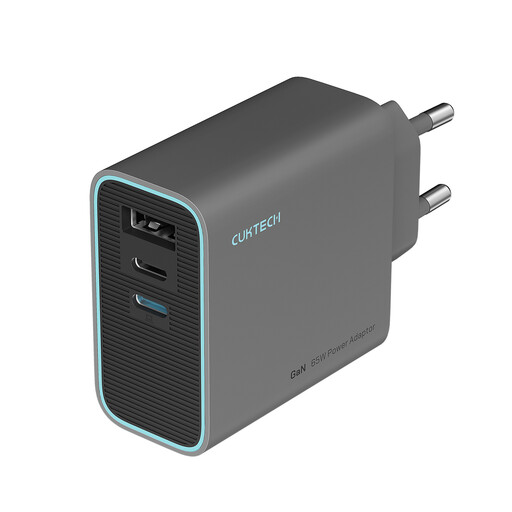
A compact option if you want to connect a tablet and other devices, and be able to put the charger away or take it with you.
Three ports and up to 65 W total according to the product information; the plug is foldable. Check how power is shared when charging several devices at once.
 No image available
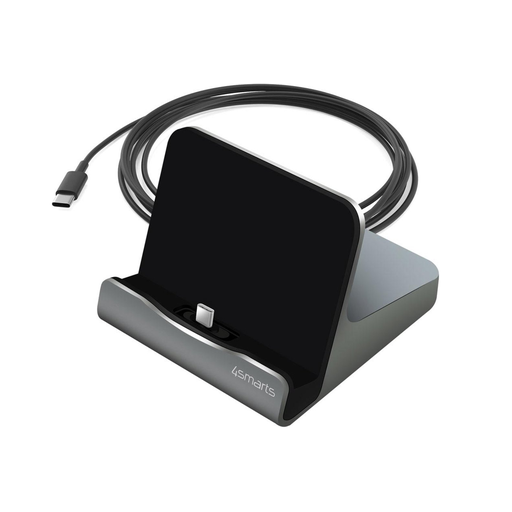
For anyone who wants to place their tablet on a stand while charging it, for example on a desk.
The product information states charging at up to 60 W via one USB-C connection and data transfer at up to 480 Mbps. This isn’t a multi-port charging point for several devices at once.
 No image available
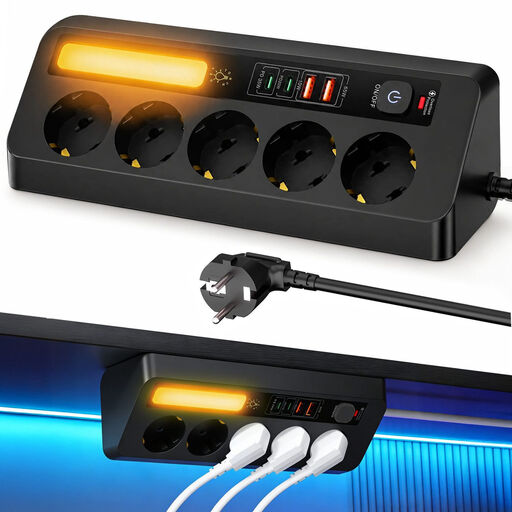
For a dedicated desk space where you want to connect USB devices and keep cables organised around your desk.
Two 20 W USB-C ports and one 18 W USB-A port according to the product specifications. The socket attaches with a clamp, so check that it will fit the edge of your desk.
Not every tablet you already own needs to have USB-C. The EU’s common charger rules have applied since 28 December 2024 to the new tablets covered by the rules that are placed on the market. Check the actual connection and charging requirements for your tablet.
A multi-port charger may share its available power between the ports in use. Check the specifications for that exact combination, and make sure the cable and connection meet your tablet’s charging requirements.
Place the charger and tablet somewhere clear where heat can escape, not under a pillow or duvet. The Dutch Fire Service advises against using damaged cables; replace them before charging again.
For a standard online consumer purchase, you generally have a statutory cooling-off period of up to 14 days after delivery, subject to applicable exceptions. According to ACM ConsuWijzer, Dutch statutory guarantee rights depend on what you can reasonably expect from the product; they are not automatically limited to a two-year manufacturer’s warranty.
Check that the specific charger carries the required CE marking and review the product information. The Dutch government states that electrical appliances placed on the EU market must meet the applicable requirements. The marking doesn’t tell you whether every tablet and cable combination will achieve the charging speed you want.