
Group with several devices
This group wants to charge a tablet and other devices in one place. Compare the number and type of ports, and how the charger distributes power across them.


If you’re charging other devices in your holiday cottage too, choose a charging station with enough suitable ports and check how the total power is shared when you connect multiple devices. For a tablet alone, a smaller adapter may be enough. Check the connection and cable for your tablet, and place the charger in a clear, suitable spot near a socket.
This group wants to charge a tablet and other devices in one place. Compare the number and type of ports, and how the charger distributes power across them.
This holidaymaker wants to charge their tablet in a clear, suitable spot. Check whether a power cable gives you enough reach, or whether a wall charger would be a better fit for the socket.
This traveller wants to take only what they need. Check your tablet’s connection, the right cable and the available charging options before choosing an adapter.
A good fit if: you want to charge your tablet and other devices together in one place. According to their manufacturers, the UGREEN and Belkin models mentioned have a 2 m power cable.
Bear in mind: the stated total power is not the power available per port when you connect multiple devices.
A good fit if: you want to take less with you and have an easily accessible socket. Anker specifies two USB-C ports and one USB-A port for the Prime 67W A2669.
Bear in mind: Anker lists different maximum power outputs when using one, two or three ports. Check the combination you plan to use.
A good fit if: you mainly want to charge an iPad and perhaps one other USB-C device. Apple says the 35 W adapter reviewed has two USB-C ports that can be used at the same time.
Bear in mind: Apple says the charging cable is sold separately, so check whether you already have a suitable one.
| What to consider | What to look for | Who should pay particular attention? |
|---|---|---|
| Charging several devices at once | Count the USB-C and USB-A ports you need, and check the power available when they’re used at the same time. UGREEN, Belkin and Anker list power outputs for the models mentioned; the total isn’t automatically available from each port. | If I also want to charge phones in the cottage, I want to know whether all the plugs will fit and how the power is shared. Around 31% of consumers prioritise charging multiple devices at once. |
| Finding a convenient place to charge | Check where a suitable socket is, how long any power cable is and whether the charger can stand clear. According to their manufacturers, the UGREEN and Belkin desktop models mentioned have a 2 m cable. | If the socket isn’t near the spot I want to use, I want to be able to plan my charging setup accordingly. Around 25% of consumers prioritise where they charge. |
| Charging safely during your stay | Check the charger and cable for damage, make sure heat can escape and follow the instructions. The NVWA states that CE marking is mandatory for electrical products on the Dutch market; this marking is not an independent test of an individual product. | If I’m using a charger in an unfamiliar cottage, I want to be able to place it in a clear, suitable spot. Around 25% of consumers prioritise safe charging. |
| Taking the right connection with you | Check your exact tablet model, its connection and the right cable. EU rules for new tablets covered by the legislation don’t tell you which connection a tablet you already own has. | For a trip with just my tablet, I want a suitable solution without unnecessary extra connections. Around 19% of consumers prioritise the right connection and a straightforward solution. |
The total maximum output and the way power is distributed can change when you use more ports. So a single total figure doesn’t tell you how much power each connected device will receive.
Check the stated power distribution for the combination of ports you plan to use during your stay.
The position of the socket partly determines where you can place a desktop charger with a power cable. The charging cable for the Apple 35 W adapter reviewed is sold separately.
Check the location, available space, included accessories and your tablet’s connection beforehand.
For the Apple adapter mentioned, check whether you already have a suitable charging cable.
EU rules for new tablets covered by the legislation don’t change the connection on a tablet you already own.
Look up the connection and charging specifications for your exact tablet model before choosing a charger or cable.
The Nexode Desktop GaN Charger 65W, 5-Port reviewed is a desktop option for anyone who wants several USB connections in one place.
The BoostCharge Pro WCH010 reviewed is a desktop option with USB-C and USB-A connections for different devices.
The Prime 67W A2669 reviewed is a compact multi-port wall charger for anyone who wants to pack light.
The 35 W mains adapter with two USB-C ports reviewed is an option for an iPad and perhaps one other device.
This selection includes USB-C adapters for one tablet and multi-port chargers for a tablet and other devices. For each model, check that the connection, cable and power distribution suit the way you plan to use it.
 No image available
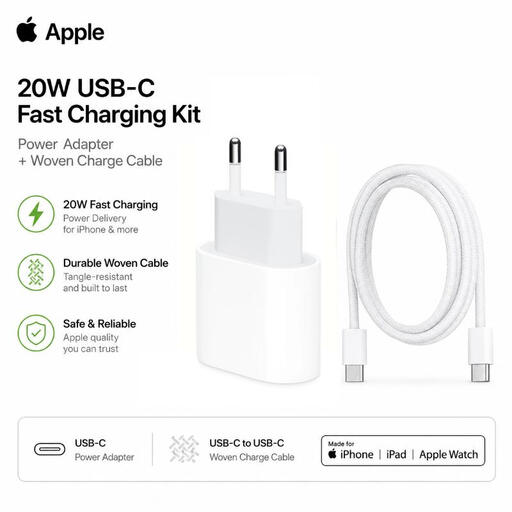
The product description lists this charging kit for iPad and other compatible USB-C devices.
Includes a 1 m braided USB-C cable.
 No image available
The product description lists tablets as compatible devices; check that the charger meets your tablet’s charging needs.
The bundle includes a 90 cm USB-C to USB-C cable. The product name specifies 240W for the cable.
 No image available
The product description says it can charge up to six devices at once; check the power distribution for the devices you connect.
The product description lists two USB-C ports, two USB-A ports and two integrated 70 cm retractable USB-C cables.
 No image available
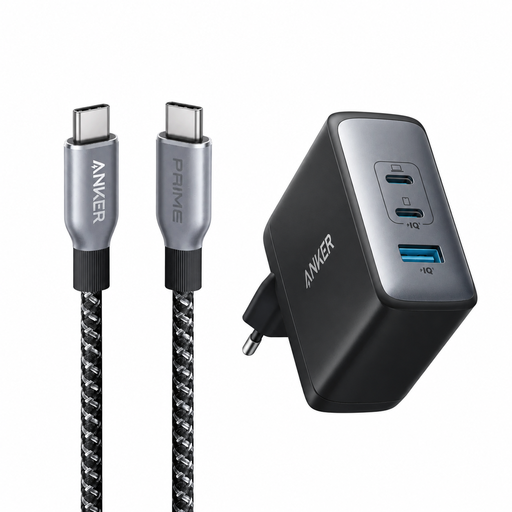
The product description lists tablets as compatible devices and says you can connect up to three devices at once.
The charger has two USB-C ports and one USB-A port; check which combination you plan to use.
 No image available
The product description lists tablets and other devices; the charger has a Europlug (Type C).
The charger has two USB-C ports, one USB-A port and a maximum output of 65 W. Charging cables are not included.
No, check the connection on your own tablet. According to the European Commission, since 28 December 2024, EU rules apply to new tablets covered by the legislation and sold on the EU market; they don’t change the connection on a tablet you already own.
Place the charger in a clear spot so heat can escape, and don’t charge your tablet under a pillow or duvet. Brandweer Nederland also advises against using damaged cables or chargers; make sure you follow the instructions too.
Check whether a suitable cable is included: Apple says the cable for the 35 W adapter reviewed is sold separately. According to the Dutch government, when you buy online from a business, you’ll often have a 14-day cooling-off period. If there’s a problem with a product, the seller must provide a solution, according to the Dutch government.
According to the Netherlands Food and Consumer Product Safety Authority, CE marking is mandatory for electrical products covered by the relevant rules. The marking is not proof that every individual product has undergone a mandatory independent inspection.