If you want to read a recipe while cooking, choose a stable stand or a dock that fits your tablet’s port and case. If your main priority is charging several devices at once, compare the power output per port and remember that a separate charger won’t hold your tablet upright. Keep your charging area dry and leave space around the charger so it can dissipate heat.
Who is a tablet charging spot on the kitchen worktop for?
Following a recipe at the worktop
You want to keep your tablet upright and easy to read while it charges as you cook. The position of the USB-C port and the space for a case can determine whether a dock fits; 4smarts describes a dock connector positioned in the centre of the bottom edge.
Families charging several devices
You want to charge a tablet and, for example, a phone at the same time. The number of ports alone doesn’t tell you how much power each port provides when several devices are connected.
Choosing a spot with limited dry space
You’re looking for somewhere the charger and cable can stay dry, with enough space for the charger to dissipate heat. The Fire Service advises placing chargers in an open space.
What should you look for in a tablet charging spot?
| What to consider |
What to check |
Who is this important for? |
| A dry, clear space |
Choose a spot away from water and place the charger in an open space; the Fire Service advises leaving room for heat to dissipate. |
If water could get onto the worktop, I want to keep the cable and charger dry and avoid enclosing the charger. Around 33% of consumers prioritise a dry charging spot. |
| Screen visible while charging |
Check the viewing angle, stability, port position and fit with the case. IKEA says the HAVREHOJ is adjustable in height and angle. |
If I want to follow a recipe while cooking, the tablet needs to be easy to read while it charges. Around 25% of consumers give priority to being able to use their device visibly. |
| Several devices charging at once |
Check the power output per port when charging several devices at once; IKEA states that the SJÖSS model reviewed provides up to 22 W per port when both ports are in use. |
If I want to charge another device as well as my tablet, I look at how the power is shared, not just the number of ports. Around 25% of consumers prioritise simultaneous charging. |
| Connection and charging requirements |
Check the exact tablet model, the position of its port, the cable and the charging method it requires; 4smarts describes the VoltDock as having a USB-C port in the centre of the bottom edge. |
If I’m considering a dock with a fixed connector, I want to know in advance whether it will fit my tablet with its case on and whether the power supply is suitable. Around 17% of consumers give compatibility top priority. |
Common mistakes when choosing a tablet charger
-
Assuming the maximum wattage is your tablet’s charging speed
The power output can change when you connect a second device, and your tablet also determines which charging methods it supports.
Check how power is shared for the way you plan to use the charger, and look up the requirements for your exact tablet model.
-
Assuming a stand is a complete charger
A separate tablet stand doesn’t automatically come with a mains charger or cable. IKEA says the SJÖSS charger model reviewed doesn’t include a USB-C cable.
Before buying, check the stand, power supply, cable and package contents separately.
With a separate setup, the stand, charger and cable may all be separate items; check which ones you already have.
-
Choosing a dock based only on screen size
With a dock that has a fixed USB-C connector, the position of the port and whether the dock fits with a case on also matter.
Compare your tablet’s connection, including with its case on, with the dock’s description.
-
Choosing a charging spot without considering moisture or heat
A damp spot or a charger that can’t dissipate heat isn’t in line with the recommended way to use chargers.
Choose a dry spot, place the charger in an open space and don’t use a damaged cable.
Brands to consider
4smarts
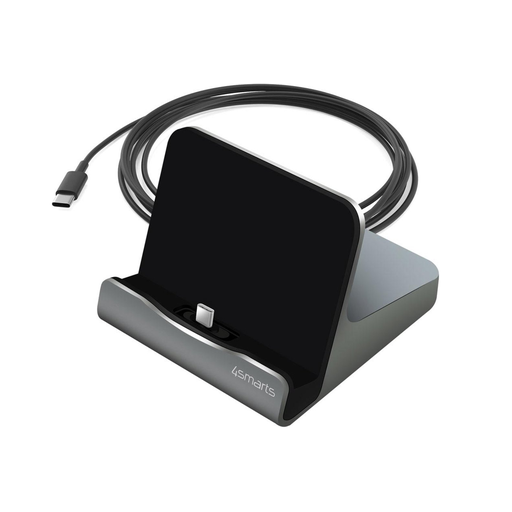
4smarts describes the VoltDock Tablet USB-C 60W as a dock that holds a compatible tablet upright and charges it via a separately connected USB-C power supply.
- The manufacturer lists a USB-C connector in the centre of the bottom edge, adhesive adapters for some tablet-and-case combinations, and a 110 cm cable.
- Check that it fits your tablet and case, and choose a suitable power supply. The stated 60 W is this model’s maximum output.
IKEA
IKEA describes HAVREHOJ as a separate tablet stand and SJÖSS as a separate USB-C charger; together, they can provide an adjustable viewing angle and wired charging.
- According to IKEA, the HAVREHOJ’s height and angle are adjustable. IKEA lists USB-C PD 3.0 and PPS for the SJÖSS.
- These are two separate products. For the SJÖSS model reviewed, IKEA lists up to 22 W per port when both ports are in use; a USB-C cable isn’t included.
Belkin
Belkin presents the BoostCharge Pro WCH013 model reviewed as a two-port USB-C wall charger for anyone who wants to charge two devices from one socket and provide their own stand.
- Belkin lists up to 65 W for this model when using one port, or 45 W plus 20 W when both ports are in use, and specifies PD 3.0 and PPS.
- This is a wall charger with no integrated tablet stand. The stated charging speed for phones doesn’t automatically apply to tablets.
UGREEN
UGREEN describes the Nexode Pro 65W as suitable for a combination of USB-C devices and a device with a USB-A charging cable.
- UGREEN lists two USB-C ports, one USB-A port and a maximum output of 65 W for this model.
- A tablet stand isn’t included. The maximum output alone doesn’t tell you how much power each port provides when charging several devices at once.
Products on Joybuy
These products include a dock with an integrated tablet stand and separate multi-port USB-C chargers. With a separate charger, you’ll need a stand if you want to keep your tablet visible while it charges.
 No image available
4smarts VoltDock Tablet USB-C 60W, gunmetal
A good choice if you want to keep your tablet upright and charging while you cook.
The fixed USB-C connector is designed for a tablet with a port in the centre of the bottom edge; check that it fits with a case on, too. The manufacturer states a maximum of 60 W. You’ll need to connect a suitable USB-C power supply separately.
Joybuy
 No image available
Lenovo Dual USB-C 65W GaN Charger, EU plug, 1.5 m cable
An option if you want to charge a tablet and a second USB-C device, and already have a separate tablet stand.
The product name lists two USB-C ports and an included 1.5 m USB-C cable. The charger doesn’t have an integrated tablet stand.
Joybuy
 No image available
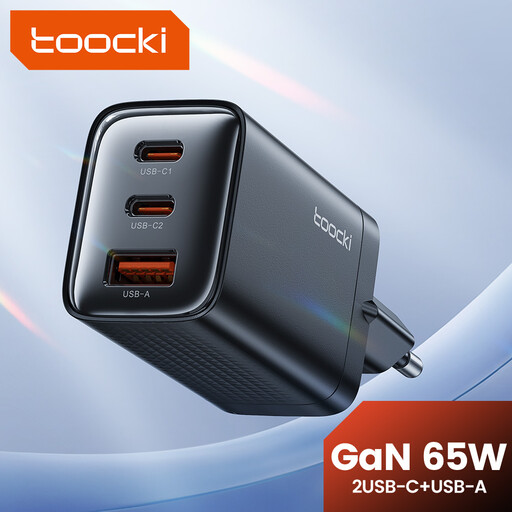
toocki 65W GaN USB C Wall Charger Black, 3-Port
A good fit for a charging spot where you want to connect several devices and don’t need the tablet to sit on the charger itself.
The product name lists three ports and a maximum output of 65 W. It doesn’t have an integrated tablet stand; check your tablet’s charging requirements.
Joybuy
 No image available
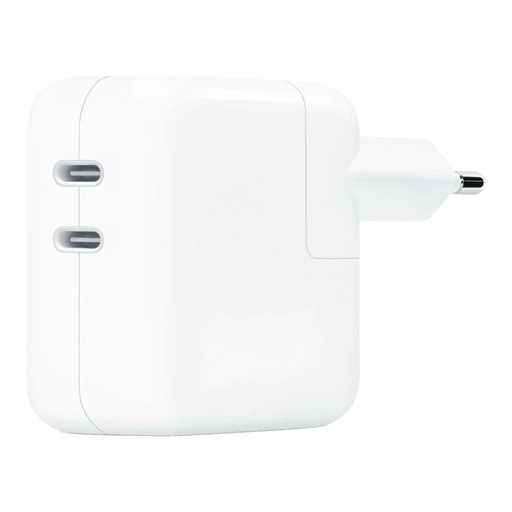
Original Apple 35W Dual Power Adapter, 2 USB-C ports, white
A separate adapter for anyone who wants to charge a tablet and a second device and provide their own stand.
The product name lists two USB-C outputs and a power rating of 35 W. The adapter doesn’t have an integrated tablet stand.
Joybuy
 No image available
Fairphone Dual USB-C + USB Fast Charger 65W Black
Worth considering if you want to charge several devices and can put your tablet on a separate stand.
The product name lists USB-C and USB connections. No cables are included, so check which cables your devices need. The charger doesn’t have an integrated tablet stand.
Joybuy
Frequently asked questions
Will a USB-C dock fit every tablet?
No. Check the type and position of the connector, and whether your case will fit. 4smarts describes the VoltDock connector as USB-C, positioned in the centre of the bottom edge.
Will I need a cable or power supply with a stand or dock?
It depends on the combination you choose. For the SJÖSS model reviewed, IKEA says a USB-C cable isn’t included; the VoltDock needs a USB-C power supply connected separately. Check what’s included and your tablet’s charging requirements.
Can a multi-port charger charge two devices at the same speed?
Not necessarily: the power available per port can change when you connect a second device. For the SJÖSS model reviewed, IKEA lists up to 45 W when using one port and up to 22 W per port when both ports are in use. Also check which charging method your tablet supports.
How should I set up a charging spot on the kitchen worktop?
Choose a dry spot and place the charger in an open space so heat can escape; don’t use a damaged cable. The Fire Service advises leaving space around the charger. Also follow the instructions for your specific charger.
Does the USB-C rule mean my existing tablet will fit a USB-C dock?
No. The Dutch government describes the USB-C requirement for new tablets placed on the market from 28 December 2024. This doesn’t tell you whether an existing tablet has USB-C or whether its connector is in the right place for a specific dock.


