Who is this relevant to?

Tablet user with a power strip that’s already full

Do you need to plug in devices with standard plugs as well as your tablet? First, work out whether you need extra sockets. Belkin Netherlands and brennenstuhl describe power strips with USB as an option for this kind of set-up.

User with several USB devices

Do you want to charge a tablet and other USB devices at the same time from a single socket? Check that there are enough suitable ports and how the power is distributed. IKEA Netherlands and Belkin Netherlands provide specifications for various multi-port chargers.

User who wants to charge their tablet quickly

Want to minimise the impact on your tablet’s charging power when charging several devices at once? Compare your tablet’s charging requirements with those of the charger, including when multiple ports are in use. IKEA Netherlands and brennenstuhl highlight things to consider around port allocation and Power Delivery.

What should you look for?

What to consider What to look for Who is this important for?
Standard sockets Count how many devices with standard plugs need to stay connected. I want to plug in devices with standard plugs as well as my tablet. Around 36% of consumers with too few sockets say extra standard sockets are their top priority.
Charging USB devices at the same time Check that the number of USB-C and USB-A ports suits your devices and cables. I charge my tablet alongside other USB devices and need suitable ports for them. Around 29% of consumers in this situation say being able to charge USB devices at the same time is their top priority.
Charging power for your tablet Compare the charging protocol and power available per port when used simultaneously with your tablet and cable requirements. I want to know how much power my tablet can actually use, even when another port is occupied. Around 21% of consumers say a charging speed suited to their tablet is their top priority.
Position and reach Check the cable length and leave enough space around the charger. I want to charge my devices somewhere convenient without covering the charger. Around 14% of consumers say having an accessible place to charge is their top priority.

Common pitfalls

  • Assuming the total wattage is available from every port

    The power available can change when you use more than one connection. IKEA Netherlands states that the SJÖSS provides 45 W when one USB-C port is in use and 22 W per port when both are used.

    Compare the power distribution for the number of devices you want to charge at once with your tablet’s charging requirements.

  • Choosing a USB charger when you need standard plugs

    A USB charger doesn’t provide standard sockets. A power strip with USB can offer both types of connection, but the number of ports varies by model.

    Before you buy, count separately how many standard sockets and USB ports you need.

    If you later find that you need to plug in standard plugs after all, you may also need a separate power strip.

  • Connecting power strips to each other without checking

    Brandweer Nederland warns that connecting power strips to each other can cause overloading and fire.

    Use a suitable set-up at the wall socket, check the load and don’t use a damaged power strip.

Brands to consider

IKEA

The SJÖSS, with two USB-C ports, is an example of a compact charger for a tablet and another USB device.

  • IKEA states that this model supports PD 3.0 and provides up to 45 W when one port is in use.
  • When both ports are in use, IKEA states that they provide 22 W per port. The model doesn’t have standard sockets.

Belkin

The models mentioned include both a USB desk charger and a power strip with standard sockets and USB.

  • Belkin states that the desk charger has two USB-C ports, two USB-A ports and a total output of up to 108 W.
  • The power strip mentioned has four standard sockets and two USB ports. These specifications apply to these models and don’t tell you how much power each port delivers individually.

UGREEN

According to UGREEN, the Nexode 65W wall charger has two USB-C ports and one USB-A port.

  • The three ports give you options for connecting USB devices.
  • UGREEN states that power is distributed intelligently, but 65 W doesn’t mean that much power is available from each port. Check the power distribution for the combination of devices you’ll use at the same time.

brennenstuhl

brennenstuhl’s buying advice presents power strips with USB as an option when you want standard sockets and charging ports in the same place.

  • The guide covers cable length and the number of USB ports, among other things to consider.
  • This information doesn’t confirm the power output or compliance of any specific model.

Products at Joybuy

This selection includes power strips with USB and multi-port USB chargers for a tablet and other devices.

7-in-1 Cube Power Strip with USB-A, USB-C and 1.5 m cable

7-in-1 Cube Power Strip, 1.5 m

Suitable for a charging area where you want to plug in standard plugs and USB devices.

The description lists three standard sockets, USB-A and USB-C connections, and a 1.5 m cable.

Maximum power: 2500 W. Don’t connect power strips to each other or exceed the maximum load.

View at Joybuy

65W Fast Charging Wall Charger with two USB-C ports and one USB-A port

65W Fast Charging Wall Charger, 2 USB-C + USB-A

An option if you want to charge a tablet and other USB devices from a single multi-port wall charger.

The title lists two USB-C ports, one USB-A port and 65 W; this isn’t a power rating for each individual port.

For indoor use only. Keep away from moisture and water.

View at Joybuy
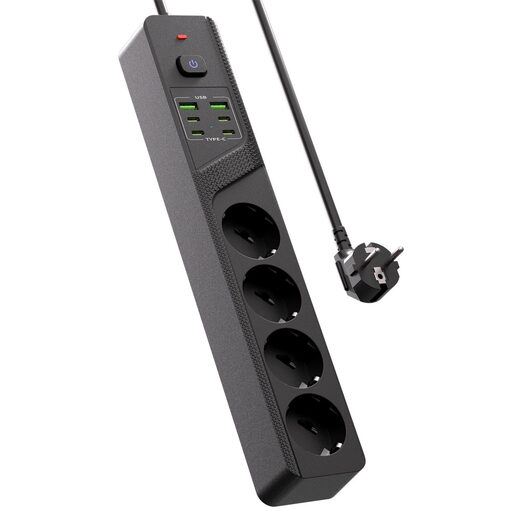
Table power strip with four Schuko sockets, four USB-C ports and two USB-A ports

10-in-1 table power strip with 4 Schuko sockets

Suitable for a desk or other charging area where you need to plug in standard plugs as well as several USB devices.

The title lists four Schuko sockets, four USB-C ports, two USB-A ports and an on/off switch.

View at Joybuy
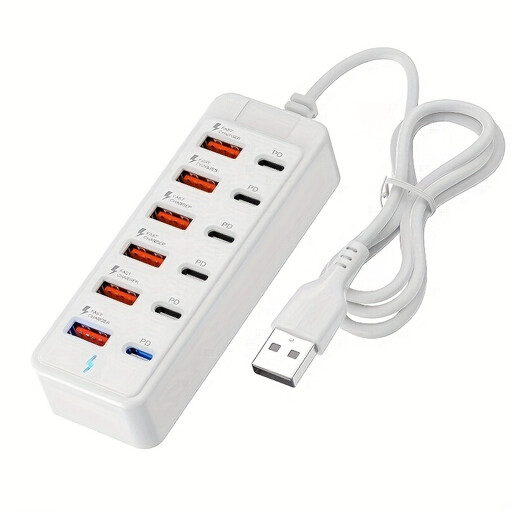
12-Port USB Fast Charging Station with six USB-C ports and six USB-A ports

12-Port USB Fast Charging Station, 6 USB-C + 6 USB-A

An option for a charging area where you charge a tablet alongside several USB devices.

The title lists six USB-C ports, six USB-A ports and up to 25 W per port.

View at Joybuy

USB Multi Charger with 10 ports for smartphones and tablets

USB Multi Charger with 10 ports

Suitable for a charging area where you connect several USB devices, including a tablet, to one charging station.

The title lists ten ports and USB-C and USB-A connections; it doesn’t specify how the ports are divided between the two types.

View at Joybuy

Frequently asked questions

Will a USB-C charging station work with every tablet?

No. Check your tablet’s connection and choose a compatible cable. Since 28 December 2024, EU rules have applied to the relevant new tablets placed on the EU market; this doesn’t mean that an older model has USB-C. For USB Power Delivery charging, the charger, tablet and cable must all be compatible.

Can I charge my tablet and phone at the same speed at the same time?

It depends on the model and the devices connected. IKEA states that the SJÖSS provides 45 W from one USB-C port and 22 W per port when both ports are in use. Check the power distribution for the combination of devices you want to connect.

Where should I put the charging station?

Place the charger in an open area so heat can escape, and don’t charge a tablet under a pillow or duvet; this is the advice from Brandweer Nederland. Don’t use a damaged power strip, and take the cable length and connected devices into account when choosing where to put it.

What if a charging station breaks too soon during normal use?

Your statutory rights may apply if the product doesn’t perform as you could reasonably expect during normal use. According to ACM ConsuWijzer, the seller is responsible for providing an appropriate solution; a manufacturer’s warranty doesn’t replace your statutory rights.

Is a CE mark, by itself, an independent safety test?

No. According to Ondernemersplein, a Dutch government website, the manufacturer uses the CE mark to declare that the device meets the relevant EU requirements and must also draw up an EU Declaration of Conformity. If you have questions, check what information is available for the model you’re considering.
