What should you look for when choosing?
First, decide whether you’ll mostly play offline or online, and whether you’ll hold the tablet or put it on a table. Then check the app and the exact tablet model, so you don’t pay for a connection or feature you don’t need.
| What to consider |
What should you check? |
Who is this important for? |
| Offline play |
Check the offline features of the specific app and test the game without an internet connection before you leave. |
If I want to play solo without relying on hotel Wi-Fi, I first check whether my game launches offline. Around 33% of consumers prioritise offline play. |
| Room for cards |
Compare the screen size and how cards and buttons appear in your game; resolution alone doesn’t determine how the app will look. |
If I want to see cards and controls clearly on a table, screen space matters more to me than compactness. Around 25% of consumers prioritise readability. |
| Size and weight |
Compare the dimensions and stated weight of the exact Wi-Fi or cellular model. |
If I’m taking the tablet with me and holding it in bed or in an armchair, I want to know whether the size suits that position. Around 25% of consumers prioritise portability. |
| Running costs |
Check for in-app purchases, your data allowance and what’s included with the tablet. |
If I want to avoid extra spending on apps, mobile internet or accessories, I check these in advance. Around 17% of consumers prioritise running costs. |
Tablets at Joybuy
These models include compact and larger tablets for card games in a hotel room, with Wi-Fi and cellular options as well as an iPad. Check compatibility and offline functionality for each app.
 No image available
Samsung Galaxy Tab A11 X135, 64 GB, Silver
A compact option if you want to take the tablet with you or hold it while travelling; the product description also mentions LTE for mobile internet.
The description lists an 8.7-inch screen, a resolution of 1340 × 800 pixels and 90 Hz. A compatible charger is sold separately.
View at Joybuy
 No image available
Apple 11-inch iPad Air (M4), Wi-Fi, 256 GB, Space Grey
An iPad option if your card game is available for iPad or you want to stay with iPadOS.
The product title lists an 11-inch screen, Wi-Fi and 256 GB of storage. Check that your specific game is compatible and works offline.
View at Joybuy
 No image available
Samsung Galaxy Tab A11 Plus, 11-inch, 128 GB, Wi-Fi, grey
A larger Android tablet to consider if you want more room for cards and controls.
The product description lists an 11-inch screen, 128 GB of storage and microSD expansion. The stated 90 Hz doesn’t tell you how your card game will look.
View at Joybuy
 No image available
Lenovo Idea Tab, 11-inch, 256 GB, Wi-Fi, grey, with stylus
An option with a larger screen if you want to put the tablet on a table to view your cards.
The product title lists an 11-inch screen, 256 GB of storage, Wi-Fi and Android 15; the product description says a stylus is included. A charger must be purchased separately.
View at Joybuy
 No image available
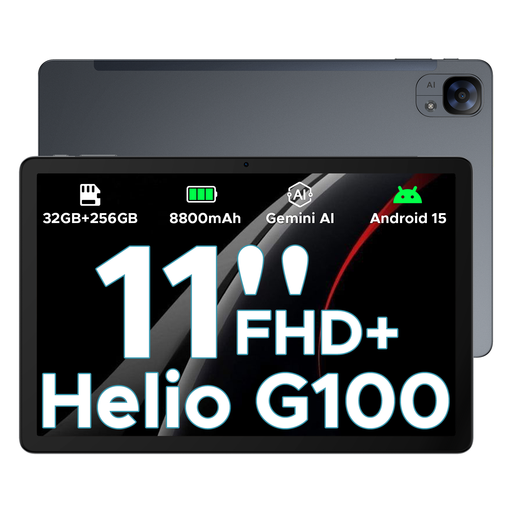
DOOGEE Tab E3, 11-inch, FHD+, 90 Hz, dual SIM, 5G and Wi-Fi
A larger tablet with Wi-Fi and 5G for anyone looking for screen space and a mobile connectivity option.
The product title lists an 11-inch FHD+ screen, 90 Hz, dual SIM slots and Wi-Fi. These details don’t prove that a specific card game app works offline or uses 90 Hz.
View at Joybuy
Frequently asked questions
Can I play a card game without hotel Wi-Fi?
It depends on the app. Google Play Help lists some built-in games, including Solitaire, that can be played offline; this doesn’t confirm that other apps work offline. Install and test your game before you leave.
How can I play online safely using hotel Wi-Fi?
You’ll need an internet connection to play online. Veilig Internetten lists a VPN or mobile data through a mobile phone hotspot as options when using public Wi-Fi. If you use a hotspot, keep an eye on your data allowance.
Will my existing card game work on every tablet?
No. Check the specific app and the supported devices in the app store. According to the Consumers’ Association, apps need to be downloaded again when switching from iPadOS to Android.
What are my rights if the tablet doesn’t work properly after purchase?
When you buy as a consumer in the Netherlands, you’re entitled to a product that works properly, and the retailer is your point of contact if there’s a fault. The Dutch government says there is no fixed statutory guarantee period that applies to all products. Online purchases generally also come with a 14-day cooling-off period after delivery, subject to applicable exceptions.
Can I also play card games for money on the tablet?
The tablet itself doesn’t determine whether an online game of chance is legally offered. According to the Dutch Gambling Authority, a provider may offer online games of chance in the Netherlands only if it has the required licence. Check the specific website or app in the Kansspelwijzer; this doesn’t automatically apply to an ordinary card game without gambling.


