
Photo reviewer who also reads
You want to look at bird photos and read articles or books in between. So, look for a balance of screen space, file transfer options and portability.


For coastal bird photography and a long reading list, a tablet of around 11 inches is a practical middle ground. Choose a larger screen if you mainly view photos and documents side by side while seated, or a compact model if you often read on the go. The Consumers' Association highlights the trade-off between screen space and portability. Also check that your camera, memory card and photo app will work with your chosen tablet, and consider an e-reader if you mainly read books.
You want to look at bird photos and read articles or books in between. So, look for a balance of screen space, file transfer options and portability.
You read for long periods and also want to view photos. Compare how a compact model feels in your hand with the extra space of a larger screen. If you mainly read books, an e-reader is also worth considering.
You want to transfer images from a camera or memory card and perhaps store them offline. Check that the connection, transfer method and storage suit the way you work.
Best for: reviewing photos and reading on one device that you also want to take with you.
Trade-off: you get less screen space than with a larger model.
Best for: mainly viewing photos alongside articles or PDFs while seated.
Trade-off: the larger size may be less comfortable to hold for long periods or take with you.
Best for: reading handheld while you’re out and about; compare a compact tablet with an e-reader if books are your main focus.
Trade-off: a compact screen gives you less room to see detail in bird photos; an e-reader isn’t necessarily suitable for assessing colour photos.
| What to consider | What to look for | Who is this most relevant to? |
|---|---|---|
| Screen and photo display | Compare screen sizes and view your own photos indoors and in the light in which you plan to assess them. | If photo detail is my top priority, I want to be able to view my own images clearly. Around 31% of consumers give photo display top priority. |
| Reading for long periods | Try your articles, PDFs or books, and consider the text size, your posture and the weight during a longer reading session. | If I read for a long time, I want a size and weight that feel comfortable in the position I use. Around 31% of consumers prioritise reading comfort. |
| Transferring and storing photos | Check that your memory card, card reader, connection and photo app work together; also check the storage capacity of the exact model. | If I want to transfer photos from my camera and store them locally, the connection and storage need to suit my files. Around 19% of consumers prioritise transfer and storage. |
| Taking it with you | Compare the weight and size of the model you plan to buy, including the case you’ll use, if applicable. | If I take my tablet with me often, I don’t want to carry more size and weight than I need for my photos and reading. Around 19% of consumers prioritise portability. |
A larger screen gives you more room for photos and documents, but it may be harder to take with you or hold for long periods.
Try your own photos and reading files on the size you’re considering, and hold the device in the position you’ll use it.
The card, connection, card reader and photo app all need to be compatible. Apple specifies a separate USB-C to SD card reader for the iPad Air (M4).
Before buying, check which type of card you use and which reader and app are compatible with your transfer method.
Allow for a suitable card reader or adapter if you need one for the way you work.
Adobe distinguishes between the free basic tools in Lightroom mobile and the extra features available with Premium.
First decide whether you simply want to view photos, make basic edits or use a specific premium feature.
You may need a subscription for features Adobe offers with Premium.
An additional manufacturer’s warranty and your statutory rights are not the same. The Netherlands Authority for Consumers and Markets says that the seller is responsible for the statutory guarantee.
Check the written warranty terms for the exact model you’re buying, and distinguish between an additional warranty and your statutory rights.
The iPad Air comes in 11- and 13-inch models; the iPad mini is a more compact option for reading and taking with you. Check the generation and storage capacity of the model you’re considering.
The Galaxy Tab S10 FE series includes a 10.9-inch model and a larger FE+ version for anyone looking to combine photo viewing, reading and stylus use.
The Idea Tab Plus ZAG70201SE is a 12.1-inch option if you value space for documents and photos more than a very compact size.
This selection mainly includes tablets of around 11 inches for viewing photos and reading, plus a larger 12.2-inch model for anyone looking for extra screen space.
 No image available
An 11-inch model for viewing photos and reading material on one tablet.
The product name specifies 256 GB of storage and the Wi-Fi version. Apple lists P3 wide colour and an anti-reflective coating for the iPad Air (M4); try your own photos in the light in which you plan to assess them.
 No image available
An 11-inch tablet for viewing reading material and photos on one screen.
The product information lists an IPS screen, 90 Hz, 500 nits, Android 15 and expandable storage via microSD. A charger is not included.
 No image available
An 11-inch model for anyone who wants to view photos and reading material on one device.
The product name lists an IPS screen, 128 GB of storage and 4G LTE. Check that the stated connection and network options suit the way you’ll use it.
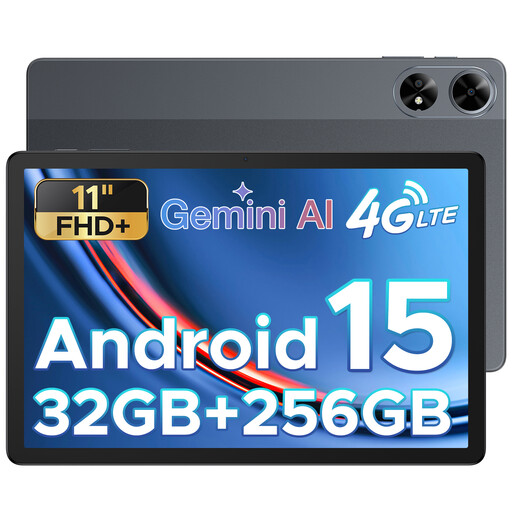 No image available
An 11-inch tablet for a combination of photo viewing and reading.
The product name lists an FHD+ screen, 256 GB of storage and a SIM card slot. Check that the version and network options suit the way you’ll use it.
 No image available
A larger screen may suit you if you mainly view photos and documents while seated.
The product name specifies a 12.2-inch 2.4K screen; the product information lists 256 GB of storage. Bear the size in mind if you plan to take the tablet with you.
If you read almost exclusively, an e-reader is worth considering: the Consumers' Association says its black-and-white screen is more comfortable for extended reading. A tablet combines reading with photo viewing; try both types with the files you use.
Apple specifies a separate USB-C to SD card reader for transferring photos and lists compatibility with the 11- and 13-inch iPad Air (M4). Check that your card and connection are compatible; for other cameras, check the relevant transfer method.
Not for all Lightroom mobile basic tools: Adobe lists free basic tools and additional features with Premium. Check that the features you want to use suit your files and workflow.
According to the Netherlands Authority for Consumers and Markets, the seller remains responsible for the statutory guarantee if a product does not meet what you may reasonably expect. ACM ConsuWijzer generally states a cooling-off period of up to 14 days after delivery, with some exceptions. An additional warranty does not replace your statutory rights.
Choose storage based on the files you want to keep locally and your transfer method. More storage won’t solve compatibility issues between a card, reader, connection or photo app; check each of these separately.