
Map annotator
You want to add notes directly to routes on maps, PDFs or sketches. Check that the pen is compatible with the exact tablet version and whether it’s included.


A tablet with a suitable pen is a natural starting point for annotating maps and drawings. If you want to look at details together, a larger screen matters more, though it will add weight and take up more space on the table. If you need to use specific GIS or CAD software, first check that the required features, files and any drivers work on the exact version you’re considering. Mobile apps and Windows tablets with Arm processors don’t automatically offer the same workflow as desktop software.
You want to add notes directly to routes on maps, PDFs or sketches. Check that the pen is compatible with the exact tablet version and whether it’s included.
You lay out drawings on a shared table and want to look at details together without taking up too much space. Both screen size and portability matter.
You need to use software specified by your course or project. Check the required features, files and platform before choosing a tablet model.
Choose this option: if you mainly want to annotate PDFs, map images and early sketches of bike routes.
Bear in mind: a more compact screen shows less of a large map at once; pen support doesn’t confirm that GIS or CAD features will work.
Choose this option: if several people need to look at a map or design drawing on the table.
Bear in mind: larger versions take up more table space and may be heavier to carry.
Choose this option: if your course requires Windows software and you want a tablet that you can also use with a keyboard.
Bear in mind: check apps, plug-ins and drivers for the processor version you choose; the pen and keyboard may be sold separately.
Choose this option: if you want to view or comment on drawings on the tablet and can prepare or finish project work elsewhere.
Bear in mind: check file sharing and the exact features you need; a mobile app won’t automatically be suitable for every desktop task.
| What to consider | What should you check? | Who is this important for? |
|---|---|---|
| Pen and annotations | Check pen compatibility for the exact version and see whether the pen is included. If possible, try your intended PDF or drawing app with one of your own files. | If you want to sketch directly on maps and drawings while studying bike routes, you’ll want to know whether you can get started with the right pen straight away. Around 31% of consumers give pen annotation top priority. |
| Looking at maps together | Compare the screen size with the space on your table and check that labels remain readable at the size you need. | If you want to point out details on a map with other people, a larger screen can help you avoid constantly zooming in. Around 25% of consumers prioritise looking at maps together. |
| GIS or CAD software | Ask which programmes, project files, plug-ins and features your course requires. If you’re using Windows on Arm, check the drivers you need as well. | If you have to complete assignments using specified design software, working compatibility matters more than simply having a pen or a large screen. Around 31% of consumers put software compatibility first. |
| Carrying it between study spaces | Compare the weight and size of the exact version, and consider whether a case, pen and any keyboard will suit the way you carry it. | If you often move between classes and study tables, you’ll want a tablet you can carry without its size getting in the way of everyday use. Around 13% of consumers give portability top priority. |
Support for a compatible pen doesn’t automatically mean it comes in the box. Samsung lists an S Pen as included with the Galaxy Tab S10 Lite; for Apple, check which compatible Pencil works with the version you’ve chosen.
Check pen compatibility and the box contents for the exact model.
A compatible pen may be sold separately.
Being able to view a design file doesn’t mean the tablet supports all the editing your assignment requires. Autodesk describes features for AutoCAD on web and mobile; a QGIS project is prepared in advance for QField.
Test a representative course file and the specific tasks you need to do, not just whether the file opens.
You may need another computer to prepare or finish a project.
Microsoft explains that many Windows apps can run on Arm, but that doesn’t confirm that every app, plug-in or driver will work with your workflow.
Check the exact software, plug-ins and peripherals for the processor version you’re considering.
Your workflow may require a different device or processor version.
The screen sizes and pen information below come from manufacturers; on their own, they don’t confirm that your course software will work.
The Galaxy Tab S10 Lite is an Android option worth considering for notes and sketches with a pen.
The iPad Air M4 is available in 11- and 13-inch versions, giving you a choice between pen use and screen space.
The Idea Tab and Idea Tab Pro ranges offer different screen sizes for Android users.
Surface Pro offers a Windows 2-in-1 option if software and keyboard use are your main priorities.
The Pad 7 and Pad 8 series are worth exploring if you’re looking for a compatible pen.
These product picks are suited to looking at maps together or annotating with a pen. If you need GIS or CAD features, check exact software compatibility separately.
 No image available
The 12.7-inch screen is well suited to looking at maps together; the product title lists compatibility with the T pen.
The title lists a Helio G99, 20GB (8GB + 12GB Virtual) RAM, 256GB storage and Android 15. T pen compatibility doesn’t mean the pen is included.
 No image available
The product title says a pen is included with this 12.1-inch tablet, making it a good fit for annotating and looking at a drawing together.
The title lists 8GB RAM, 256GB storage, Wi-Fi and the colour Rose.
 No image available
The title lists a Tab Pen Pro, making this a good fit for notes and sketches on a tablet.
The listed specifications are an 11.1-inch 3.2K touchscreen, Snapdragon 8 Gen 3, 12GB LPDDR5X RAM, 256GB UFS 4.0 and Android 15.
 No image available
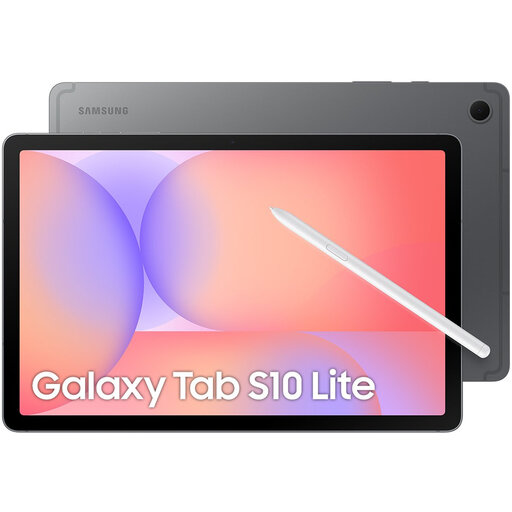
This version is suited to pen annotation; Samsung Netherlands lists an S Pen included with the Galaxy Tab S10 Lite and a 10.9-inch screen.
The product title lists Wi-Fi, 128GB and Grey. Check that your required design app works on this tablet.
 No image available
The product title lists a stylus with this 11-inch tablet, making it suitable for annotations; the smaller screen offers a different fit on the table from a larger model.
The title lists Wi-Fi, Android 15 and 256GB storage.
Not without first checking your course’s software list. Autodesk describes specific CAD features on web and mobile; the QField documentation explains that projects are prepared in QGIS in advance. Test an assignment file to see whether the features and file sharing you need work.
According to the QField documentation, you prepare the project in QGIS and package it with QFieldSync before opening it in QField. Also agree with your study group on where project files are stored and how you’ll share them.
No, it depends on the model and the offer. Samsung lists an S Pen included with the Galaxy Tab S10 Lite; Microsoft says the Surface Slim Pen and keyboard are sold separately. Check the box contents for the exact version.
According to ACM ConsuWijzer, the seller must offer a solution if a product doesn’t meet reasonable expectations under normal use. This statutory right is separate from any manufacturer’s warranty or extended warranty you may have purchased.
For an online purchase by a consumer in the Netherlands, there is generally a statutory cooling-off period of up to 14 days after delivery, according to ACM ConsuWijzer. There are exceptions, so check the terms for trying and returning the tablet before you order.