
Your print server has an Ethernet port
You’re short of a spare network connection at your workstation and want to add extra ports easily. HP lists a router, switch or hub as a connection option for a printer with Ethernet.


Choose an unmanaged gigabit switch if your print server has Ethernet and you need extra wired connections. Remember to count the port used to connect to your router when choosing the number of ports. A switch won’t make a USB-only printer network-ready by itself: you’ll also need a compatible print server or another printer-sharing feature.
You’re short of a spare network connection at your workstation and want to add extra ports easily. HP lists a router, switch or hub as a connection option for a printer with Ethernet.
Alongside your print server, you want to connect other devices to the network and decide whether five ports will be enough or eight would be more practical. TP-Link Netherlands lists five ports for the TL-SG105 and eight for the TL-SG108.
Check whether you need a separate USB print server, or whether a connected device requires PoE power or configurable network features. TP-Link and StarTech.com describe separate print server products for USB printers.
TP-Link Netherlands lists five ports for the TL-SG105 and eight for the TL-SG108; according to LazyAdmin, the connection to your router also uses a port. Start by checking the connection on your printer or print server, then work out how many devices and features you want to connect.
| What to consider | What should you look for? | Who is this most relevant to? |
|---|---|---|
| Easy connection | Check that your print server has Ethernet and count the port used to connect to your router. | If I want to connect an existing Ethernet print server without a complicated set-up, I mainly need extra network ports; around 42% of consumers have this need. |
| Number of ports | Count the router connection, print server and other wired devices, and allow for any spare ports you might need. | If I want to connect more devices by cable alongside my print server, I check whether there’s room to expand. Around 25% of consumers mainly want enough ports for their workstation. |
| Sharing a USB printer | Check whether your printer already has a network feature; if you use a USB print server, check that it supports your printer and devices. | If my printer only has USB, I first need to find out how to share it over the network. Around 17% of consumers mainly have this USB-related question. |
| PoE or network management | For PoE, check the required standard and the power budget of the exact version; choose configurable features only if you need them. | If a device needs power over Ethernet or I want to configure network features, I check the requirements before choosing. Around 16% of consumers have a specific PoE or management requirement. |
Extra Ethernet ports won’t give a USB-only printer network connectivity by themselves.
First, check the connections and printer-sharing features of the equipment you already have. If your printer only has USB, look for a compatible way to share it.
The connection to your router also uses a port. That leaves a maximum of four ports for devices connected to a five-port switch.
Count your router, print server and other wired devices before choosing between five and eight ports.
TP-Link Netherlands describes versions of the TL-SG1005P with different PoE standards and total power budgets: 802.3af with 56 W and 802.3af/at with 65 W.
Check the exact hardware version, the required PoE standard and the power requirements of the device you want to connect.
TP-Link Netherlands describes simple five- and eight-port switches, a configurable TL-SG105E and PoE versions.
NETGEAR describes the GS305v3 as an unmanaged five-port gigabit switch for simple network connections.
D-Link describes the DGS-105GL as an unmanaged five-port gigabit switch for home or a small office.
Linksys describes the SE3005 as an unmanaged five-port gigabit switch for home or office use.
Zyxel describes the GS-100 series as compact, unmanaged gigabit switches with five or eight ports.
This selection includes simple five-port switches as well as models with more ports, PoE or configurable network features. Choose extra features only if your connected equipment or network set-up genuinely requires them.
 No image available
Ideal if you want to connect an Ethernet print server and a small number of other devices by cable, without configuring the switch.
5 gigabit RJ45 ports; unmanaged and plug-and-play, according to the product description.
 No image available
An option if you want to power a compatible device via PoE as well as connecting devices by cable.
5 gigabit ports and 4 PoE ports, according to the product description. Check the PoE standard and power budget of the exact version.
 No image available
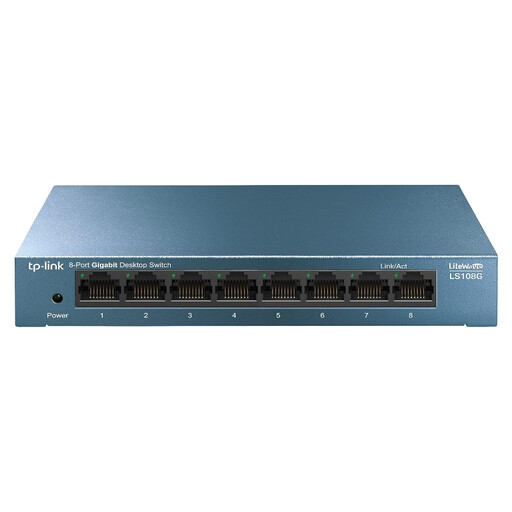
Ideal if you want to connect more wired devices alongside your print server or keep some ports free.
8 ports at 10/100/1000 Mbps; unmanaged and plug-and-play, according to the product description.
 No image available
Suited to a workstation that needs more wired connections and may have a device that requires PoE.
8 gigabit ports; the product name lists Easy Smart and 4 PoE ports. Check the features and PoE specifications of the exact version.
 No image available
Ideal for expanding a wired network with several devices if you also need configurable network features.
The product description lists 8 gigabit RJ45 ports, VLAN, QoS and IGMP snooping.
No. A standard switch provides Ethernet ports; a printer with USB only also needs a compatible printer-sharing feature, such as a suitable USB print server.
Connect the switch to your router, then use an Ethernet cable to connect the print server to a spare switch port. Set up the printer and print server by following their instructions; if you run into problems, check the cable and port lights too.
Not if one port is used to connect to the router: that leaves a maximum of four ports for devices connected to the switch.
Electronic equipment placed on the market in the Netherlands is subject to the applicable European product rules. Where CE marking is required for a particular version, the manufacturer uses it to declare conformity; CE is not an independent quality mark. Business.gov.nl advises checking the product requirements for the version being offered.