Who are these options for?

Switch party game players

You want several people to take part in a minigame at the same time. Check how many players each game supports and what controller set-up it requires. Nintendo, for example, explains how individual Joy-Con 2 controllers are counted when synchronising.

Hosts with an audience watching

If there are more people present than active player slots, phones can come in handy for compatible Jackbox games. Jackbox Games explains how to join using a room code and notes that player numbers and audience features vary by game.

Players with controllers they already own

You want to know first whether a controller you already own works with your Switch or Switch 2, and how to charge it. According to Nintendo, original Joy-Cons can be used wirelessly with Switch 2, but cannot be charged on that console.

What should you look for when choosing?

Joy-Con 2 on Switch 2

A good fit when: the game supports individual Joy-Con 2 controllers and extra guests want to play too. Nintendo says the set includes a left and right controller, along with two wrist straps.

Keep in mind: Joy-Con 2 works only with Switch 2, and the number of players also depends on the game.

Original Joy-Cons

A good fit when: you have an original Switch or want to use existing Joy-Cons wirelessly with Switch 2, provided the game supports that control method.

Keep in mind: Nintendo says original Joy-Cons cannot be attached to or charged on Switch 2.

Full-size Switch controller

A good fit when: a game supports a full-size controller and you want each active player to use one. According to 8BitDo, the Ultimate 2C supports Bluetooth on Switch and, from the stated system version onwards, Switch 2.

Keep in mind: PowerA says the PowerA Advantage Wired we looked at has no motion controls and does not work with games that only support Joy-Cons.

Jackbox with phones

A good fit when: participants join a compatible Jackbox game on their phones using the room code shown on the host screen.

Keep in mind: Jackbox Games says the number of active players and the availability of an audience feature vary by title. You’ll also need a host device and a screen that everyone can see.

What to consider What to check before buying Who should consider this?
Compatibility Check the console, the exact controller model and the control method required by the game. I want to avoid buying a controller that doesn’t work with my console or minigame. Around 36% of consumers prioritise compatibility with their console and game above all else.
Number of participants Check the maximum number of players, whether there’s an audience feature and whether one player needs a single Joy-Con or a pair. If I want everyone to join in, I need to count active players and spectators separately. Around 29% of consumers prioritise extra options for participants.
Controls required Check whether the game supports motion controls, individual Joy-Cons or a full-size controller. I want a controller that can handle the inputs my minigame needs, not just the standard buttons. Around 21% of consumers prioritise the controls required by the game.
Charging and set-up Check what charging option you already have and whether a wired controller will fit your dock set-up. If I want to reuse controllers or play with a wired connection, I consider charging and cable space. Around 14% of consumers prioritise ease of use and set-up.

Common buying pitfalls

  • Assuming paired controllers guarantee enough player slots

    The number of synchronised controllers doesn’t automatically determine how many players a game supports. For Switch 2, Nintendo distinguishes between individual Joy-Con 2 controllers being counted separately and the capabilities of the game itself.

    Before buying, check the maximum number of players and the controller set-up required for the specific game.

  • Choosing a full-size controller for a game that requires individual Joy-Cons

    According to PowerA, the PowerA Advantage Wired we looked at has no motion controls and isn’t suitable for games that only support Joy-Cons.

    Compare the inputs required by the minigame with the features of the exact controller model.

  • Assuming original Joy-Cons charge on Switch 2

    Nintendo says original Joy-Cons can be used wirelessly with Switch 2, but cannot be attached to or charged on that console.

    Check what charging option you already have before reusing your original Joy-Cons.

  • Buying extra controllers for Jackbox spectators

    With compatible Jackbox games, participants join in on their phones. The number of active players and whether there’s an audience feature vary by title.

    Check the game you’ve chosen first, and distinguish between active players and the audience.

Brands to consider

Nintendo

Joy-Con ranges for party games on the original Switch and Switch 2. Choose the right generation first, then check the game’s controller requirements.

  • Nintendo says a Joy-Con 2 set includes two controllers and wrist straps for supported local multiplayer.
  • Joy-Con 2 works only with Switch 2. According to Nintendo, original Joy-Cons can be used wirelessly with Switch 2, but cannot be charged on that console.

PowerA

Full-size wired controllers, including the Advantage Wired for Switch 2. The features below apply to this model and not automatically to other controllers from the brand.

  • According to PowerA, the Advantage Wired comes with a detachable 10 ft USB-C cable.
  • PowerA says this model only works when Switch 2 is docked, has no motion controls and isn’t suitable for games that only support Joy-Cons.

8BitDo

According to 8BitDo, the Ultimate 2C Bluetooth is designed for Switch and, from the stated system version onwards, Switch 2. Check the full model name.

  • 8BitDo lists Bluetooth, a wired USB connection and motion controls for the Ultimate 2C Bluetooth.
  • The differently named Ultimate 2C Wireless is listed by 8BitDo for Windows and Android, so compatibility for that variant is not the same.

Joybuy products

This selection features full-size controllers for supported Switch games. Check whether each minigame supports the controller layout and motion controls. For joining compatible Jackbox games on phones, you’ll use a different set-up.

Turtle Beach Afterglow Wave Wireless Controller, Bluetooth, transparent

Turtle Beach Afterglow Wave Wireless Controller, Bluetooth, transparent

A wireless full-size controller for games that support this controller set-up.

According to the product description, it’s compatible with Switch and Switch 2; the description also mentions Switch Lite and Switch OLED.

The description lists a gyroscope, two programmable rear buttons and up to 40 hours of battery life.

Joybuy
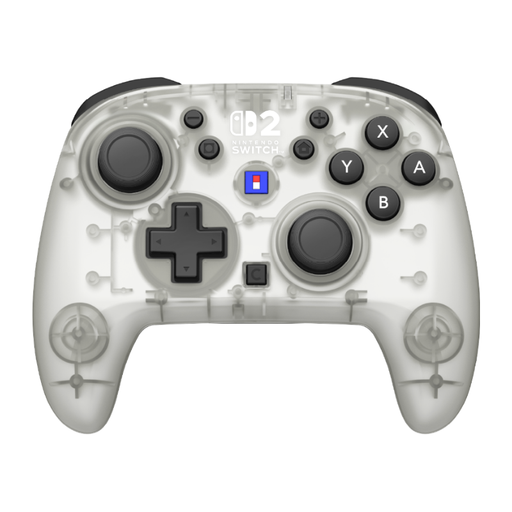
Hori Horipad Turbo Frost Wireless Controller for Nintendo Switch and Switch 2

Hori Horipad Turbo Frost Wireless Controller

A wireless full-size controller for supported Switch games. Check that the minigame accepts this type of control.

The product description lists compatibility with Switch and Switch 2, as well as a gyroscope and accelerometer.

Battery life is listed as up to 10 hours.

Joybuy

Turtle Beach Rematch Super Mario Jump Wireless Controller

Turtle Beach Rematch Super Mario Jump Wireless Controller

A wireless full-size controller for games that support this type of controller.

The product description lists compatibility with Switch 2, Switch and Switch OLED, a TMR joystick and a C button for GameChat.

It also lists two programmable rear buttons and up to 40 hours of battery life.

Joybuy

KONIX Nintendo Switch and Switch OLED JoyPad Controller Pair, blue and red

KONIX Nintendo Switch and Switch OLED JoyPad Controller Pair, blue and red

A pair of full-size controllers for games where multiple participants can play using this controller set-up.

The product name lists Nintendo Switch, Switch OLED and compatibility with Switch 2.

The product description lists Bluetooth, a 6-axis gyroscope and up to 8 hours of battery life.

Joybuy

Wireless game controller with dual vibration and gyroscope for Switch and PC

Game Controller with Dual Vibration and Gyroscope for Switch and PC

A physical controller for Switch games that support this type of controller; the product name also lists PC.

The product description lists a gyroscope, dual vibration motors and a wireless connection.

Joybuy

Frequently asked questions

Can four people play as soon as you have four Joy-Cons?

Not necessarily: the number of players and the controllers required also depend on the game and the features you use. Nintendo says individual Joy-Con 2 controllers are counted separately when synchronising; also check the game’s player information.

How can spectators join a Jackbox game?

In compatible Jackbox games, participants can use their phones to enter the room code shown on the host screen. Check how many active players each title supports and whether it also has an audience feature.

Can you use and charge original Joy-Cons on a Switch 2?

According to Nintendo, you can connect original Joy-Cons wirelessly to Switch 2, but you can’t attach them to or charge them on the console. You’ll need, for example, an original Switch or a compatible charging accessory.

What can you do if a newly purchased controller doesn’t work properly?

In the Netherlands, the seller must provide a solution if a product doesn’t meet what you could reasonably expect, according to the Dutch government. There’s no fixed statutory two-year warranty period. Report the problem to the seller. A manufacturer’s warranty or an extra warranty comes on top of your statutory rights. For purchases made remotely from a business, you’ll also generally have a 14-day cooling-off period, although there are exceptions.

Which EU rules apply to a wireless controller?

The European Commission describes the Radio Equipment Directive as the framework for radio equipment placed on the market within its scope. CE marking is required for products covered by applicable harmonised EU rules that require it. A CE marking alone doesn’t prove that a controller works with your console or game.
