
Games night with friends
You want several people to play together on one system. Check that your chosen game supports local multiplayer and that you have enough compatible controllers.


Start with the games you want to play together on one console. For each game, check its local play options and player count; online multiplayer doesn’t automatically mean you can play locally. Then choose between a Switch set-up for tabletop or TV play and a fixed-screen set-up with PlayStation or Xbox, and check how many controllers come with the version you’re considering. You’ll need a disc drive for physical games; an all-digital version won’t play them.
You want several people to play together on one system. Check that your chosen game supports local multiplayer and that you have enough compatible controllers.
You’re looking for a game for two players on a shared screen. PlayStation, for example, describes It Takes Two as couch co-op; also check the controller requirements for the game you choose.
You use the room for work too, so you’ll want to weigh up whether a built-in screen in tabletop mode would suit you, or whether you’d rather connect a console to an external screen.
The percentages give a general indication of which needs may be most important in this study set-up. Start by checking the game’s local play options, then compare the screen set-up, controllers and game format.
| What to consider | What should you check? | Who is this important for? |
|---|---|---|
| Local play options | Look for local co-op or competitive play on the game page, and check how many players can play on one system. | When I play with friends, I want to know whether our chosen game supports local play for enough players; around 33% of consumers prioritise local play. |
| Screen set-up | Decide where everyone will sit and look, and check whether the system supports tabletop play or the connection you want to use with an external screen. | I want to use the console without a fixed screen set-up dictating how the study is arranged; around 27% of consumers prioritise a flexible screen set-up. |
| What’s included with the console | Check what’s in the bundle and factor in the controllers, game and any additional storage you’ll need. | Before choosing a bundle, I want to know what else I need to get started together; around 20% of consumers focus mainly on having a complete set-up from the start. |
| Physical or digital games | Check the full model name and whether that version has a disc drive. | If I want to play physical games, the console needs to support them; around 20% of consumers prioritise the choice between physical and digital games. |
Online multiplayer and local play are different features. A game may support playing together online without letting several players play on the same system.
Before buying, check the local play options and player count on the page for the exact game and version.
The standard PS5 and Xbox versions reviewed are listed with one controller. A separate PS5 bundle is listed with two controllers, so what’s included varies by version.
Compare the contents of the exact box with the number of controllers your game requires.
The Xbox Series S and PS5 Digital Edition reviewed here are disc-free. There’s also a digital version of the Xbox Series X.
Check the full model name and whether it has a disc drive before factoring in your existing physical games.
Nintendo offers Switch versions for tabletop and TV play, as well as games made specifically for Switch systems. The older Switch OLED model is another option for compatible Switch games.
PS5 versions are an option if you want to play specific local PlayStation games and choose between a disc drive and a digital version.
Xbox Series S and Series X are options if the local games you want are available on Xbox; your choice also depends on whether you want to play digitally or use physical discs.
This selection includes Nintendo Switch and PS5 versions for different gaming set-ups. Note the differences between handheld and screen-based play, digital and disc versions, and what’s included with each bundle.
 No image available
For anyone looking for a Nintendo Switch bundle with a physical game card; check the local play options and player count for this game.
The product name lists 32 GB of storage and a Mario Kart 8 Deluxe game card.
 No image available
For anyone who wants to play Mario Kart World on Switch 2: Nintendo lists up to four players on the same system for this game.
Nintendo lists 256 GB of storage for Switch 2. The bundle name includes a Mario Kart World download and three months of Nintendo Switch Online.
Nintendo lists two Joy-Con 2 controllers with Switch 2; the suitable layout still depends on the game.
 No image available
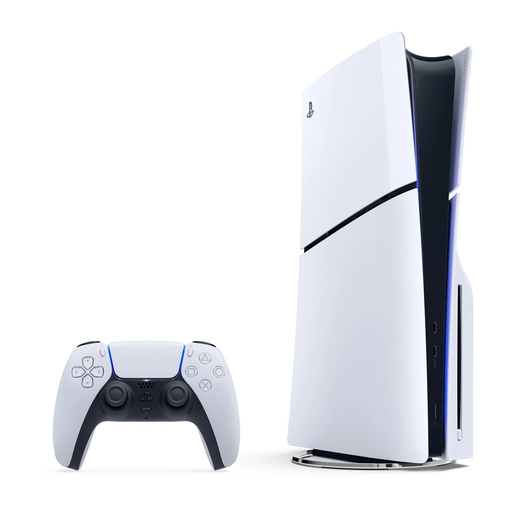
For anyone looking for a PS5 with a disc drive; check whether each game supports local co-op on a shared screen.
The product name lists 1 TB and Disc Edition. PlayStation describes It Takes Two as couch co-op.
The standard PS5 reviewed is listed with one DualSense controller; check how many controllers are included with this bundle.
 No image available
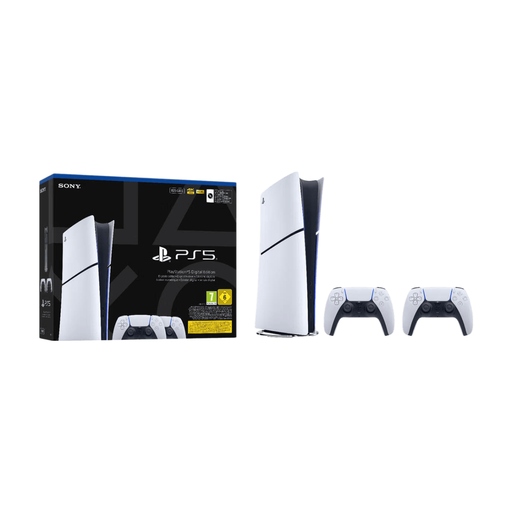
For anyone who wants to get started with digital gaming for two players; check whether each game supports local co-op.
The product name lists 825 GB and two controllers. The digital version has no disc drive and won’t play physical game discs.
PlayStation describes It Takes Two as couch co-op; check that it suits the games you want to play.
 No image available
Only suitable if handheld gaming works for your set-up; Nintendo states that Switch Lite cannot be connected to a TV.
The product name lists 32 GB, the colour Turquoise, a Tomodachi Life download and a 30-day trial of Nintendo Switch Online. Check the local play options and player count for the game.
No, check the local play options for each game. Nintendo lists up to four players on the same system for Mario Kart World; PlayStation describes It Takes Two as couch co-op for two players.
No, Nintendo states that Switch Lite cannot be connected to a TV. For another console, check that its connection is compatible with the screen you want to use.
The Dutch Government describes PEGI ratings on game packaging as age recommendations. Also check the game’s content information and use parental control settings where needed.